Continuous Flows - Rework and Temporary Off-Flow#
Overview#
Continuous Flows support scenarios where a Material temporarily leaves the main flow and later returns.
This can happen through:
- Rework Flows
- Temporary Off-Flow Paths
To preserve flow continuity, MES manages Material ranks during these transitions.
When a Material leaves the main flow, it is assigned a dedicated rank:
| Rank | Description |
|---|---|
| InRework | Material temporarily removed from the main Continuous Flow |
When the Material returns, MES may automatically restore its rank according to its position relative to the remaining Materials.
Changing Rank Names#
The default rank names are:
- InRework
To change these values:
Configuration Entry#
/MedDev/ContinuousFlows/ReworkRankName
Note
Automatic rank updates during return operations require the Auto Re-Evaluation of Material Ranks functionality to be enabled.
Rework Scenarios#
Material is Sent to Rework#
When a Material participating in a Continuous Flow is sent to Rework:
- The Material rank is updated to
InRework. - MES evaluates the remaining Materials in the group.
- Additional rank updates may be performed to preserve flow continuity.
Additionally, MES prevents the Track-In of a Material with rank Tail if another Material of the same group is currently in Rework and is configured to return to that same Step.
The following logic is applied.
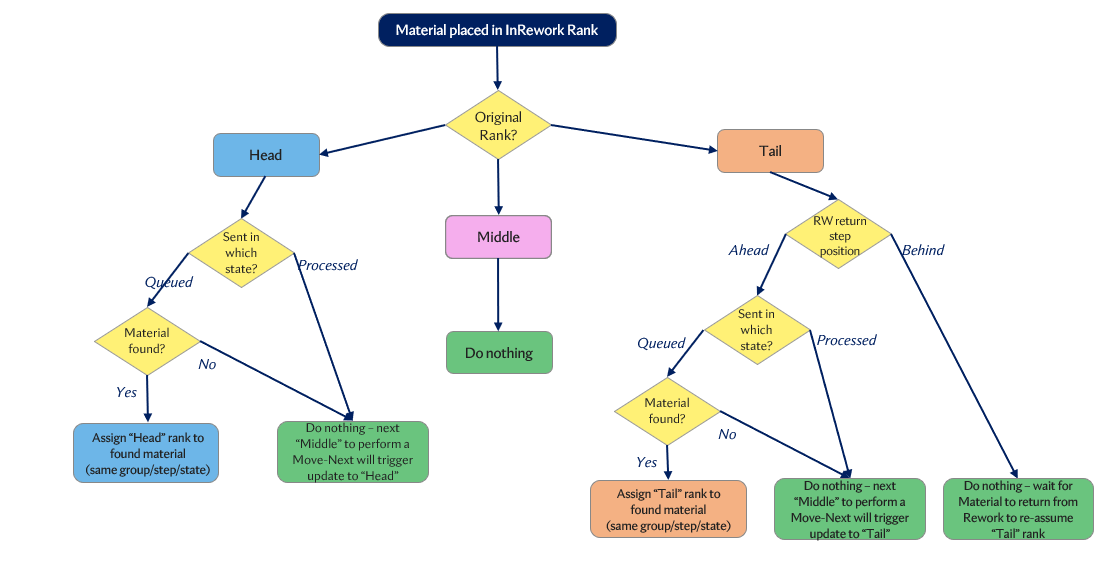
Original Rank = Head#
When a Head material is sent to Rework, MES attempts to reassign the Head rank to the next material in the flow.
-
Material State = Queued
MES searches for another material of the same group at the same Step with the same state.
- If found, that material is promoted to
Head. - If not found, no immediate change is made. The
Headrank will be reassigned automatically once the nextMiddlematerial performs a Move-Next, provided Auto Re-Evaluation of Material Ranks is enabled.
- If found, that material is promoted to
-
Material State = Processed
- No immediate change is made.
- The
Headrank will be reassigned automatically once the nextMiddlematerial performs a Move-Next, provided Auto Re-Evaluation of Material Ranks is enabled.
Original Rank = Middle#
- No rank changes are made to other materials. Flow continuity is preserved as-is.
Original Rank = Tail#
The behavior depends on where the material is expected to re-enter the flow after Rework.
Rework Return Step is Ahead of Current Step
The material will re-enter the flow further ahead, so MES attempts to reassign the Tail rank.
-
Material State = Queued
MES searches for another material of the same group at the same Step with the same state.
- If found, that material is assigned the
Tailrank. - If not found, no immediate change is made.
- The
Tailrank will be reassigned automatically once the lastMiddlematerial performs a Move-Next, provided Auto Re-Evaluation of Material Ranks is enabled.
- If found, that material is assigned the
-
Material State = Processed
- No immediate change is made.
- The
Tailrank will be reassigned automatically once the lastMiddlematerial performs a Move-Next, provided Auto Re-Evaluation of Material Ranks is enabled.
Rework Return Step is Behind Current Step
- No immediate change is made.
- The
Tailrank will be reassigned automatically once the lastMiddlematerial performs a Move-Next, provided Auto Re-Evaluation of Material Ranks is enabled.
Material Returns from Rework or Temporary Off-Flow#
When a Material returns from Rework or Temporary Off-Flow, its rank is updated from InRework to Head, Middle, or Tail based on its position relative to the remaining Materials in the flow.
Note
Auto Re-Evaluation of Material Ranks must be enabled.
Note
Materials returning from Rework always return as Queued.
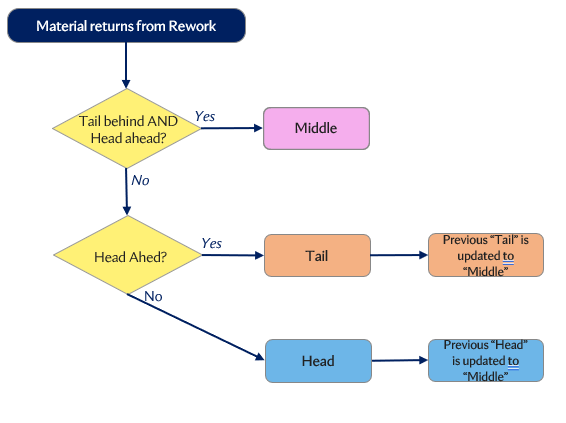
Determining Whether a Tail Exists Behind#
Material Returns as Queued
- Searches the same Step and Logical Flow Path.
- Searches previous Steps and Logical Flow Paths if no Material is found.
Material Returns as Dispatched or *Processed*
- Searches the same Step and Logical Flow Path for Materials with state less than or equal to the returning Material state.
- Searches previous Steps and Logical Flow Paths if no Material is found.
Determining Whether a Head Exists Ahead#
Material Returns as Queued or *Dispatched*
- Searches the same Step and Logical Flow Path.
- Searches subsequent Steps and Logical Flow Paths if no Material is found.
Material Returns as Processed
- Searches the same Step and Logical Flow Path for Materials with the same state.
- Searches subsequent Steps and Logical Flow Paths if no Material is found.
Rank Assignment
Once MES determines the positions of surrounding Materials, the returning Material is ranked as follows:
- Tail behind AND Head ahead → ranked as
Middle - Head ahead only → ranked as
Tail. If another Material already holdsTail, it is updated toMiddle. - No Head ahead → ranked as
Head. If another Material already holdsHead, it is updated toMiddle.
Save In-Process Material Rank for Returns#
Some processes require a Material to preserve the rank it had when it entered processing, even if rank updates occur later due to Rework or Temporary Off-Flow returns.
Pre-Conditions#
Enable either:
-
Global configuration
/MedDev/ContinuousFlows/EnableGlobalKeepInProcessRankOnReworkMaterialReturn -
Context-Specific setting on the
MedDevContinuousFlowFeaturesConfigSmart Table underKeepInProcessRankOnReworkMaterialReturnEnabledcolumn
When enabled:
- MES stores the rank present during Track-In in the Material attribute:
MedDevInProcessMaterialRank- If rank changes later, the original in-process rank is preserved.
- Checklist and Data Collection resolution uses the saved value whenever it exists.
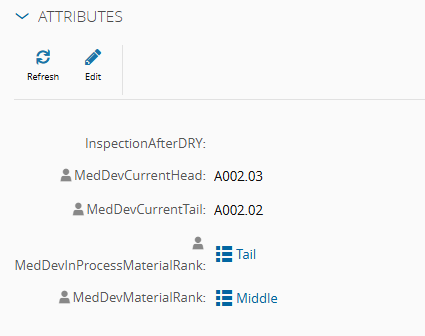
This guarantees continuity for Checklists and Data Collections configured against specific Material ranks.