Prerequisites#
Confirm the following items before you start the scenarios in Weigh and Dispense Tutorial.
Permissions#
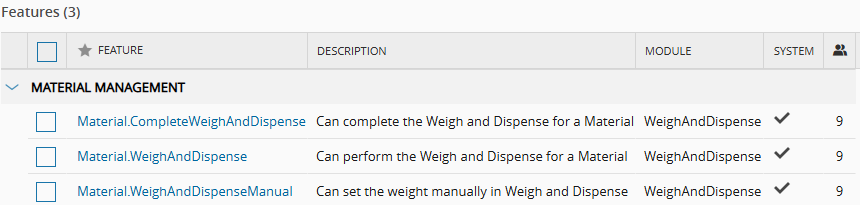
Your user must have a Role that grants the following security features, which you find under Administration > Security > Feature:
| Feature | Used to |
|---|---|
Material.WeighAndDispense | Perform Weigh and Dispense for a Material. |
Material.WeighAndDispenseManual | Enter the weight manually, without an electronic scale. |
Material.CompleteWeighAndDispense | Complete Weigh and Dispense for a Material. |
ContextResolution.EditData | Add rows to the context tables, such as the BOMContext smart table. |
Table: Security features for the scenarios
Info
To capture an electronic signature at each dispense, enable the Force Signature property of the Material.WeighAndDispense feature. Set ForceVerification to true to require a second person to verify each dispense, as in Weigh and Dispense in a Single Step.
To capture an electronic signature at the end of the transaction, enable the Force Signature property of the Material.CompleteWeighAndDispense feature. For more information, see Features.
You also need an Employee that you associate with your user, and the features to configure the master data file that the scenarios use, such as Product, BOM, and Resource.
Configuration Entries#
Weigh and Dispense uses the configuration entries under /Cmf/System/Configuration/WeighAndDispense/. To view them, go to Administration > Configuration.
| Entry | Default | Description |
|---|---|---|
ScaleTimeOut | 30 | Communication timeout of the electronic scale, in seconds. If the scale does not respond within this time, the system considers the connection lost. |
ScalePrecisionMatchingMethod | Empty | Method to match the precision readings of the scale. Set the value to Legacy to use the legacy precision matching algorithm. When empty, the system uses the standard method. |
PrecisionQuantum | 2 | Precision quantum of the process. It controls the number of decimal places, or precision steps, that the weigh calculations apply. |
HideContainerFields | false | Controls the visibility of the container fields in the Weigh and Dispense wizard. Set the value to true to hide the fields when containers are not relevant to the process. |
ForceVerification | false | When Force Signature is enabled for Material.WeighAndDispense, defines the signatures required at each dispense. When false, the system requires only the signature of the current user, with a password or PIN. When true, the system requires two signatures: Performed By, the operator who performed the operation, and Verified By, a second person who verified it. |
DefaultPartialDispenseButton | DispenseAndReset | Default button for a partial dispense. DispenseAndReset resets the dispensed quantity to zero and adjusts the target quantity accordingly. DispenseAndContinue keeps the dispensed quantity, and the target quantity stays the same. |
AccuracyQuantum | 1 | Accuracy quantum of the process. It controls the granularity step of the accuracy calculations during weighing. |
Table: Weigh and Dispense configuration entries
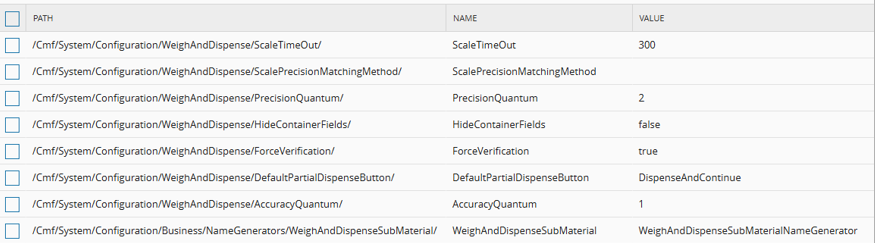
The master data file sets ScaleTimeOut to 300 seconds for the scenarios. This example value overrides the system default of 30 seconds. Each scenario lists the other values that it requires.
Use Case Data#
The scenarios use the following example data. You can replace it with data from your own environment.
| Entity | Example | Used in |
|---|---|---|
| Facility and Area | Production and Assemble Preparation | All scenarios |
| Steps | Chemicals Preparation and Chemicals Preparation and Mixing. The Service Context smart table links them to the Services W&D Preparation and W&D Preparation and Mixing. | |
| Resources | MDLWS#09, a Process Resource for chemical Weigh and Dispense with the Service W&D Preparation, and MDLMIX#02 and MDLMIX#03, Process Resources with the Service W&D Preparation and Mixing | |
| Scales | MDLWS#09 has the scales MDLSCL#01 and MDLSCL#10 (Instrument Type Scale High Precision), and MDLSCL#02 and MDLSCL#11 (Instrument Type Standard Scale). MDLMIX#02 and MDLMIX#03 have similar scales. | |
| Target Products | Blue Compound and Green Compound, of type SFG | All scenarios |
| Source Products | Powdered chemical Blue, Powdered chemical Green, Phthalates, and Secret Chemical Recipe, of type RawMaterial | All scenarios |
| BOMs | BOM W&D Compound B with the Relative formula type, and BOM W&D Compound G with the Absolute formula type, both with the Weigh and Dispense scope and Kg units | |
| Target Materials | Blue Compound#01 and Green Compound#01, with Primary Quantity 0 Kg, and Target Material Quantity 25 Kg | |
| Source Materials | One Material for each source Product, for example Powdered chemical Blue#04 and Phthalates#04. Each Material sits in a Container at the Step that the BOM defines. |
Table: Master data in the scenarios
The Instrument Type values come from the InstrumentType lookup table.
Info
The configuration of the foundation model, including Calendar, Facility, Area, Steps, Services, Flows, and Containers, is outside the scope of this tutorial.
Next Scenario#
Continue with Configure Weigh and Dispense.