Send Message Bus Message#
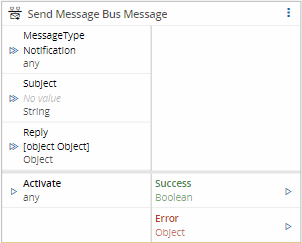
The Send Message Bus Message task sends a message to a message bus subject. The message is either a notification (fire and forget) or a request that waits for a reply.
Details#
| Fields | Details |
|---|---|
| Scope | Connect IoT Data Platform Enterprise Integration Factory Automation |
| Workflow | Data flow Control flow |
IsProtocol flag |
Inputs#
| Name | Data Type | Description |
|---|---|---|
| MessageType | String | Type of message to send: Notification or Request. Overrides the Message Type setting. |
| Subject | String | Message bus subject to send the message to. Overrides the Subject setting. |
| Message | Object | Message to send. Overrides the Message setting. |
| Timeout | Integer | Maximum time, in milliseconds, to wait for a reply. Only available when the message type is Request. |
| Activate | any | Activates the task. |
Outputs#
| Name | Data Type | Description |
|---|---|---|
| Reply | Object | Reply received for the request. Only available when the message type is Request. |
| Success | Boolean | Emits true when the message is sent or, for a request, when the reply arrives. |
| Error | Error | Error that occurred during the processing of this task. |
Settings#
On the General tab, the Message section has the following settings:
| Name | Data Type | Default | Description |
|---|---|---|---|
| Message Type | Enum | Notification | Notification sends the message without waiting for a reply. Request sends the message and waits for a reply. |
| Subject | String | Message bus subject to send the message to. | |
| Message | Object | {} | Message to send using the message bus. |
| Timeout | Integer | 60000 | Maximum time, in milliseconds, to wait for a reply. Only available when the message type is Request. |
Behavior#
When activated, the task sends the message to the configured subject. Values received on the inputs take precedence over the settings.
- With the
Notificationmessage type, the task publishes the message and emitstrueon the Success output. It does not wait for a reply. - With the
Requestmessage type, the task sends the message and waits for a reply for up to Timeout milliseconds. When the reply arrives, the task emits it on the Reply output and then emitstrueon the Success output. If no reply arrives in time or the request fails, the task emits the error on the Error output.
Remarks#
To answer a request inside another workflow, subscribe to the subject with the Message Bus Listener task and reply with the Message Bus Reply task.
Text received on Message together with the activation is parsed as JSON: text that is not JSON is sent as {}, and numeric text is sent as a number, which loses the last digits of a 19-digit MES Id.
A MessageType other than Notification or Request sends nothing and emits neither Success nor Error.