Post Measurement#
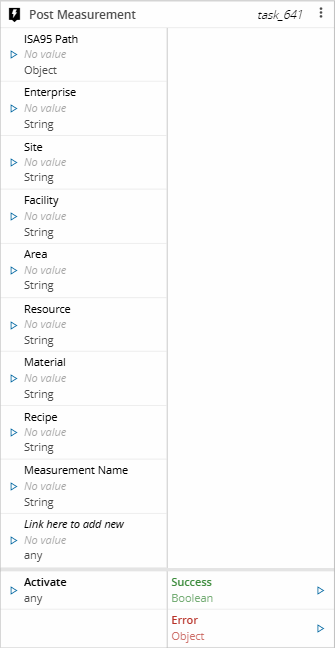
The Post Measurement task sends collected data to Data Platform as a measurement. It posts the PostMeasurement IoT Event Definition, so you do not have to assemble the event yourself with a generic API Post Event task. In the workflow designer, the task is listed under the Data Platform Tasks category, in the Actions section.
Each value you want to post is added as an input on the task. The task sends the plant context, that is the ISA-95 location, the Material, and the Recipe, together with those values.
Details#
| Fields | Details |
|---|---|
| Scope | Connect IoT Factory Automation Enterprise Integration Data Platform |
| Workflow | Data flow Control flow |
IsProtocol flag |
Inputs#
| Name | Data Type | Description |
|---|---|---|
| ISA95 Path | Object | The resolved ISA-95 hierarchy, as emitted by the raw output of the ISA-95 Decoder task |
| Enterprise | String | The name of the Enterprise |
| Site | String | The name of the Site |
| Facility | String | The name of the Facility |
| Area | String | The name of the Area |
| Resource | String | The name of the Resource |
| Material | String | The name of the Material |
| Recipe | String | The name of the Recipe |
| Measurement Name | String | The name of the measurement |
<custom list> | <custom> | One input per value to post. The input name is the parameter name sent to Data Platform |
| Activate | any | Triggers task execution |
Table: Post Measurement inputs
Outputs#
| Name | Data Type | Description |
|---|---|---|
| Success | Boolean | Returns true if the measurement is accepted by Data Platform |
| Error | Error | Contains information about any error that occurs |
Settings#
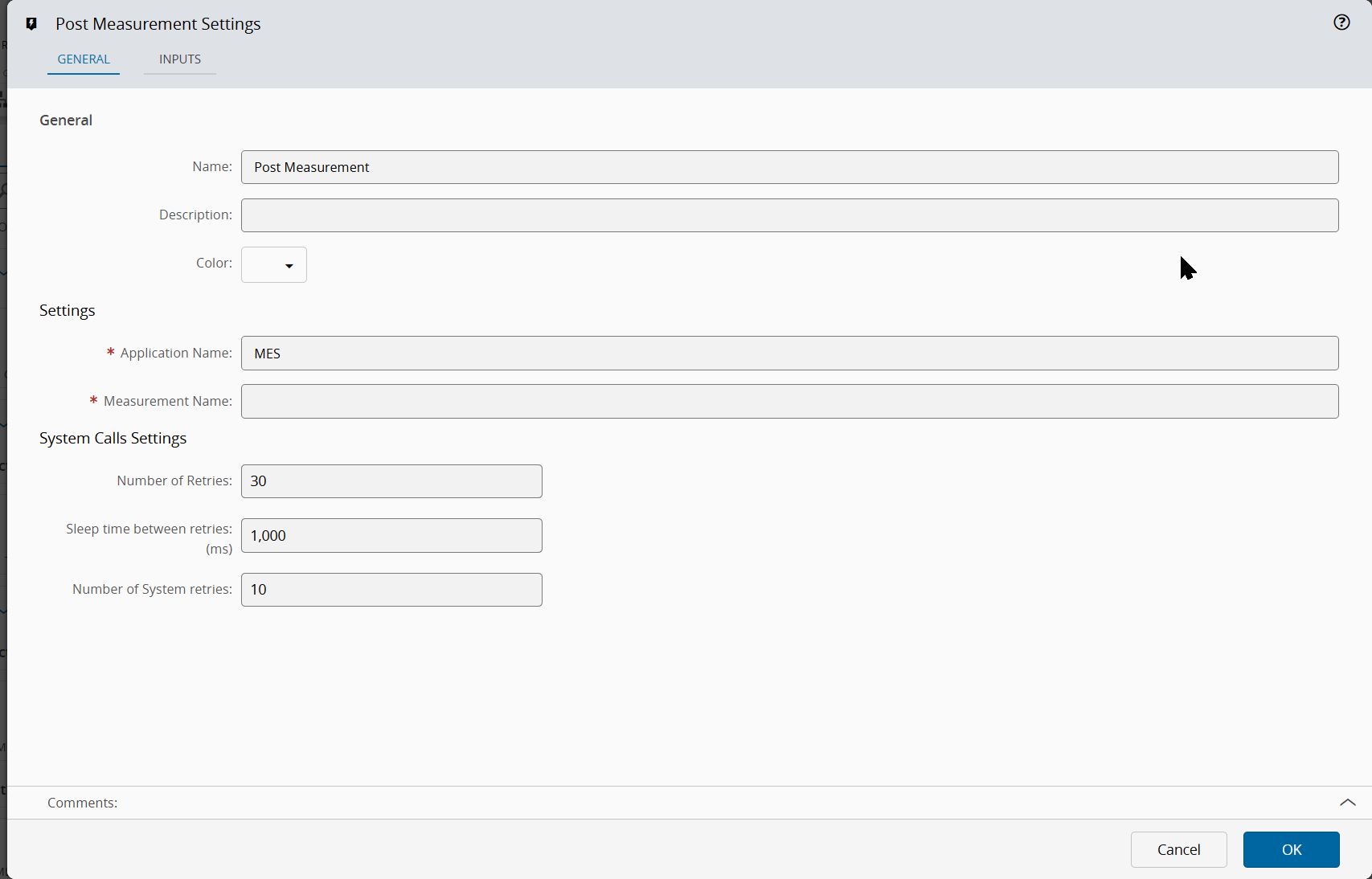
The General tab includes standard task settings and the following parameters:
| Name | Data Type | Default Value | Description |
|---|---|---|---|
| Application Name | String | MES | Application name recorded with the posted event. This value is required |
| Measurement Name | String | Name of the measurement posted to Data Platform. This value is required |
Table: Post Measurement general settings
The System Calls Settings section includes the following parameters:
| Name | Data Type | Default Value | Description |
|---|---|---|---|
| Number of Retries | Integer | 30 | Number of attempts to repeat the call to the system until a successful reply is received |
| Sleep time between retries | Integer | 1000 | Number of milliseconds to wait between retries. It applies only when the previous call fails |
| Number of System retries | Integer | 10 | Number of times that the system retries to process the system call |
Table: Post Measurement system call settings
The Inputs Tab includes the following settings, for each value to post:
| Name | Data Type | Description |
|---|---|---|
| Name | String | The parameter name sent to Data Platform. This value is required |
| Friendly Name | String | The displayed input name |
| Type | ComplexType | The data type of the value. This value is required |
| Collection type | Enum | Array, Map, or None, for values that hold a collection |
| Default value | DynamicType | Value used when the input has no value at activation |
Table: Post Measurement input settings
Behavior#
Plant context#
The task resolves each ISA-95 level from the dedicated input first, and falls back to the ISA95 Path object when that input has no value:
| Level | Resolution order |
|---|---|
| Enterprise | Enterprise input, then the enterprise property of ISA95 Path |
| Site | Site input, then the site property of ISA95 Path |
| Facility | Facility input, then the facility property of ISA95 Path |
| Area | Area input, then the area, productionLine, or storageArea property of ISA95 Path |
| Resource | Resource input, then the storageUnit or workCell property of ISA95 Path |
Table: Resolution of the ISA-95 levels
This lets you wire the raw output of the ISA-95 Decoder task straight into ISA95 Path and still override any single level with an explicit input.
The Material and the Recipe are taken from their own inputs. The measurement name is taken from the Measurement Name setting.
Posted values#
At activation, the task collects the current value of every input you configured on the Inputs tab and posts them as the measurement parameters and values. An input with no value falls back to its configured default value.
Note
When no input is configured, or none of them holds a value, the task still posts the event and logs a warning stating that no parameters were defined.
Errors#
The task emits the Error output when the application name is empty, when Data Platform rejects the event, or when the system call fails after the configured retries.