Enabling SSL after installation#
If the installation process was run without configuring SSL, and to enable SSL after the installation process has been completed, follow these steps to update the application server:
- Add a new binding for HTTPS and define an SSL certificate for the HTML5 website (
$Env) created by the setup process. - Update the configuration
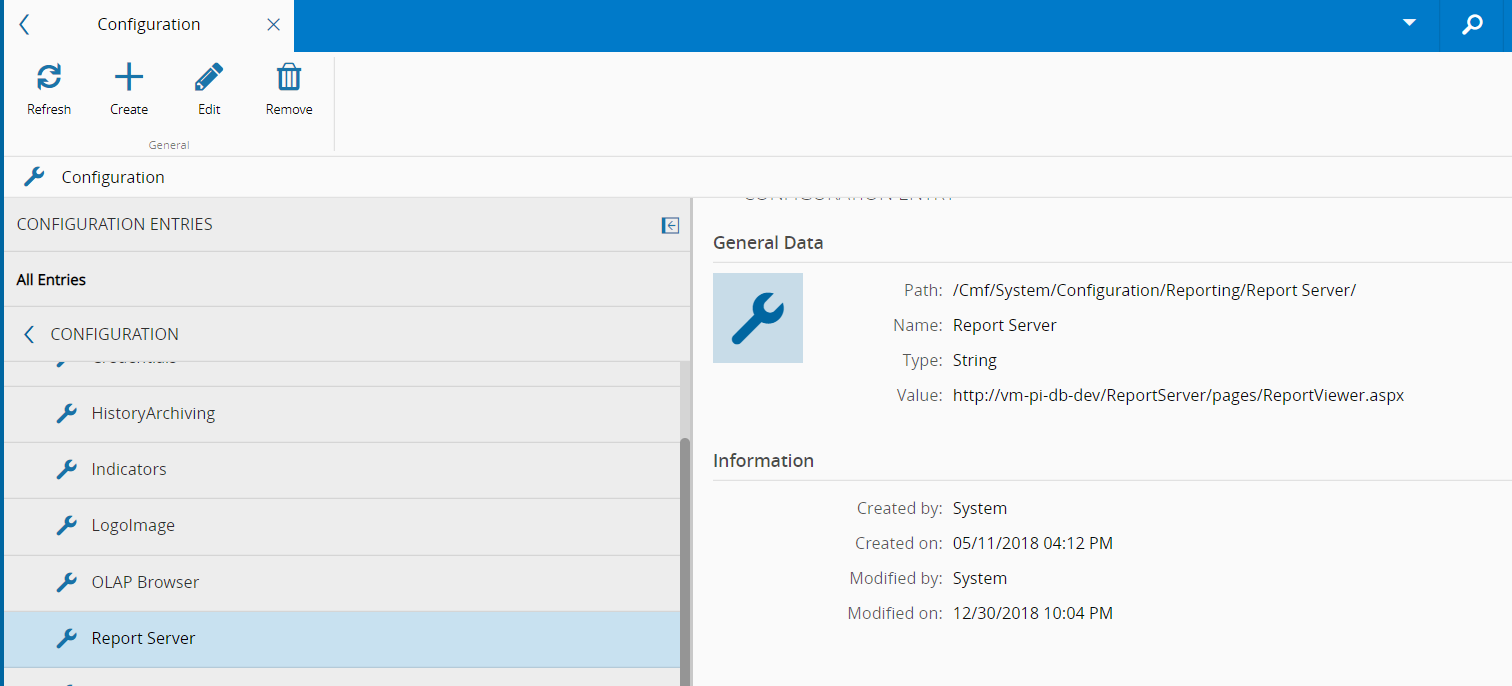
/Cmf/System/Configuration/Reporting/Report Server/fromHTTPtoHTTPS. - Update all references to the environment-related URLs:
InstallationFolder\UI\Html\config.jsonInstallationFolder\UI\api\web.configInstallationFolder\BusinessTier\Settings\TransportConfig.json- Configuration file for MasterDataLoader, located in the
MasterDataLoaderfolder - Configuration table in the database (
T_Config):- Documentation Portal URL
- Security Portal URL
Security Portal#
If the Security Portal is in use, the following changes must be performed to update the application server:
- The certificate on the IIS website for Security Portal must be added.
InstallationFolder\UI\Web.config- Any instances of
HTTPmust be changed toHTTPS.
Discovery Service#
If Discovery Service is enabled, the following file references should be edited accordingly:
InstallationFolder\BusinessTier\Settings\LoadBalancingConfig.json- Protocol property from Host Instance -
HTTPtoHTTPS InstallationFolder\MessageBusGateway\config\config.json- ExternalAddress property -
WStoWSS
Warning
If the available reports should also run on HTTPS, the Report Server paths must also be altered from HTTP to HTTPS.
The image below contains the Value that must me altered from HTTP to HTTPS: