Manage Material Future Actions#
 Material.ManageFutureActions
Overview#
The Manage Material Future Actions is used to maintain Future Actions for a Material. When updating an existing Material Future Action, you can only edit the Future Actions created by you. To be able to modify any Future Action, you need to use the Special Manage Material Future Actions instead.
Setup#
No special setup is required other than to meet the preconditions of the transaction.
Preconditions#
- Material is Active.
- To edit a Future Action, the Future Action system state must not be Waiting or Error.
- It is not possible to create a Future Action for a Pass-Through Step if the Action field is Set Resource.
- It is not possible to create a Future Action for a Pass-Through Step if the Action field is Set Service.
- It is not possible to create a Future Action for a Pass-Through Step if the State field is Queued.
Sequence of Steps#
Step 1: Future Actions#
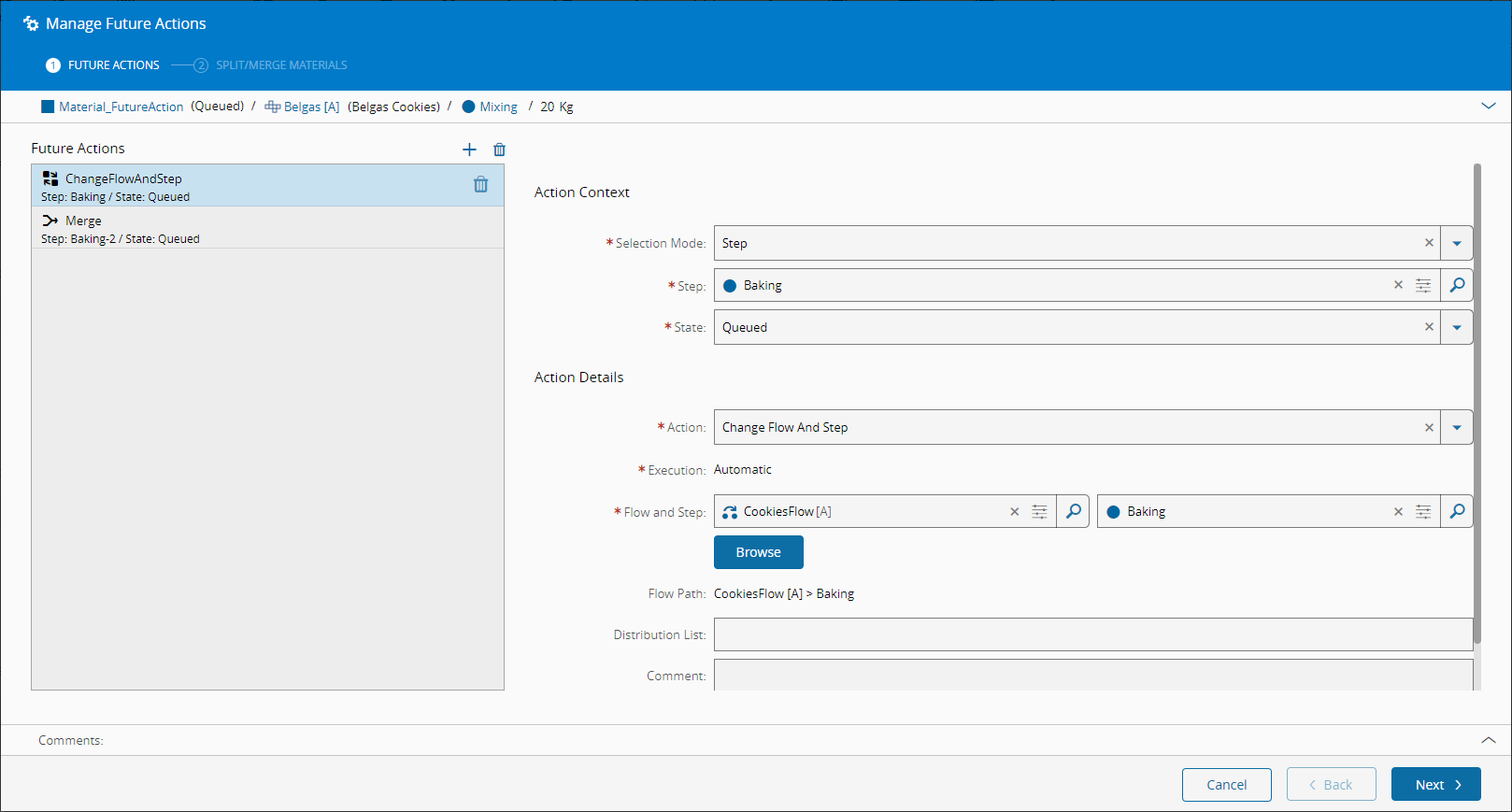
This screen captures all the necessary information for the transaction.
-
Add, edit or remove any Future Action for the Material, defining for each Future Action:
- The details of the context where the Future Action is triggered. You have three selection modes:
- Flow Path - where you choose the Flow and Step using the original entity names.
- Logical Flow Path - where you choose the Flow and Step using the logical entity names.
- Step - where you only choose the Step.
- The State from which the Future Action must be triggered: Queued or Processed (for Future Actions of type Split For Step, the state must be Queued).
-
The type of Action - currently the system supports the following types of Future Actions:
- Change Flow And Step - changes the Flow and Step of the Material.
- Collapse - collapses the Material and merges the Sub-Materials back into the parent Material.
- Create Send-Ahead Run - creates a Send-Ahead Run for this Material.
- Detach - detaches the Material from its parent Material.
- Hold - puts the Material on Hold.
- Merge - merges two or more Materials.
- Send Mail - sends an e-mail notification.
- Set Note - sets a note for the Material.
- Set Resource - sets the Required Resource for the Material.
- Set Service - sets the Required Service for the Material.
- Split - splits the Material.
- Split For Step - splits the Material at a Step in state Queued and merges it back at the end of the Step in state Processed.
- Temporary Off Flow - sends the Material to a temporary Off-Flow.
- Terminate - terminates the Material.
Note
If Feature Security Level is enabled, you will need access requirements (feature linked to the function) to perform or execute Future Actions (see table below).
-
The Execution Mode - with the exception of Split, Split For Step and Merge, the Execution Mode is always set as Automatic and overrides the value of the Step property Default Future Logistic Action Execution Mode.
- The Create Notification - with the exception of Set Note, Set Resource and Set Service, you must specify whether or not to Create Notification (default is
False). If Create Notification is enabled, you must specify the Assignment Type:- Employee - this is the default and the Assigned To Employee field is mandatory (default to current user).
- Everyone.
- Role - the Assigned To Role field is mandatory.
- Optionally, a Distribution List to be notified when the Future Action is triggered.
- Optionally, a comment for the operation.
- The details of the context where the Future Action is triggered. You have three selection modes:
-
For Future Actions of type Hold, specify for the Future Action:
- The Hold Reason, which must be associated with the Step of the Future Action.
- Optionally, a Release Role.
- Optionally, a Release Code.
- For Future Actions of type Change Flow And Step, specify for the Future Action:
- The Flow and Step to send the Material.
- For Future Actions of type Temporary Off Flow, specify for the Future Action:
- The reason to be used when sending the Material on the Off Flow.
- The Flow and Step to use.
- For Future Actions of type Terminate, specify for the Future Action:
- The reason to be used when terminating the Material.
- For Future Actions of type Set Note, specify:
- The Step on which to set the note.
- Optionally, the Flow Path context for the Step.
- For Future Actions of type Set Resource, specify for the Future Action:
- The Resource to be used by the Material at the specified context.
- Whether Automatic Dispatching is to take place.
- For Future Actions of type Set Service, specify for the Future Action:
- The Service to be used by the Material at the specified context.
-
For Future Actions of type Split and Split For Step will need further specifications, namely a Split Mode for the Future Action, which can be:
- Percentage
- Sub-Material IDs
Note
Future Actions of type Split and Split For Step will also need further specifications on the type of material and quantity to be split. For more information on how to define these criteria, see the instructions below.
-
For Future Actions of the type Send Mail, specify for the Future Action:
- The Distribution List to be used.
- For Future Actions of type Create Send-Ahead Run, specify for the Future Action:
- The Selection Mode and the Steps and Flows to configure the Send-Ahead Run:
- Step
- Flow Path
- If the Selection Mode was defined as Step, define the Steps for the Evaluate and Merge stages.
- If the Selection Mode was defined as Flow Path, you must define Flows and Steps for Evaluate and Merge stages.
- Define the Results Capture Mode:
- Manual
- Manual At TrackOut
- SPC With No Violation
- Data Collection Within Limits (this is referring to the Error Limits of the Data Collection)
- Define the Send-Ahead Split Type that will be performed to the Material that will be kept in the Waiting state.
- Define how the Sub-Materials will be selected for the Send-Ahead Run:
- Manual - define a format to apply to the selection. This format should follow these rules:
[Container]':'[Position]separated by semi.colons, e.g.:'C:1,P:1;C:Right-1,P:Bottom+2'. - Rule - specify the Rule to be used for the selection through the execution of a DEE Action. See Rule and DEE Actions for more information.
- Sub-Material Ids - specify the IDs of the Sub-Materials that will be selected.
- System - allows the MES system to select the Sub-Materials. Define the number of Sub-Materials to select and how they will be picked from the main Material:
- Bottom - selects the defined count of Sub-Materials that were attached last to the main Material.
- Middle - selects the defined count of Sub-Materials from the middle of the Sub-Materials stack of the main Material.
- Random - selects the defined count of Sub-Materials randomly from the main Material.
- Spread - selects the defined count of Sub-Materials spread evenly from the main Material.
- Top - selects the defined count of Sub-Materials that were attached first to the main Material.
- Manual - define a format to apply to the selection. This format should follow these rules:
- The Selection Mode and the Steps and Flows to configure the Send-Ahead Run:
Step 2: Split/Merge Materials#
- This wizard will enable you to define:
- The number of Child Materials.
- Optionally, a name for the Child Material and a percentage of the quantity for the Child Material.
- For Future Actions of type Merge, Split and Spilt For Step specify for the Future Action:
- The name of the Materials that will be split/merged, which must refer to valid active Materials.
- Select Update to complete the transaction.
Future Action Feature Level Security#
| Future Action | Change Flow and Step | Collapse | Create Send-Ahead Run | Detach | Hold | Merge | Send Mail | Set Note | Set Resource | Set Service | Split | Split For Step | Temporary Off Flow | Terminate |
| Security Feature | Material.ChangeFlowAndStep | Material.Collapse | SendAheadRun.Create | Material.Detach | Material.Hold | Material.Merge | Material.SendMail | Material.SetNote | Material.SetResource | Material.SetService | Material.Split | Material.SplitForStep | Material.TemporaryOffFlow | Material.Terminate |
Table: Feature Level Security Access Requirements for Future Actions