Manage Sampling Plan#
 SamplingPlan.ManageInstances
Overview#
This operation allows the user to manage Sampling Plan instances.
Setup#
No special setup is required other than to meet the preconditions of the transaction.
Preconditions#
- Sampling is properly licensed in the system
- Sampling Plan exists and it's Active
Sequence Of Steps#
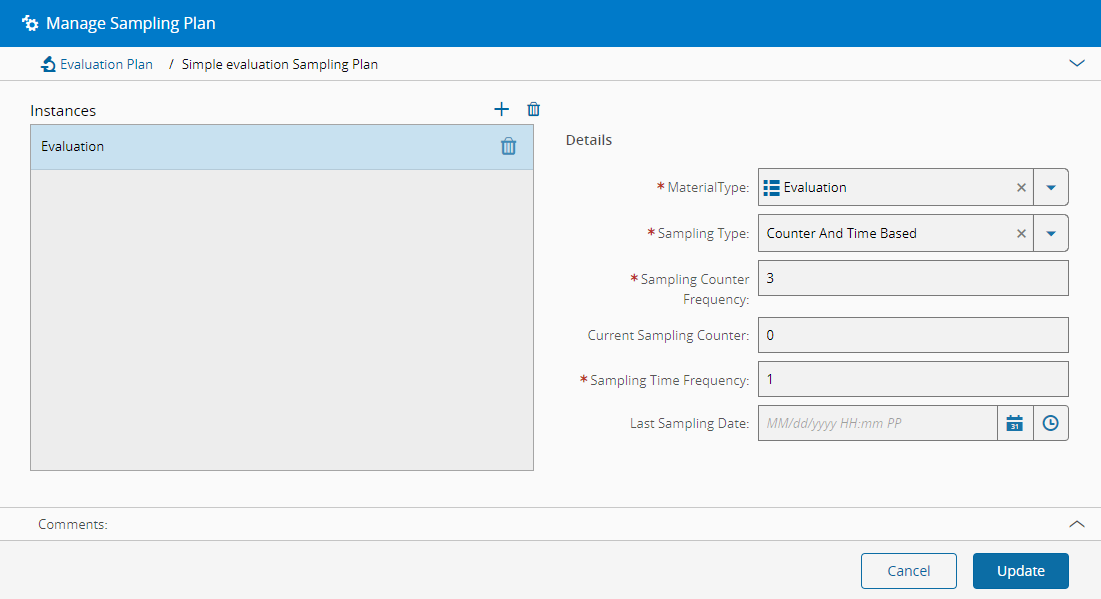
- Select an appropriate Sampling Plan, navigate to the Instances section and press the Manage button.
-
Add as many instances as desired (press in the top right of the grid to add a new entry and to remove an existing entry), providing the following information for each item:
- Material Type (values retrieved from the MaterialType lookup table)
- Sampling Type. The possible values are:
- CounterBased
- CounterAndTimeBased
- TimeBased
-
Depending on the Sampling type selected above, specify:
- Sampling Counter Frequency (for CounterBased, CounterAndTimeBased)
Warning
If set, must be >=
0. A value of0disables counter-based sampling. -
Current Sampling Counter (for CounterBased, CounterAndTimeBased)
Warning
If set, must be >=
0and < Sampling Counter Frequency. If Sampling Counter Frequency is0, this field cannot hold a valid value and the system returns an error message. -
Sampling Time Frequency (for CounterAndTimeBased, TimeBased) - a value, in hours
Warning
If set, must be >=
0(0means disabled). -
Last Sampling Date (for CounterAndTimeBased, TimeBased) - must not be a future date/time, or left empty.
Note
Last Sampling Date can only be edited if the Sampling Plan is TimeBased or CounterAndTimeBased.
-
Optionally, enter a comment.
- Select Update to complete the operation.