Microsoft Distributed Transaction Coordinator (MS-DTC) Configuration#
This section describes how to install and configure Microsoft Distributed Coordinator (MS-DTC). MS-DTC is a component that is used to managed distributed transactions and the two-phase commit protocol. Microsoft Distributed Coordinator (MS-DTC) is installed as part of the operating system installation but it needs to be configured in order for Critical Manufacturing to work correctly.
Note
Microsoft IIS needs to be installed in all Critical Manufacturing Application and Database servers.
The instructions for configuring Microsoft Distributed Coordinator (MS-DTC) according to Critical Manufacturing requirements are the same for Windows Server 2008 and for Windows Server 2012 and can be found in the URL: http://technet.microsoft.com/en-us/library/cc731495.aspx ⧉. For convenience, the configuration procedure is described in this section.
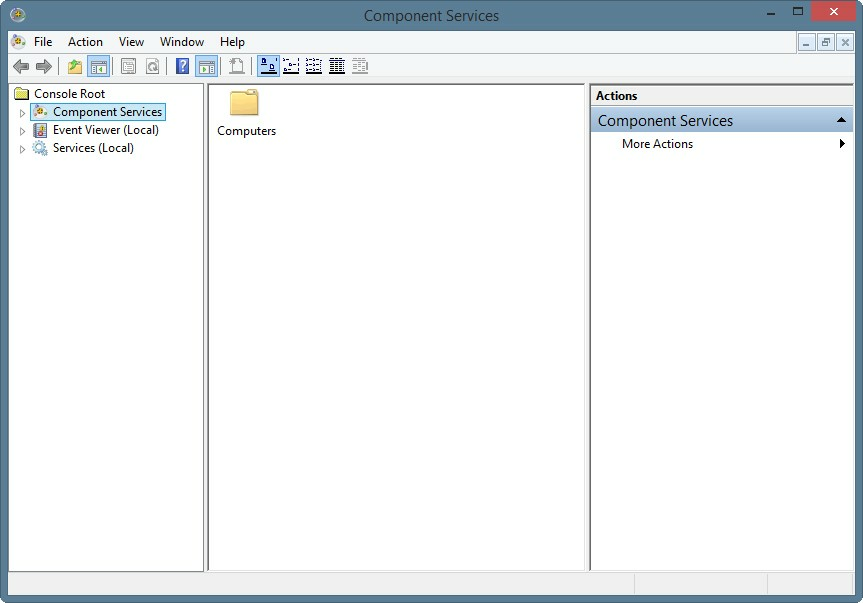
- Start the Component Services management console by typing comexp.msc in the start command and pressing OK.
-
Drill-down by clicking on Component Services > Computer > My Computer > Distributed Transaction Coordinator > Local PC.
-
Right-click on the Local PC under Distributed Transaction Coordinator and then select Properties.
-
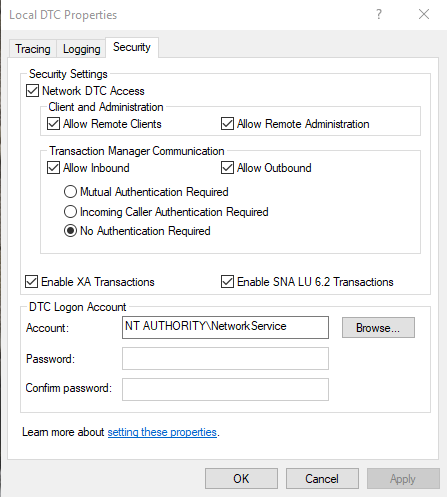
Click on the Security tab and then make sure that the following options are checked as shown in the picture below:
-
Network DTC Access
- Allow Remote Clients
- Allow Remote Administration
- Allow Inbound
- Allow Outbound
- Enable XA Transactions
- Enable SNA LU 6.2 Transactions