Reports#
 Access to Reports is associated with the security feature Analytics.Reports.
The reports tree is generated automatically based on the report server folder structure.
For the user to have access to the reports tree, he must be granted permission in the report server. For more information please refer to Security Reports Folder section the User Guide.
The application standard reports are organized in the following structure:
Material History - Material History reports
- Material Genealogy - Material Genealogy for any Material (ODS database)
- Material History - Material History for any Material (ODS database)
- Material History (from XML) - Material History for data exported into XML
- Material History (New Design) - Material History with customizable information for any Material (ODS database)
Material Logistics - Material Logistics reports
- Periodic Inventory Details - Details for a specific Periodic Inventory (ODS database)
- Pick List Details - Details for a specific Pick List (ODS database)
- Transfer Order Details - Details for a specific Transfer Order (ODS database)
- Transfer Requirement Details - Details for a specific Transfer Requirement (ODS database)
Performance - Dynamic operational indicators for a given time interval
- Material Facility Cycle Time DWH - information about the material facility cycle time (since it entered the facility until it left)
- Material Losses DWH - information about material losses
- Material State Time Distribution DWH - information about the time that each material was at each state for a period of time
- Material Step Cycle Time DWH - information about the material step cycle time (since it entered the step until it left)
- Material Volume and Yield DWH - information about the volume and yield in a given period of time
- Material Yield Loss DWH - information about yield and losses for a certain period of time
- Resource OEE DWH - resource overall equipment efficiency (this report requires that the Resource Ideal Cycle times are properly defined)
- Resource Performance DWH - includes information about resource uptime, downtime, medium time between failures (MTBF), medium time to repair (MTTR) as well as yield, production pieces per hour (PPH) and global pieces per hour
- Resource State Time Distribution DWH - information about the time that each resource was at each state for a period of time
Quality - Quality related reports
- Protocol Instance History - execution history for a Protocol Instance (ODS database)
Resource History - Resource History reports
- Maintenance History - Resource Maintenance History for one or many Resource (ODS database)
- Resource History - Resource History for any Resource (ODS database)
State - snapshot information about the current system state
- Materials
- Material Aggregated Inventory - consolidated and aggregated state of work in progress (WIP)
- Material Detailed Inventory - individual material state of work in progress (WIP)
- Resources
- Resource Aggregated State - consolidated and aggregated current resources state
- Resource Detailed State - individual resource current state
System - application monitoring information
- Service Performance - provides information about the services which are called more frequently and take most time to complete
To access a particular report, it is only necessary to navigate in the tree and click on the desired report.
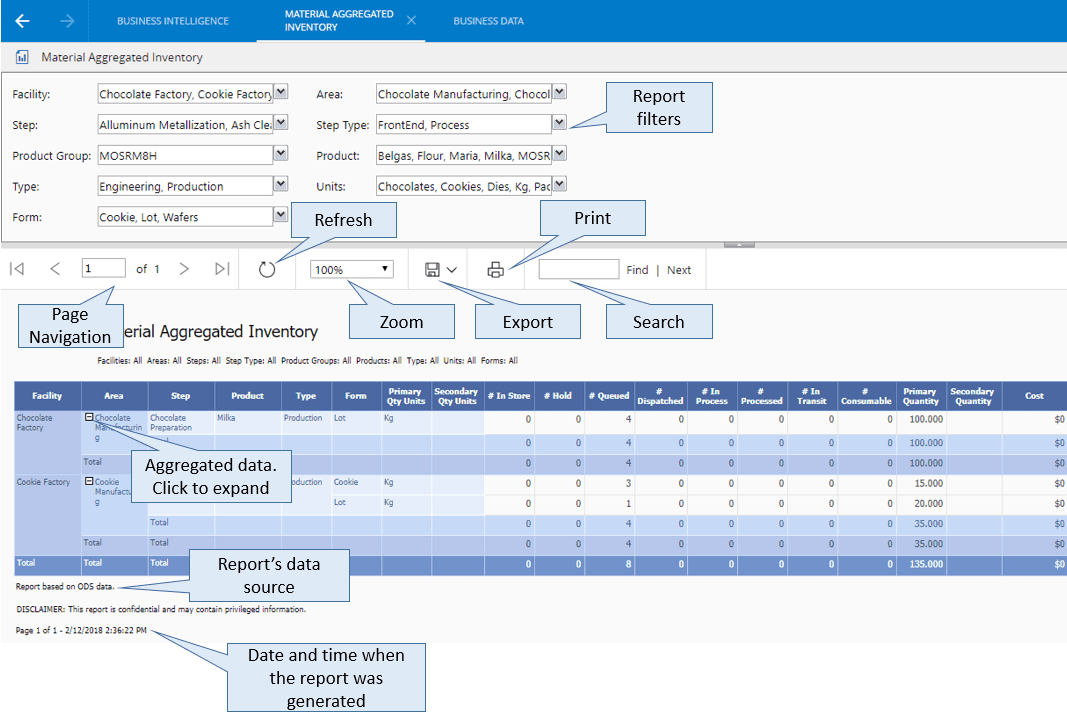
The report may include parameters. The '%' filter means All.
When multiple selection filters are available, selecting all the options is the same as making no filter
To display the report press View Report. Once the report is displayed, one can:
- Move between pages
- Zoom in and zoom out
- Search for an item
- Export the report, by clicking on the Export button and selecting the desired format
- Print the report, by clicking on the Print button
- Drill-down by clicking on the '+' boxes