部署概览#
软件包包含工件及其相关元数据。使用元数据,它描述了跨一台或多台称为目标的计算机在给定系统中安装元数据所需的总体操作顺序。软件包使用一系列具有标识和类型的步骤来描述其安装过程。该标识允许识别它们,并且该类型与将负责执行该特定操作的类相关联。
复杂系统可以通过根软件包划分为多个软件包。此根软件包没有特殊的需求,但是创建一个不包含只有元数据的工件的根软件包是一种很好的做法,以便发现组成系统的软件包列表。要安装的软件包的总体列表是通过收集所有软件包依赖项和所有显式部署的软件包来确定的。如果DeployPackage步骤类型引用软件包,则将软件包视为显式部署。
安装过程概览#
安装过程由经过多个阶段的处理管道处理。下图按顺序说明了所有这些阶段。每个软件包中的每个步骤都将经历每个阶段。与步骤类型关联的类可能会添加代码来处理该阶段,或者如果它们不执行任何操作,则可以忽略该阶段。

启动时的部署框架会尝试确定目标计算机是否安装了任何要部署的软件包。如果找到至少一个软件包,则安装将视为处于升级模式,否则将视为处于干净模式。
在干净或升级模式下,通过将最早版本迁移到依赖项或显式部署引用的版本来部署包。选择要部署的版本时,DF会检查每个版本的迁移策略。迁移策略可以通过LatestOnly或MigrationPath实现。如果是LatestOnly,则将扫描软件包来源以获取该软件包的最高版本号,并仅部署该软件包。如果是MigrationPath,则将扫描软件包来源,以查找安装版本和最新版本之间的软件包。如果没有安装的版本,则将从找到的最低版本号开始。步骤可以为软件包设置目标版本,以控制将要考虑的最顶层版本。它们可以使用通配符来表示与6.1版(应该是6.1.*)兼容的最新软件包。
步骤具有可扩展的语法,因为它们允许任意内部元素。此功能允许自定义步骤处理程序包括它们需要的任何类型的元数据。
管道阶段#
在执行时,管道中的每个步骤都会执行每个管道阶段。此进程只有在完成所有步骤后才进入下一阶段。所有步骤将首先运行初始化操作,然后所有步骤将运行获得操作,直到达到清理为止。接下来的几点总结了管道的每个阶段将执行的操作。
初始化#
- 解析根软件包清单文件,展开依赖关系树并删除重复数据
- 在parameters.json文件中读取
- 读取软件包并检测变量
- 检测每个包ID的迁移策略(LatestOnly或MigrationPath)
- 装配执行计划(要安装的软件包及其安装顺序)
- 装配管道(根据要安装的软件包的已排序列表,以树状结构安装软件包中的所有 步骤)
- 构建部署目标(计算机和容器)的列表
- 连接到目标计算机上的部署代理
获得#
- 检测安装的组件并设置安装模式
- 检查是否需要准备并输出准备通知(将创建或更改的内容)
验证#
- 我们是否有所有必需的变量?
- 我们是否已安装所有必备软件?如果没有,我们可以安装吗?
- 我们可以建立所需的连接吗?
- 我们是否拥有所需的授权?
- 出现错误时,我们可以继续,还是应该中止?
准备#
- 安装必备软件
- 创建或修改将接受软件包的环境(数据库、文件夹、Windows服务等)
执行#
- 通过运行已装配的管道,按排序部署所有软件包。
完成#
- 在数据库上完成任务,例如完成始终启用配置
- 在Windows服务上启动它们
- 如果需要,注册卸载脚本以删除已安装的内容
- 更新部署日志,以便我们能够跟踪已安装的内容
清理#
- 删除由安装过程创建的工作目录和临时文件。
软件包类型和软件包步骤类型#
“软件包类型”和“软件包步骤类型”将清单元素链接到将负责解释的类。
软件包类型处理程序还负责收集操作所需的变量,以及自定义环境以接收工件。
在软件包内部,如何处理每个内容部分可能会有所不同,这也是步骤类型发挥作用的时候。它们允许软件包处理程序部署软件包内的内容。
软件包清单文件#
每个软件包必须有一个且只有一个清单文件。清单文件始终命名为manifest.xml。
以下示例说明了格式:
<?xml version="1.0" encoding="utf-8"?>
<deploymentPackage version="1.0-alpha4">
  <packageId>Cmf.Online.Mes</packageId>
  <packageType>Database</packageType>
  <description>Creates the MES database objects.</description>
  <version>5.0.0</version>
  <dependencies>
    <dependency id="Cmf.OptionalDependency" version="5.0.0"/>
    <dependency id="Cmf.Dependency" version="5.0.0" mandatory="true"/>
  </dependencies>
  <steps>
    <step type="RunSql" contentPath="01-Sprint01.sql" targetDatabase="$(Product.Database.Online)" />
  </steps>

</deploymentPackage>
DeploymentPackage#
软件包清单文件的根元素。
- version - 识别软件包清单文件格式版本的属性。
PackageId#
包含软件包标识符的元素。
PackageType#
将相关软件包分组在一起的元素。它目前用于将软件包与其中一个产品层相关联。就部署框架而言,它允许在给定类型的第一个软件包之前和最后一个软件包之后运行逻辑。
描述#
允许输入文本来描述软件包内容或用途的元素。
依赖项#
可选或强制依赖软件包的列表。
版本#
基于语义版本 ⧉规范的版本号。
步骤#
安装软件包所需的步骤列表。
步骤#
部署软件包时要执行的一项任务。
- type - 表示将被调用的处理程序类型的属性。
- contentPath - 表示要传递给处理程序的工件的路径的属性。
除了这些属性之外,该步骤还可能使用任何额外数量的xml属性。部署框架提供了一个API以允许步骤处理程序读取它们。
该步骤还可以采用任意数量的内部xml元素。某些标准步骤类型使用此功能向清单文件添加额外的部署选项。
UI#
UI元数据允许声明如何向用户提示软件包所需的变量。
向导步骤#
向导步骤将作为安装程序ui中的步骤呈现:

<wizardStep id="Product.Steps.SystemName" order="100" title="System Information" type="generic" requiresValidation="true">
 ...
</wizardStep>
- id - 为将在验证期间中使用的步骤创建唯一标识符。每个步骤都应有唯一ID
- order - 向导中步骤的顺序
- title - 将放置在向导痕迹中的文本
- type - 用于识别需要特殊处理的界面。在1.0版中,不支持自定义界面,非产品向导步骤应使用通用。
- requiresValidation - 用于指示用户单击下一步时是否应调用验证API
变量#
变量将是用户提供的输入。它们可以在步骤属性中使用。通常,\((VariableName)表达式将被变量字典中的变量值替换。某些变量以特殊方式处理以简化步骤声明。例如,产品数据库连接。在这些情况下,开发人员将引用类似\)(Product.Database.Online)这样的内容,框架将使用变量字典中的信息装配连接字符串。
<variables>
        <variable name="Product.SystemName" order="0" readOnly="false" isRequired="true" valueType="Text" label="System Name" />
</variables>
属性:
- name - 将在变量字典中识别变量的字符串。在步骤属性上,$(VariableName)表达式将被字典中的值替换。
- order - 用于对相应组或wizardStep中的输入进行排序
- readOnly - 如果为true,则用户将无法编辑变量
-
isRequired - 如果为true,则无法进入下一步,直到提供一个值
-
valueType - 描述将由输入捕获的数据类型。
- label - 将在变量输入旁边呈现的标签值
变量类型:
- 文本
- FilePath
- FolderPath
- NetworkPort
- IpAddress
- 整数
- 密码
- 布尔值
组#
为具有独立验证的变量创建容器,并表示其中包含的变量之间的某种逻辑关系:
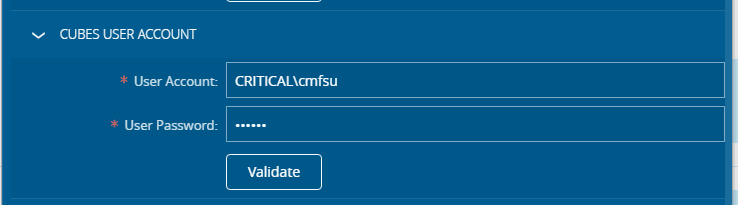
 <wizardStep id="Product.Steps.PresentationTierConfiguration.HTML" order="900" title="UxFab" type="generic" requiresValidation="true">
    <groups>
        <group id="Product.Steps.SystemName.General" order="0" title="" type="generic" requiresValidation="true">
   ...
  </group>
    </groups>
 </wizardStep>
- id - 为验证期间将使用的组创建唯一标识符。每个组都应该有一个唯一的ID
- order - 用于在wizardStep或父组中对相应组进行排序
- title - 组的可视容器的标签
- type - 用于对产品中的某些特定组进行特殊处理。在1.0版中,不支持自定义视觉外观,您应该使用通用。
- requiresValidation - 用于指示用户单击测试时是否应调用验证API
数据库#
每个数据库都分配一个代表它的逻辑名称。逻辑名称不是数据库的实际名称,而是引用它的一种方式,而不依赖于为数据库选择的名称。
步骤类型#
部署框架支持以下基本步骤:
DeployPackage#
此步骤显式部署给定的软件包。
DeployFiles#
允许将文件从文件包复制到目标位置。当前版本仅支持由PackageType指示的两个目标位置。如果是Presentation,则使用全局清单文件中的PresentationFileLocation元素,如果是Business,则使用BusinessFileLocation元素。
- contentPath - 表示将复制的内容。可使用Minimatch模式筛选内容。
RunPowershell#
执行contentPath中提供的PowerShell脚本:
RunSql#
对targetDatabase属性中声明的数据库执行SQL脚本。支持值包括Online、Ods和Dwh。
RunClickHouseSql#
针对ClickHouse数据库执行SQL脚本,该数据库将被访问http://targetHost:targetPort(例如https://clickhouse:9123),如果脚本本身没有数据库,将针对目标数据库运行。
<step type="RunClickHouseSql" contentPath="01-Sprint01.sql" targetHost="$(Product.Database.ClickHouse.Host)" targetPort="$(Product.Database.ClickHouse.Port)" targetDatabase="$(Product.Database.ClickHouse.Database)" />
RunXmla#
对Analysis Services数据库执行XMLA脚本。
TaggedFile#
替换contentPath指示的文件中的标记:
RestoreDatabaseFromBackup#
进行数据库备份以及还原。
<step type="RestoreDatabaseFromBackup" contentPath="online.bak" targetDatabase="$(Product.Database.Online)" />
ConfigureEntityTypeOperations#
为实体类型列表添加所需的操作配置。
<step type="ConfigureEntityTypeOperations">
      <entityType  assemblyName="Cmf.Foundation.BusinessObjects" className="ChangeSet" entityTypeName="ChangeSet" />
</step>
ConfigureServices#
为包含服务的程序集列表添加所需的服务配置。
<step type="ConfigureServices">
      <serviceAssembly assemblyName="Cmf.Foundation.Services.Administration.dll" serviceName="Administration" interfaceName="IAdministration" />
</step
CreateSystemUsers#
在系统中创建用户帐户。
DeployReports#
在报告服务中部署报告。
EnqueueSql#
发送稍后执行的SQL,方式是将SQL放在命令队列中。
系统将使用与Product.Database.Online的连接来执行名为Control.P_EnqueueCommand的过程。该过程必须接受以下参数:
- BatchExecutionId - 对必须在批处理中执行的命令进行分组的唯一标识符。
- QueueName - 用于接受放置脚本的队列名称的varchar。框架将传递作为目标数据库传递的数据库的逻辑名称。(请参阅数据库部分以了解逻辑名称)
- CommandText - 命令的文本。
ProductLicense#
安装产品许可证。产品许可证应在变量Product.Licensing.LicenseRawData中设置。
ProductConfiguration#
部署配置条目。
TransformFile#
通过基于源转换文件插入、替换、合并或删除数据来转换目标文件,其中后者还可以包含 要由StepType TaggedFile替换的标记。
<step type="TransformFile" file="config.json" tagFile="true" />
<step type="TransformFile" file="Web.Config" tagFile="true" relativePath=".."/>
此步骤具有以下属性: 1. file - 目标文件和源转换文件两者的名称。这是强制属性。 2. tagFile - 可选择设置,以便在应用转换之前将TaggedFile步骤应用于源转换文件。 3. relativePath - 可选择设置以指示目标文件不在软件包的TargetDirectory中,而是在它的相对路径中。请注意,源转换文件始终位于软件包的主文件夹中,而不是任何子文件夹中。
如果我们想要更改已在产品发行版中发货的文件中的某些信息,又不想用我们的文件替换整个文件(完全替换可能会造成难以维护),则此步骤非常有用。因此,与其用另一个文件替换文件,我们只需声明一个具有我们想要执行的操作的转换文件,例如添加配置、删除另一个配置、更改值等,然后这些更改将反映在目标文件中。
这些转换是通过使用Microsoft的jdt(用于 json)和xdt(用于xml)完成的,每一种都有自己的语法。有关详细信息,请参阅其文档: * Jdt ⧉ * Xdt ⧉
目前,仅支持使用json和xml文件执行此操作。
示例:
- 转换UI HTML config.json以包括和删除软件包:
软件包步骤声明#
目标文件:#
{
  ...
  "packages": {
    "available": [
      "cmf.core.shell",
      "cmf.core.business.controls",
      "cmf.core.controls",
      "cmf.core.checklist"
    ],
    ...
  },
  ...
}
源转换文件:#
{
  "@jdt.remove": [
    {
      "@jdt.path": "$.packages.available[?(@ == 'cmf.core.checklist')]"
    }
  ],
  "@jdt.merge": [
    {
      "@jdt.path": "$.packages.available",
      "@jdt.value": [
        "cmf.newavailablepackage"
      ]
    }
  ]
}
最终目标文件:#
{
  ...
  "packages": {
    "available": [
      "cmf.core.shell",
      "cmf.core.business.controls",
      "cmf.core.controls",
      "cmf.newavailablepackage"
    ],
    ...
  },
  ...
}
- 转换UI Web.config以包括和删除规则:
包步骤声明#
目标文件:#
<?xml version="1.0" encoding="UTF-8"?>
<configuration>
...
<connectionStrings>
  ...
</connectionStrings>
...
<system.webServer>
  <rewrite>
    <rules>
      <rule name="Index 1">
        <match url=".*" />
        <conditions logicalGrouping="MatchAll">
          <add input="{REQUEST_URI}" pattern=".*\.[a-z]" />
          <add input="{REQUEST_URI}" matchType="Pattern" pattern="^/help(/.*)?$" ignoreCase="true" negate="true" />
          <add input="{REQUEST_URI}" matchType="Pattern" pattern="^/iis(/.*)?$" ignoreCase="true" negate="true" />
          <add input="{REQUEST_URI}" matchType="Pattern" pattern="^/api(/.*)?$" ignoreCase="true" negate="true" />
          <add input="{REQUEST_URI}" matchType="Pattern" pattern="^/ReportServer(/.*)?$" ignoreCase="true" negate="true" />
          <add input="{REQUEST_URI}" matchType="Pattern" pattern="^/discovery-service(/.*)?$" ignoreCase="true" negate="true" />
          <add input="{REQUEST_URI}" matchType="Pattern" pattern="^/messagebus(/.*)?$" ignoreCase="true" negate="true"/>
        </conditions>
        <action type="Rewrite" url="html/{R:0}" />
      </rule>
      <rule name="Index 2">
        <match url=".*" />
        <conditions logicalGrouping="MatchAll">
          <add input="{REQUEST_FILENAME}" matchType="IsFile" negate="true" />
          <add input="{REQUEST_URI}" matchType="Pattern" pattern="^/help(/.*)?$" ignoreCase="true" negate="true" />
          <add input="{REQUEST_URI}" matchType="Pattern" pattern="^/iis(/.*)?$" ignoreCase="true" negate="true" />
          <add input="{REQUEST_URI}" matchType="Pattern" pattern="^/api(/.*)?$" ignoreCase="true" negate="true" />
          <add input="{REQUEST_URI}" matchType="Pattern" pattern="^/ReportServer([/\?].*)?$" ignoreCase="true" negate="true" />
          <add input="{REQUEST_URI}" matchType="Pattern" pattern="^/discovery-service(/.*)?$" ignoreCase="true" negate="true" />
          <add input="{REQUEST_URI}" matchType="Pattern" pattern="^/messagebus(/.*)?$" ignoreCase="true" negate="true"/>
        </conditions>
        <action type="Rewrite" url="html/index.html" />
      </rule>
    </rules>
  <rewrite>
</system.webServer>
...
</configuration>
源转换文件:#
<?xml version="1.0" encoding="UTF-8"?>
<configuration xmlns:xdt="http://schemas.microsoft.com/XML-Document-Transform">
<!-- Remove and Add to ensure no duplicates -->
<system.web xdt:Transform="Remove"></system.web>
<system.web xdt:Transform="InsertAfter(/configuration/connectionStrings)">
<httpRuntime targetFramework="4.6.1" requestPathInvalidCharacters="<,>,*,%,&,\"/>
</system.web>
<!-- Remove and Add to ensure no duplicates -->
<add input="{REQUEST_URI}" matchType="Pattern" pattern="^/myendpoint(/.*)?$" ignoreCase="true" negate="true" xdt:Transform="Remove" xdt:Locator="XPath(/configuration/system.webServer/rewrite/rules/rule[@name='Index 1']/conditions/add[@pattern='^/myendpoint(/.*)?$'])"/>
<add input="{REQUEST_URI}" matchType="Pattern" pattern="^/myendpoint(/.*)?$" ignoreCase="true" negate="true" xdt:Transform="Insert" xdt:Locator="XPath(/configuration/system.webServer/rewrite/rules/rule[@name='Index 1']/conditions)"/>
<add input="{REQUEST_URI}" matchType="Pattern" pattern="^/myendpoint(/.*)?$" ignoreCase="true" negate="true" xdt:Transform="Remove" xdt:Locator="XPath(/configuration/system.webServer/rewrite/rules/rule[@name='Index 2']/conditions/add[@pattern='^/myendpoint(/.*)?$'])"/>
<add input="{REQUEST_URI}" matchType="Pattern" pattern="^/myendpoint(/.*)?$" ignoreCase="true" negate="true" xdt:Transform="Insert" xdt:Locator="XPath(/configuration/system.webServer/rewrite/rules/rule[@name='Index 2']/conditions)"/>
<system.webServer>
<rewrite>
<rules>
<!-- Remove and Add to ensure no duplicates -->
<rule xdt:Transform="Remove" xdt:Locator="Condition(@name='Public Files')"></rule>
<rule name="Public Files" patternSyntax="ExactMatch" stopProcessing="true" xdt:Transform="InsertBefore(rule[@name='Index 1'])">
<match url="myimage.png"/>
<serverVariables>
<set name="CMF_ALLOW_UNAUTHENTICATED" value="True"/>
</serverVariables>
</rule>
</rules>
</rewrite>
</system.webServer>
</configuration>
最终目标文件:#
<?xml version="1.0" encoding="UTF-8"?>
<configuration>
...
<connectionStrings>
...
</connectionStrings>
...
<system.web>
<httpRuntime targetFramework="4.6.1" requestPathInvalidCharacters="<,>,*,%,&,\"/>
</system.web>
...
<system.webServer>
<rewrite>
<rules>
<rule name="Public Files" patternSyntax="ExactMatch" stopProcessing="true">
<match url="myimage.png"/>
<serverVariables>
<set name="CMF_ALLOW_UNAUTHENTICATED" value="True"/>
</serverVariables>
</rule>
<rule name="Index 1">
<match url=".*" />
<conditions logicalGrouping="MatchAll">
<add input="{REQUEST_URI}" pattern=".*\.[a-z]" />
<add input="{REQUEST_URI}" matchType="Pattern" pattern="^/help(/.*)?$" ignoreCase="true" negate="true" />
<add input="{REQUEST_URI}" matchType="Pattern" pattern="^/iis(/.*)?$" ignoreCase="true" negate="true" />
<add input="{REQUEST_URI}" matchType="Pattern" pattern="^/api(/.*)?$" ignoreCase="true" negate="true" />
<add input="{REQUEST_URI}" matchType="Pattern" pattern="^/ReportServer(/.*)?$" ignoreCase="true" negate="true" />
<add input="{REQUEST_URI}" matchType="Pattern" pattern="^/discovery-service(/.*)?$" ignoreCase="true" negate="true" />
<add input="{REQUEST_URI}" matchType="Pattern" pattern="^/messagebus(/.*)?$" ignoreCase="true" negate="true"/>
<add input="{REQUEST_URI}" matchType="Pattern" pattern="^/myendpoint(/.*)?$" ignoreCase="true" negate="true"/>
</conditions>
<action type="Rewrite" url="html/{R:0}" />
</rule>
<rule name="Index 2">
<match url=".*" />
<conditions logicalGrouping="MatchAll">
<add input="{REQUEST_FILENAME}" matchType="IsFile" negate="true" />
<add input="{REQUEST_URI}" matchType="Pattern" pattern="^/help(/.*)?$" ignoreCase="true" negate="true" />
<add input="{REQUEST_URI}" matchType="Pattern" pattern="^/iis(/.*)?$" ignoreCase="true" negate="true" />
<add input="{REQUEST_URI}" matchType="Pattern" pattern="^/api(/.*)?$" ignoreCase="true" negate="true" />
<add input="{REQUEST_URI}" matchType="Pattern" pattern="^/ReportServer([/\?].*)?$" ignoreCase="true" negate="true" />
<add input="{REQUEST_URI}" matchType="Pattern" pattern="^/discovery-service(/.*)?$" ignoreCase="true" negate="true" />
<add input="{REQUEST_URI}" matchType="Pattern" pattern="^/myendpoint(/.*)?$" ignoreCase="true" negate="true"/>
</conditions>
<action type="Rewrite" url="html/index.html" />
</rule>
</rules>
</rewrite>
</system.webServer>
...
</configuration>
MasterData#
通过创建和加载MasterDataPackage实例,创建将导入主数据的集成条目。 这些属性代表Master Data Packages支持的相同配置。CreateInCollection当前不可配置。
<step type="MasterData" filePath="MD/MasterData_Sprint45_US105840.xlsx" deeBasePath="MD/DEEs" checklistImagePath="MD/ChecklistImages" documentFileBasePath="MD/Documents" mappingFileBasePath="MD/MappingFiles" automationWorkflowFileBasePath="MD/AutomaticWorkFlowFiles" importXMLObjectPath="MD/ImportXMLs" />
要导入的主数据可以是普通主数据文件及其附加文件,也可以是已包含所有内容的zip存档文件。
请考虑使用以下安装软件包文件夹结构:
My.Custom.Package.1.0.0
├── DEEs
│   ├── FirstCustomDee.cs
│   └── SecondCustomDee.cs
├── XMLObjects
│   └── MyUIPage.xml
├── MasterData
│   ├── MasterDataFile.xlsx
│   └── MasterDataArchive.zip
└── manifest.xml
要正确创建MasterDataPackage,必须使用以下数据设置manifest.xml中的步骤:
<step type="MasterData" filePath="MasterData/MasterDataFile.xlsx" deeBasePath="DEEs" importXMLObjectPath="XMLObjects" />
MasterDataFile.zip
├── DEEs
│   ├── FirstCustomDee.cs
│   ├── SecondCustomDee.cs
├── XMLObjects
│   ├── MyUIPage.xml
└── MasterDataFile.xlsx
但是,如前所述,也可以使用已经构建的zip存档文件。在这种情况下,用户有责任确保其格式正确,因为它将按原样设置为MasterDataPackage的Package属性。清单文件中的配置变得更加简单,因为唯一需要设置的属性是filePath。其他的都不考虑。
ExportedObjects#
创建一个或多个将导入xml对象的集成条目。
ProcessRules#
创建一个或多个将执行DEE的集成条目。
CreateIntegrationEntries#
使用为集成信息内容指定的文件内容创建一个或多个集成条目。
<step type="CreateIntegrationEntries" contentPath="ProcessRules/EntityTypes/**\*.cs" messageType="" eventName="" sourceSystem="" targetSystem=""/>
这些属性代表的配置与系统集成的集成处理程序解决方案部分中定义的配置相同。
示例:
<step type="CreateIntegrationEntries" contentPath="DEE" messageType="ExecuteActionCode" eventName="ExecuteActionCode" sourceSystem="MES" targetSystem="MES"/>
UpdateConfiguration#
更新现有配置值。