执行服务调用#

此任务执行MES服务调用。它使connect IoT模块能够与MES服务交互。
Note
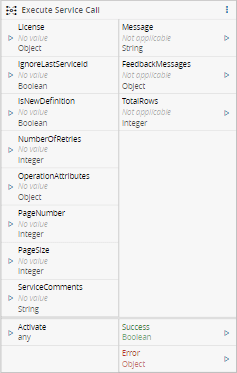
任务图是使用MES DeleteLicense服务的示例。如果未选择任何服务,则该任务将没有输入或输出,但Activate、Success和Error除外。
输入#
| 名称 | 数据类型 | 是否是触发器 | 描述 |
|---|---|---|---|
<custom list> | <custom> | 否 | 服务输入 |
| 激活 | any | 是 | 执行配置的MES服务 |
输出#
| 名称 | 数据类型 | 描述 |
|---|---|---|
<custom list> | <custom> | 服务输出 |
| 成功 | Boolean | 如果没有问题,则发出 true |
| 错误 | Error | 处理此任务期间发生的错误 |
设置#
在常规选项卡上,您可以使用常规设置。
在服务选项卡上,您可以使用所有可用MES服务的列表。
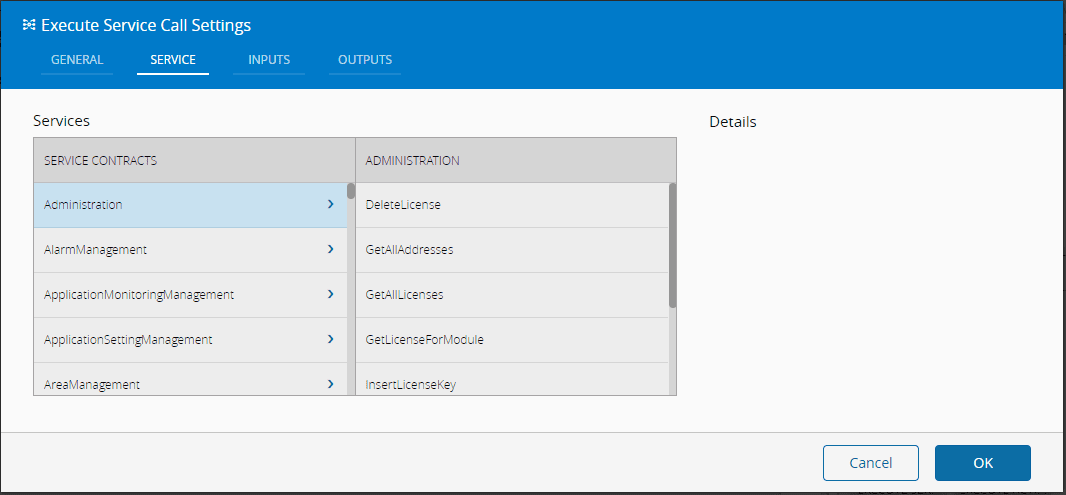
在输入选项卡上,您可以使用引用所选服务(自动加载)的输入:
| 名称 | 数据类型 | 默认 | 描述 |
|---|---|---|---|
| 名称 | String | <Filled by the Service> | MES服务输入的名称。 |
| 易记名称 | String | <Filled by the Service> | 要显示的名称。 |
| 类型 | LongDecimalDateTimeBooleanStringInteger | <Filled by the Service> | MES服务输入的类型。 |
| 集合类型 | NoneArrayMap | <Filled by the Service> | |
| 默认 | <custom type> | MES服务输入的默认值 |
在输出选项卡上,您可以使用引用所选服务的输出:
| 名称 | 数据类型 | 默认 | 描述 |
|---|---|---|---|
| 名称 | String | <Filled by the Service> | MES服务输出的名称。 |
| 易记名称 | ``字符串 | <Filled by the Service> | 要显示的名称。 |
| 类型 | LongDecimalDateTimeBooleanStringInteger | <Filled by the Service> | 输出的类型 |
| 集合类型 | NoneArrayMap | <Filled by the Service> |
行为#
此任务会执行给定一组输入值的MES服务。它实例化一个MES输入对象,调用服务,并将MES输出对象转换为单个输出变量。
备注#
确保与输入链接的MES对象已完全加载,否则,服务调用可能会失败。如果未加载对象,为了避免多次调用MES来完全加载对象,您可以向服务添加Pre操作并将其加载到MES系统中,从而使调用更加有效。