---
alias: user-guide-automation-task-core-equipmentevent
tags:
- automation tasks
description: "This task triggers automation events based on equipment data and configurable settings for event listening"
---
# On Equipment Event
:iot-on-equipment-event-lg:{style="font-size: 100px"}
The **On Equipment Event** task is activated when the configured event(s) are received from the equipment and the properties values received will be emitted.

## Details
| Fields | Details |
| ----------------- | ---------------------------------------------------------------------------------- |
| Scope | Connect IoT |
| Workflow | Data flow
Control flow |
| `IsProtocol` flag | :material-check:{style="color:#4DB6AC"} |
## Inputs
| Name | Data Type | Description |
| ------ | --------- | --------- |
|Activate | `Boolean` | Enables or Disables the event listening and triggering|
!!! note
Although the drawn Task box indicates that the Activate input is of type `any` it will act based on the converted value to Boolean. The visual information will be fixed in a future version.
## Outputs
| Name | Data Type | Description |
| ------ | --------- | --------- |
| event | `AutomationEvent` | The automation event object|
| timestamp | `DateTime` | The timestamp for when the event is triggered|
| eventRawData | `Object` | The raw automation event object|
| `` | ` value` | Properties associated with the event|
| Error | `Error` | Error that occurred during the processing of this task|
## Settings
On the `General Tab`, you have the usual settings and the following settings:
| Name | Data Type | Values | Default | Description |
| ------ | --------- | --------- | --------- | --------- |
| Auto Activate | `Boolean` | | `true` | If the event is activated by the register of an event of that type or if it is only activated by the `activate` input |
| All events | `Boolean` | | `false` | The task event triggers whenever there is an event |
| On Equipment Event | `Automation Event` | | | Specific event to listen |
| Working Mode | `enum` | `AlwaysActive`
`OneEvent` | `AlwaysActive` | Specifies the behavior of the task |

!!! note "Extended Data"
This task shows extended data in the `Settings` and the `Outputs` tab when an Automation Event is selected. The extended data shown depends on the driver in use.
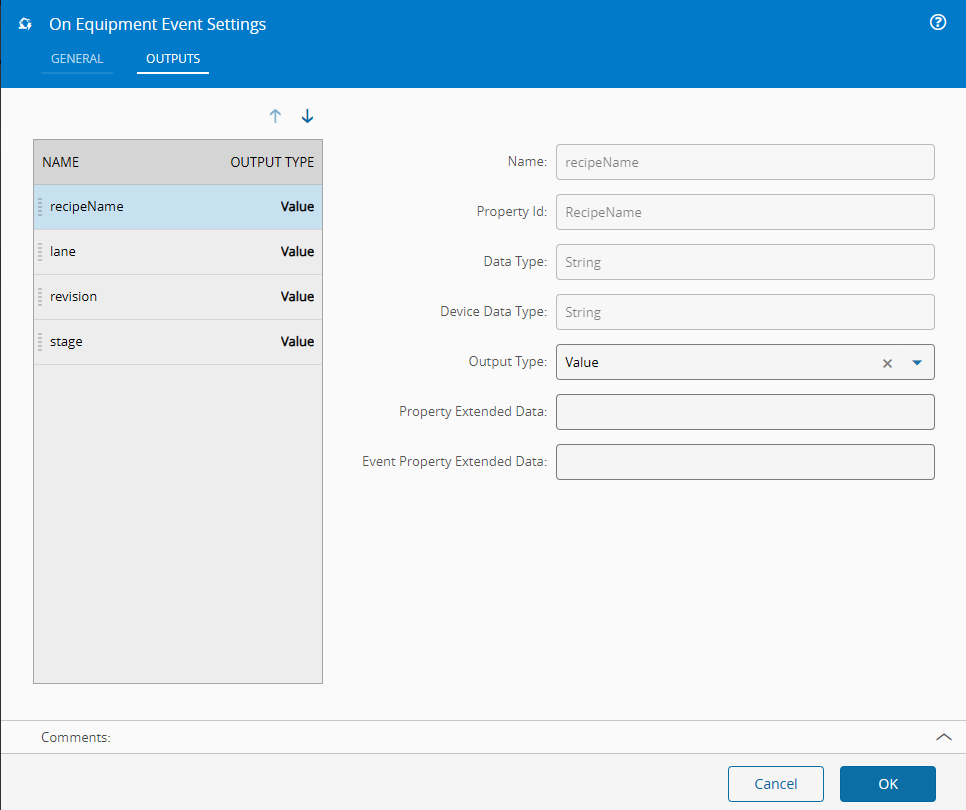
On the `Output Tab`, you have the following settings:
| Name | Data Type | Values | Default | Description |
| ------ | --------- | --------- | --------- | --------- |
|OutputType | `enum` | `Value`
`RawValue` | `Value` | Species if property will return a converted value or the original driver read value |
## Behavior
In this task you choose a driver when dropping it into the workflow (if you have more than one driver associated with the controller).
The task will become available (listening to the event(s)) on one of the following conditions:
- `Auto Activate` setting is set to `true`
- `Activate` input is fed with a `true` Boolean value (or compatible, like `1`, `true`, `t`, `yes`, `y`)
When the selected event occurs (or any event if `All events` flags is activated), every property associated with it will have its value emitted.
If the working mode is `OneEvent`, the event will only trigger once, whereas if it is `AlwaysActive` it will always trigger until it is disabled.
The task can be disabled by sending a `false` Boolean value into the `Activate` input.
## Remarks
{% include-markdown 'includes/pages/automation_zones_note.md' %}