---
alias: user-guide-automation-task-mes-createnotification
tags:
- automation tasks
---
# Create Notification
:iot-notification-lg:{style="font-size:100px"}
This task creates a notification in the MES system and optionally assigns it to users, roles, or everyone. The notification can include severity, detailed content, clearance rules, and optional email delivery to the assigned parties.
## Details
| Fields | Details |
| ----------------- | ---------------------------------------------------------------------------------- |
| Scope | Connect IoT
Data Platform
Enterprise Integration
Factory Automation |
| Workflow | Data flow
Control flow |
| `IsProtocol` flag | :material-close:{style="color:#EF5350"} |
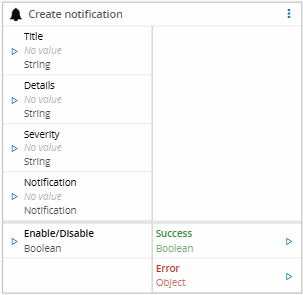
## Inputs
All input values are static and defined at design time.
| Name | Data Type | Description |
| -------------------- | --------- | -------------------------------------------------------- |
| notificationTitle | `String` | Title of the notification to be created |
| notificationDetails | `String` | Detailed description or message body of the notification |
| notificationSeverity | `String` | Severity level of the notification |
| notification | `Entity` | Notification entity reference |
| activate | `Boolean` | Enables or disables the execution of the task |
## Outputs
| Name | Data Type | Description |
| ------- | --------- | ------------------------------------------------------ |
| Success | `Boolean` | Emitted when the notification is successfully created |
| Error | `Error` | Error that occurred during the processing of this task |
## Settings
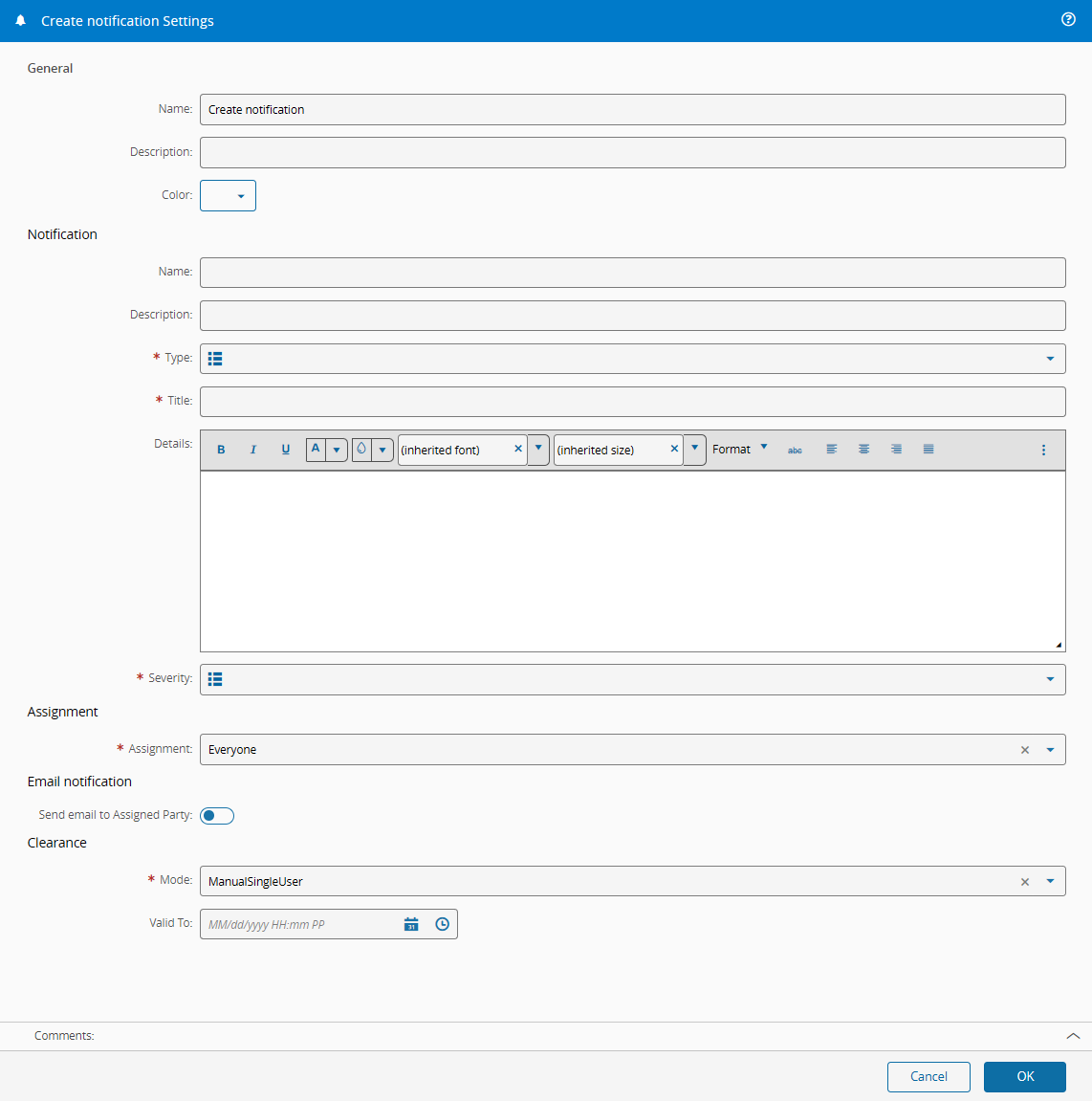
On the `General` Tab, the following configuration groups are available.
### General for the task
| Name | Data Type | Description |
| ----------- | --------- | ------------------------------------------------ |
| Name | `String` | Internal name of the notification |
| Description | `String` | Optional description for identification purposes |
| Type | `Lookup` | Notification type |
| Title | `String` | Notification title |
| Details | `HTML` | Notification content, supports rich text |
| Severity | `Lookup` | Notification severity |
{% include-markdown 'includes/pages/iot_tasks_retries_settings.md' %}
### Assignment
| Name | Data Type | Description |
| ---------- | --------- | -------------------------------------------------------------- |
| Assignment | `Enum` | Defines who receives the notification: Everyone, User, or Role |
| User | `Entity` | Target user when Assignment is set to `User` |
| Role | `Entity` | Target role when Assignment is set to `Role` |
### Email Notification
| Name | Data Type | Description |
| ---------------------------- | --------- | ------------------------------------------------------------------- |
| Send email to Assigned Party | `Boolean` | Enables email delivery to the assigned user or role |
| Distribution List | `String` | Optional email list (semicolon-separated) for additional recipients |
### Clearance
| Name | Data Type | Description |
| -------- | ---------- | --------------------------------------------------------------------- |
| Mode | `Enum` | Clearance strategy: manual (single or multiple users) or automatic |
| Valid To | `DateTime` | Expiration date for the notification clearance, depending on the mode |
## Behavior
When the task is activated, it creates a new notification in the MES system using the configured title, details, type, and severity. The notification is then assigned according to the selected assignment rules (everyone, specific users, or roles).