---
tags:
- packing
alias: user-guide-package-index
description: "Critical Manufacturing MES manages packaging hierarchies for transportation and shipping"
---
# Package
:lock: Package.**Show**
## Overview
A **Package** is created from one or more **Products** of Product Type Packaging. Although associated to a Product, a package hierarchy can have various **Materials**.
Packing is understood to be any type of box, package or container used for the purposes of transportation or shipping. Additionally, packing can take place at many levels as shown in the example below:
```mermaid
flowchart LR
subgraph Product
direction LR
subgraph Packing["Protective Packaging for every level"]
direction LR
A1[Transportation Packaging] -.->|Corrugated Boxes| N1[Level 4]
A2[Display Packaging] -.->|Counter Display| N2[Level 3]
A3[Secondary Packaging] -.->|Folded Carton| N3[Level 2]
A4[Primary Packaging] -.->|Plastic Jar| N4[Level 1]
end
A5[Finished Product Materials] -.-> Packing
end
classDef mermaid_title color:#000, fill:#fafafa, stroke:#fafafa, stroke-width:0x, font-size:100%, font-weight:200;
classDef mermaid_start color:#000, fill:#fafafa, stroke:#fafafa, color:#fafafa, stroke-width:0x, font-size:100%, visibility: hidden;
classDef mermaid_businessdata color:#000, fill:#65CDE8, stroke:#65CDE8, stroke-width:0px, font-size:100%;
classDef mermaid_nonbusinessdata color:#000, fill:#B7DEE8, stroke:#B7DEE8, stroke-width:0px, font-size:100%;
classDef mermaid_entity color:#000, fill:#FB9F53, stroke:#FB9F53, stroke-width:0px, font-size:100%;
classDef mermaid_entitylinked color:#000, fill:#FCD5B5, stroke:#FCD5B5, stroke-width:0px, font-size:100%;
classDef mermaid_context color:#000, fill:#B9CDE5, stroke:#B9CDE5, stroke-width:0px, font-size:100%;
classDef mermaid_optional color:#000, fill:#B7DEE8, stroke:#65CDE8, stroke-width:1px, font-size:100%, stroke-dasharray: 5 5;
classDef mermaid_state color:#000, fill:#d7e4bd, stroke:#000, stroke-width:1px, font-size:100%, font-weight:300;
class Main mermaid_entity
class Start mermaid_start
class A1,A2,A3,A4,A5,A6,A7,A8,A9,A10,A11,A12 mermaid_state
class L1,L2,L3,L4,L5,L6 mermaid_state
class C1,C2,C3,C4,C5,C6 mermaid_context
class N1,N2,N3,N4,N5,N6 mermaid_nonbusinessdata
```
## Packing levels
Critical Manufacturing MES distinguishes between two levels of packing as shown in the table below:
| **Level** | **Description** | **Driven by** | **Comments** |
|-------|-------------|-----------|-------|
| **Level 1
Primary (Product)** | Packaging of the main product, which is typically a **Manufacturing Process**. This includes all the Materials that make up an individual Product Package.
The contents of Packages at this level consist always of Materials. | A BOM. | 1. Requires only one Product of Product Type Packaging in the BOM.
2. Supports Trackable (has a unique Id) and Non-Trackable Packages. |
| **Level 2 and Above
Secondary, Tertiary, and above (Package)** | Packing of packages of Level 1 or above into other packages of a higher level (multiple level packaging), which is typically a **Logistics Process**.
The contents of Packages at this level consist always of other Packages. | A Step level configuration together with a Packing Context Smart Table. | 1. Will resolve to one Product of Product Type Packaging per level.
2. Multiple level packing is possible.
3. Level 2 Packages are always Trackable. |
Table: Different Packing levels
### Primary Packing
Primary packing consists of creating the packages of the first level - Level 1 packages. These are the packages that directly contain the WIP.
### Secondary and Above Packing
Secondary and above packing consists of packing packages of Level 2 or above in other packages. This operation is referred to as multiple level packing.
## Label/Document Printing
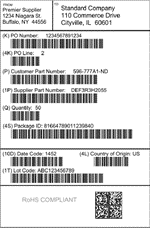
Critical Manufacturing MES supports the printing of one or more labels or documents per package. The table below illustrates some document examples as described by the Electronic Components Industry Association (ECIA) standard:
| **Label Type** | **Description** | **Example** |
|-------|-------------|-----------|
| **Product Label** | Primary Packaging
 |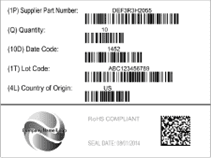|
| **Intermediate Label (optional)** | Secondary Packaging
 | 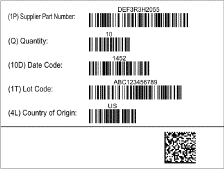 |
| **Logistic/Carton Label** | Logistic Packaging
 |  |
| **Packing Slip Label** | Packing Slip – typically per Purchase Order
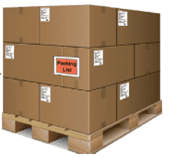| 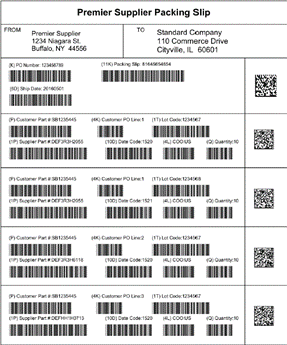 |
Table: Label examples
## Packing Object Model
The high-level Packing object model is shown in the diagram below. The core object is the Package, which is a recursive object constructed from the bottom up.
```mermaid
graph TD
Main[Package] --> A1[Package Material]
Main -->|Multiple level Package| Main
classDef mermaid_title color:#000, fill:#fafafa, stroke:#fafafa, stroke-width:0x, font-size:100%, font-weight:200;
classDef mermaid_start color:#000, fill:#fafafa, stroke:#fafafa, color:#fafafa, stroke-width:0x, font-size:100%, visibility: hidden;
classDef mermaid_businessdata color:#000, fill:#65CDE8, stroke:#65CDE8, stroke-width:0px, font-size:100%;
classDef mermaid_nonbusinessdata color:#000, fill:#B7DEE8, stroke:#B7DEE8, stroke-width:0px, font-size:100%;
classDef mermaid_entity color:#000, fill:#FB9F53, stroke:#FB9F53, stroke-width:0px, font-size:100%;
classDef mermaid_entitylinked color:#000, fill:#FCD5B5, stroke:#FCD5B5, stroke-width:0px, font-size:100%;
classDef mermaid_context color:#000, fill:#B9CDE5, stroke:#B9CDE5, stroke-width:0px, font-size:100%;
classDef mermaid_optional color:#000, fill:#B7DEE8, stroke:#65CDE8, stroke-width:1px, font-size:100%, stroke-dasharray: 5 5;
classDef mermaid_state color:#000, fill:#d7e4bd, stroke:#000, stroke-width:1px, font-size:100%, font-weight:300;
class Main mermaid_entity
class Start mermaid_start
class A1,A2,A3,A4,A5,A6,A7,A8,A9,A10,A11,A12 mermaid_state
class L1,L2,L3,L4,L5,L6 mermaid_state
class C1,C2,C3,C4,C5,C6 mermaid_context
class N1,N2,N3,N4,N5,N6 mermaid_nonbusinessdata
click Main "../../business-data/package"
click A1 "../../business-data/material"
```
The table below provides more detail on the main objects:
| **Object** | **Description** |
|-------|-------------|
| **Package** | This is the main object. Among other things, it contains a reference to the **Product** that represents the package, and it keeps the status of the number of packages, packed quantity, and package weight. |
| **Package Material** | This object is only used to store **Material** Ids in case a box contains serialized Ids. |
Table: Packing objects
## Packing Content Types
A Package can have content of four different types as described below:
| **Object** | **Description** |
|-------|-------------|
| **Material Quantity Single** | This Content Type is used for **Primary Packing** to store a certain quantity of a particular **Material**.
This type of package can be marked as trackable or not. |
| **Material Quantity Multiple** | This Content Type is used for **Primary Packing** to store homogenous sets of material quantity packages in case the package is not trackable. It can significantly reduce the number of objects and facilitate the operations of the logistic operator.
This type of package cannot be marked as trackable. |
| **Material Ids** | This Content Type is used for **Primary Packing** to store serialized **Material** Ids.
This type of package can be marked as trackable or not, but unique package Ids will always be generated. |
| **Packages** | This Content Type is used for **Secondary and Above Packing** and it can store Primary or other type of Packages for Multiple Level Packing. |
Table: Packing content types
## State Model
The **Package** has a system defined state model as shown in the next picture:
```mermaid
graph TD
Start -->|Create| A1
A1[Open] -->|Close| C1[Closed]
C1 -->|Reopen| A1
classDef mermaid_title color:#000, fill:#fafafa, stroke:#fafafa, stroke-width:0x, font-size:100%, font-weight:200;
classDef mermaid_start color:#000, fill:#fafafa, stroke:#fafafa, color:#fafafa, stroke-width:0x, font-size:100%, visibility: hidden;
classDef mermaid_businessdata color:#000, fill:#65CDE8, stroke:#65CDE8, stroke-width:0px, font-size:100%;
classDef mermaid_nonbusinessdata color:#000, fill:#B7DEE8, stroke:#B7DEE8, stroke-width:0px, font-size:100%;
classDef mermaid_entity color:#000, fill:#FB9F53, stroke:#FB9F53, stroke-width:0px, font-size:100%;
classDef mermaid_entitylinked color:#000, fill:#FCD5B5, stroke:#FCD5B5, stroke-width:0px, font-size:100%;
classDef mermaid_context color:#000, fill:#B9CDE5, stroke:#B9CDE5, stroke-width:0px, font-size:100%;
classDef mermaid_optional color:#000, fill:#B7DEE8, stroke:#65CDE8, stroke-width:1px, font-size:100%, stroke-dasharray: 5 5;
classDef mermaid_state color:#000, fill:#d7e4bd, stroke:#000, stroke-width:1px, font-size:100%, font-weight:300;
classDef mermaid_initial_state fill:#d7e4bd,stroke:#92d050,stroke-width:3px,color:#000;
classDef mermaid_final_state fill:#a7e2f2,stroke:#65CDE8,stroke-width:3px,color:#000;
class A1 mermaid_initial_state
class C1 mermaid_final_state
class Main mermaid_entity
class Start mermaid_start
class A2,A3,A4,A5,A6,A7,A8,A9,A10,A11,A12 mermaid_state
class L1,L2,L3,L4,L5,L6 mermaid_state
class C2,C3,C4,C5,C6 mermaid_context
class N1,N2,N3,N4,N5,N6 mermaid_nonbusinessdata
```
!!! info
For more information, see [Packing](../../../tags#packing).
{{ generate_index() }}