Protocol Instance History (New Design)#
Overview#
The Protocol Instance History report provides a record of a specific Protocol Instance. It includes all relevant details, associated tasks, Materials, Documents, states, Checklists, Parameters, and notes, providing traceability and supporting quality and compliance.
Warning
If you are using Enterprise Data Platform (EDP), only the Details section will be displayed.
This Stimulsoft report can be accessed through the Business Intelligence tab, in the Quality folder.
Data Source#
The report uses data from the CDM (Common Data Model) and ODS (Operational Data Store) databases, accessed through the following data sets:
- Protocol Instance Tasks
- Protocol Instance Documents
- Protocol Instance Materials
- Protocol Instance States Data Set
- Protocol Instance State Parameters Data Set
- Protocol Instance State Checklists Data Set
Filters#
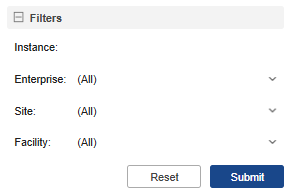
The report provides the following filters:
- Instance – Identifier of the instance.
- Enterprise – Name of the enterprise.
- Site – Site of the enterprise.
- Facility – Specific facility within the site.
Report Sections#
The report is structured into several sections and subsections, each providing specific information related to the selected Protocol Instance.
Details#
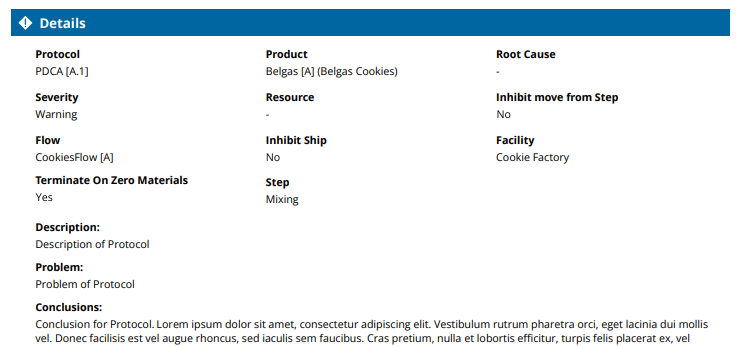
This section provides information about the selected Protocol Instance. It includes the following fields:
| Field | Description |
|---|---|
| Protocol | The name of the protocol instance being executed. |
| Product | The product associated with the protocol instance. |
| Root Cause | The identified cause of the issue being addressed. |
| Severity | The criticality level. |
| Resource | The resource involved in the protocol. |
| Inhibit Move from Step | Indicates whether movement from the current step is restricted. |
| Flow | The Flow associated with the protocol instance. |
| Inhibit Ship | Indicates whether shipment is restricted. |
| Facility | The facility where the protocol is applied. |
| Terminate on Zero Materials | Defines if the protocol instance automatically ends when no materials remain. |
| Step | The current Step. |
In addition to these fields, Description, Problem, and Conclusions are available, providing contextual and analytical information about the Protocol Instance.
The Details section may also display related entities, including:
Tasks#
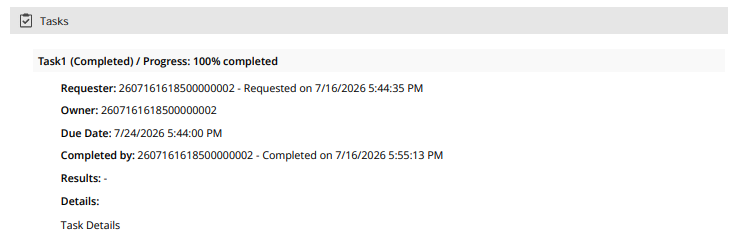
- Task name, State and Progress
- Requester and Owner with date and time.
- Due date and time
- If completed, the completion date and time
- Results of the Task
- Details
Materials#
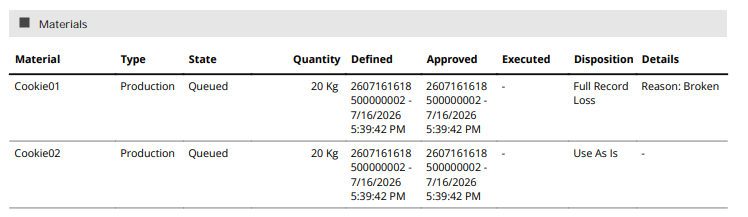
- Material Name
- Type of Material
- State
- Quantity
- Defined, Approved, Executed with date and time
- Disposition
- Details
Documents#
- Attached Files
- Type and Date
States#
A protocol instance can be in one of the following states:
Open– The state when the protocol instance is first created.Adjust– A manually forced state change.Change– A natural state transition based on process logic.Close– A natural closing of the instance when completed.Terminate– A manually forced termination of the instance.
Each state includes a set of fields that describe its characteristics:
| Field | Description |
|---|---|
| Previous State | The state the protocol instance was in before the current transition. |
| Auto State Change Behavior | Defines if the system automatically transitions between states. |
| Allow Disposition | Indicates whether material disposition actions are permitted. |
| User | The user who performed the state change. |
| Allow Task Creation | Specifies if new tasks can be created in this state. |
| Disposition Mode | The mode used for material disposition. |
| Role | The user role required to perform actions in this state. |
| Task Creation State | The state in which tasks are automatically generated. |
| Disposition Requires Approval | Indicates if disposition actions in this state require approval. |
| Date | The date when the state change occurred. |
| Allow Task Release | Specifies whether tasks can be released in this state. |
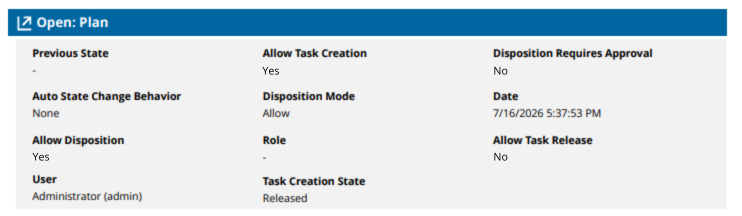
The States section may also display related entities, including:
Checklists#
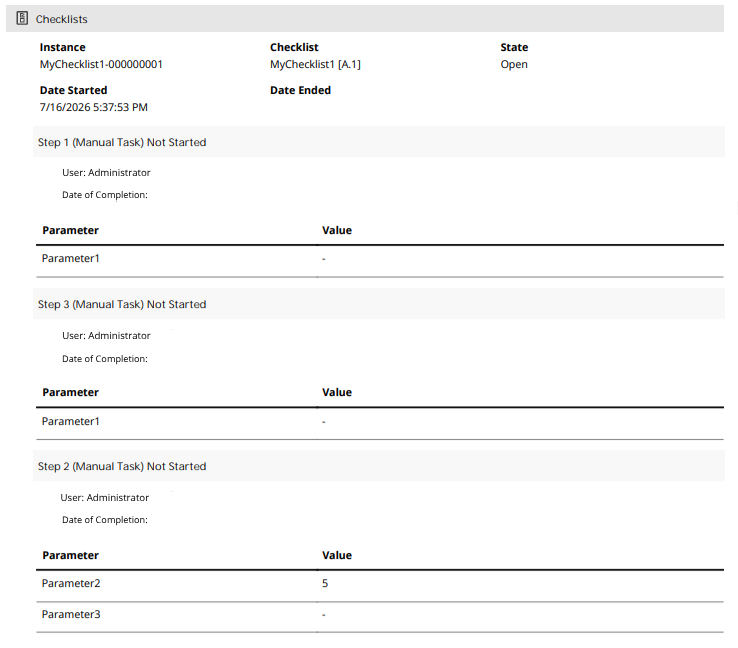
For each Checklist instance, the following details are displayed:
- Instance name
- Checklist name
- State
- Date and time of Start
- Date and time of End
There are different sections for each Item and their respective tasks and state (example: Name of Task (Manual Task) Completed) detailing:
- User
- Task Date of Completion
- Parameter measured
- Value measured
- Notes
Parameters#
Each Parameter includes:
- Parameter name
- Value measured
- Previous Value measured

Notes#
Each note contains the user who added it and the note content.