---
alias: revisions-index
tags:
- versions
- revisions
description: "Critical Manufacturing MES uses revisions to manage entity changes and dependencies"
---
# Revisions
In Critical Manufacturing MES, entities can be versioned or non-versioned. Some characteristics are intrinsic to the entity itself, rather than tied to a specific version. Revisions are used when an entity has dependencies or ongoing processes that cannot be disrupted or modified immediately (for example, active scenarios or complex data exchanges). Revisions provide a high-level definition that allows changes to be made to entities with shared core definitions without impacting those currently in use by the system.
As an example, let's imagine a **Flow**, which is a versioned entity. When processing a **Material** at that **Flow**, the **Material** starts on a specific revision of that **Flow**. While the **Material** is being processed, some changes can be made to the **Flow** and fall under two different types:
* Affecting - changes that affect any **Material** that reference that **Flow** revision and take effect immediately.
* Non-Affecting - changes that do not affect **Materials** that reference that revision and will only be applied to other **Materials** not yet under processing.
Affecting changes are implemented through a new version within the revision while non-affecting changes are handled through the creation of a new revision. Multiple revisions can coexist and are independent from each other, allowing different versions to be created that reference different revisions, all associated to the same entity. Versioned entities will have a Revision property in addition to their own Version property.
In summary, entities in Critical Manufacturing MES can be divided into three hierarchical levels:
| Level | Description |
| - | -- |
| **Entity** | Represents all revisions and versions of an entity |
| **Revision** | Represents a set of interchangeable versions within the same revision of an Entity |
| **Version** | Represents one interchangeable version within a revision of an Entity |
Table: Hierarchical entity levels
Some information that should be taken into account:
* An entity with different revisions means that they are not interchangeable and should exist to support major changes.
* An entity with different versions within the same revision are interchangeable and exist to support minor changes, with each version retaining the form, fit and function of the entity.
* Some properties may still need to reference specific versions, typically runtime properties that bind to the original entity (usually entity instances) to a particular revision and version combination.
```mermaid
graph BT
subgraph
subgraph Entity Level
Entity[Entity]
end
subgraph Revision Level
RevisionA[Entity.A] ---> Entity[Entity]
RevisionB[Entity.B] ---> Entity[Entity]
RevisionC[Entity.C] ---> Entity[Entity]
end
subgraph Version Level
Version1[Entity.A.1] ---> RevisionA
Version2[Entity.A.2] ---> RevisionA
Version3[Entity.A.3] ---> RevisionA
Version4[Entity.A.4] ---> RevisionA
Version5[Entity.A.5] ---> RevisionA
Version6[Entity.B.1] ---> RevisionB
Version7[Entity.B.2] ---> RevisionB
Version8[Entity.C.1] ---> RevisionC
Version9[Entity.C.2] ---> RevisionC
Version10[Entity.C.3] ---> RevisionC
Version11[Entity.C.4] ---> RevisionC
end
end
classDef mermaid_title color:#000, fill:#fafafa, stroke:#fafafa, stroke-width:0x, font-size:100%, font-weight:200;
classDef mermaid_start color:#000, fill:#fafafa, stroke:#fafafa, color:#fafafa, stroke-width:0x, font-size:100%, visibility: hidden;
classDef mermaid_businessdata color:#000, fill:#65CDE8, stroke:#65CDE8, stroke-width:0px, font-size:100%;
classDef mermaid_nonbusinessdata color:#000, fill:#B7DEE8, stroke:#B7DEE8, stroke-width:0px, font-size:100%;
classDef mermaid_entity color:#000, fill:#FB9F53, stroke:#FB9F53, stroke-width:0px, font-size:100%;
classDef mermaid_entitylinked color:#000, fill:#FCD5B5, stroke:#FCD5B5, stroke-width:0px, font-size:100%;
classDef mermaid_context color:#000, fill:#B9CDE5, stroke:#B9CDE5, stroke-width:0px, font-size:100%;
classDef mermaid_optional color:#000, fill:#B7DEE8, stroke:#65CDE8, stroke-width:1px, font-size:100%, stroke-dasharray: 5 5;
classDef mermaid_state color:#000, fill:#d7e4bd, stroke:#000, stroke-width:1px, font-size:100%, font-weight:300;
class Entity mermaid_entity
class Version1,Version2,Version3,Version4,Version5,Version6,Version7,Version8,Version9,Version10,Version11 mermaid_businessdata
class RevisionA,RevisionB,RevisionC mermaid_entitylinked
```
## Naming
:lock: *EntityTypeName*.**SetRevisionName**
Revisions can be either automatically named or you can provide your own name.
!!! note
If you create a name for your revision, it must be between 1 and 8 characters long, and only the following is accepted by the system:
* uppercase letters (A–Z)
* lowercase letters (a–z)
* digits (0–9)
* hyphens (-)
Whenever a new revision is created, a specific **DEE Action** (called ResolveNameGenerator) is called to determine the proper **Name Generator** to call from the contexts currently configured in the system, depending on the entries in the [NameGeneratorContext](../../administration/tables/smart-tables/namegeneratorcontext.md) smart table. At least one entry is supplied out of the box in the Critical Manufacturing MES in order to determine the default **Name Generator** for revisions, called RevisionNameGenerator, that defines all the necessary tokens that will generate the name for each revision.
This **Name Generator** is configured with a specific token that is configured as an alphabetical ordered string sequence by default:
!!! info
This token can be customized however needed, depending on the need for revision names in your system.
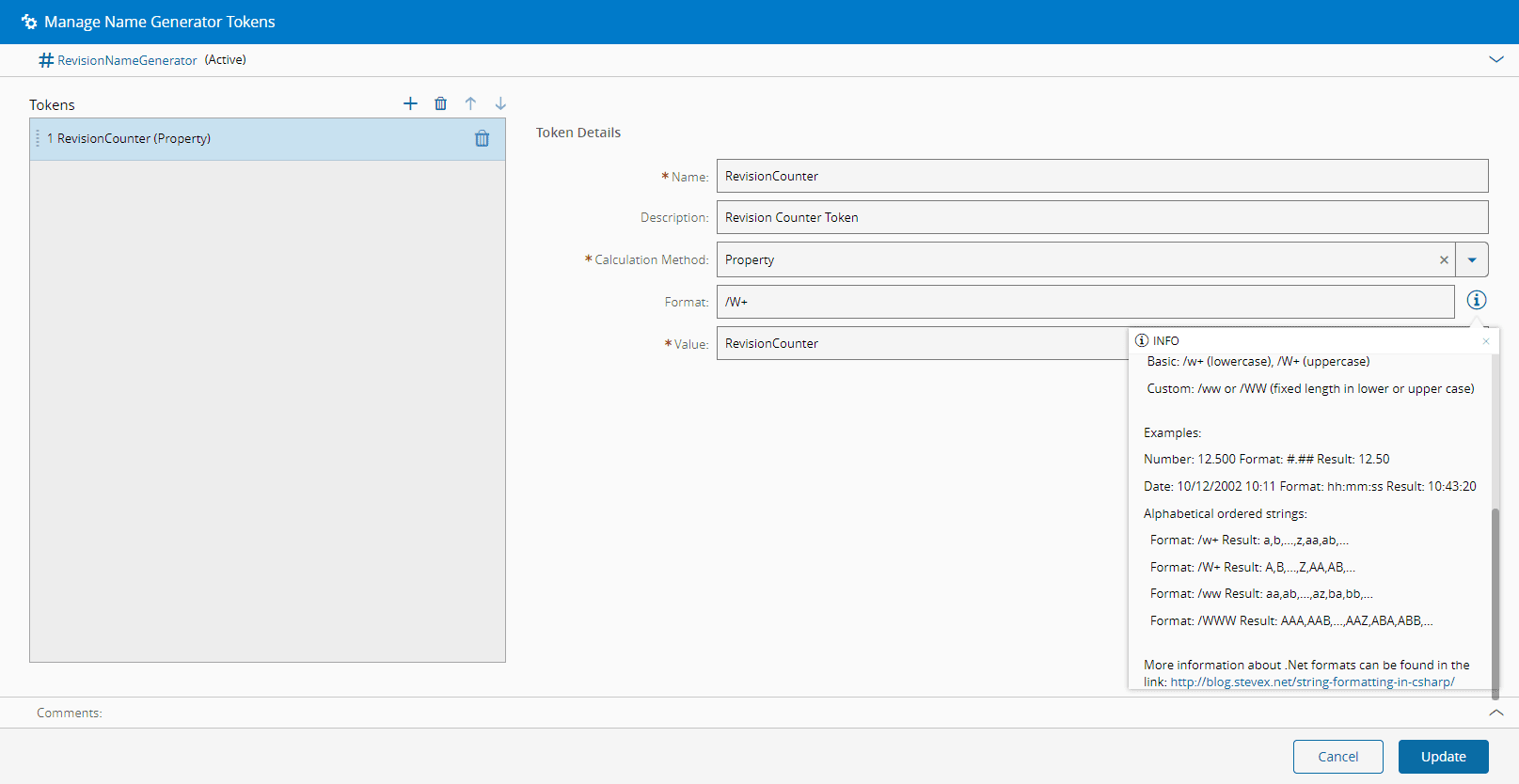
For more information, see [Name Generators](../../administration/name_generator.md).
## State model
Revisions can exist in three possible states, with only one of the revisions for an entity being considered as default at any single time.
* **Default** - the default revision is the one that is loaded when no specific revision is referenced.
* **Active** - exists in the system and can be referenced when needed, however it must be explicitly referenced when used, otherwise the default revision will take precedence.
* **Obsolete** - existing objects can continue to reference the revision, but a revision in obsolete state cannot be referenced by a new object. Also, new versions cannot be created from an obsolete revision.
Here is a simplified state model diagram for revision states:
```mermaid
graph LR
Active[Active] --> DefaultTest{Revision has
effective version
AND
Entity type supports
default revision dates}
DefaultTest -->|Yes|Default
Active --> |Mark as Obsolete|ObsoleteTest{There is another revision
with an effective version}
Default --> |Mark as Obsolete|ObsoleteTest{There is another revision
with an effective version}
ObsoleteTest -->|Yes|Obsolete
ObsoleteTest -->|No|DefaultObsolete[Default/Obsolete]
Obsolete -->|ReactivateRevision|ReactivateTest{There is another revision
with an effective version}
DefaultObsolete -->|ReactivateRevision|ReactivateTest{There is another revision
with an effective version}
ReactivateTest -->|Yes|Default
ReactivateTest -->|No|Active
classDef mermaid_title color:#000, fill:#fafafa, stroke:#fafafa, stroke-width:0x, font-size:100%, font-weight:200;
classDef mermaid_start color:#000, fill:#fafafa, stroke:#fafafa, color:#fafafa, stroke-width:0x, font-size:100%, visibility: hidden;
classDef mermaid_businessdata color:#000, fill:#65CDE8, stroke:#65CDE8, stroke-width:0px, font-size:100%;
classDef mermaid_nonbusinessdata color:#000, fill:#B7DEE8, stroke:#B7DEE8, stroke-width:0px, font-size:100%;
classDef mermaid_entity color:#000, fill:#FB9F53, stroke:#FB9F53, stroke-width:0px, font-size:100%;
classDef mermaid_entitylinked color:#000, fill:#FCD5B5, stroke:#FCD5B5, stroke-width:0px, font-size:100%;
classDef mermaid_context color:#000, fill:#B9CDE5, stroke:#B9CDE5, stroke-width:0px, font-size:100%;
classDef mermaid_optional color:#000, fill:#B7DEE8, stroke:#65CDE8, stroke-width:1px, font-size:100%, stroke-dasharray: 5 5;
classDef mermaid_state color:#000, fill:#d7e4bd, stroke:#000, stroke-width:1px, font-size:100%, font-weight:300;
class Active,Default,Obsolete,DefaultObsolete mermaid_entity
class DefaultTest,ObsoleteTest,ReactivateTest mermaid_businessdata
class L1,L2,L3,L4,L5,L6 mermaid_entitylinked
class C1,C2,C3,C4,C5,C6 mermaid_context
class N1,N2,N3,N4,N5,N6 mermaid_nonbusinessdata
```
### Transitions
Transitions between Active/Default states and Obsolete states can be performed by two different operations:
* [Mark Revision as Obsolete](mark_as_obsolete_and_reactivate.md)
* [[user-guide-mark-as-obsolete-and-reactivate#reactivate-revision]]
## Entity / Revision / Version Properties
All properties can be associated to a specific level of an entity, with different requirements for change control as detailed below:
| Level | Change Controlled |
| --- | - |
| **Entity** | No |
| **Revision** | No |
| **Version** | Always |
Table: Change control for properties per level
Most properties are bound to any of the versions that exist and reference any revision. Some specific properties are bound to the revision:
* `Sequence` - value that determines the sequence of the revision in the association to the entity.
* `Default From Date` - used to configure the default revision dates. For more information see [Manage Default Revisions](manage_default_revisions.md).
* `Default To Date` - used to configure the default revision dates. For more information see [Manage Default Revisions](manage_default_revisions.md).
* `System State` - current system state of the revision, which can be Active or Obsolete.
* `Is Default Revision` - defines whether the revision is set as default.
## Default Revision
The default revision is the revision that will always be used as a default in the system and will be displayed and loaded by default when referencing it in other objects unless another revision is specifically set as the reference. For more information and the algorithm used to define the default revision for each entity, see [Manage Default Revisions](manage_default_revisions.md).
## Displaying Revision and Version
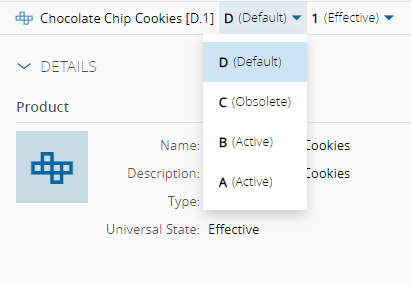
Below the top ribbon on a versioned entity page, from left to right you can see the entity name, followed by a dropdown where you can select the revision and another one where you can select the version:

The visual conventions for revision and version are described below:
Entity **[** Revision . Version **]**
As an example: Product X [A.1] indicates that it is version 1 of revision A of **Product** X.
To select a specific revision in an entity page, use the revision dropdown available just below the top ribbon and right next to the entity name.
## Filtering Revision States
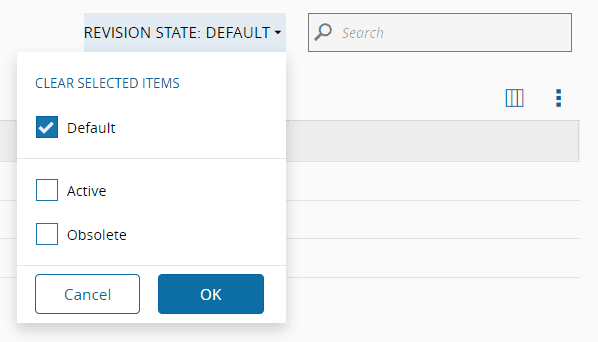
In the landing page of any versioned Entity Type in the Business Data menu, along with the default query and the search bar, you can also filter the available objects of that Entity type by their revision state.
## Creating a Revision
For more information on creating revisions, see [Create Revision](create_revision.md).
!!! info
For information on creating revisions through a Master Data Package, see [[master-data-packages-tutorial]] or the [Master Data Package](../../administration/master_data_packages.md) page in the Administration section.
## Cloning a Revision
For more information on cloning revisions, see [Clone](../clone.md).
## Terminating and Unterminating Revisions
For more information on terminating revisions, see [Terminate and Unterminate](../terminate_and_unterminate.md).
{{ generate_index() }}