---
alias: meddev-feature-continuousflows
---
# Continuous Flows
## Overview
The Continuous Flow feature aims to improve the handling of scenarios where parts of a lot Material can gradually move to the next step while the rest of the lot finishes the previous process Step.
It allows partial chunks of the lot to be processed in parallel in different steps, while preserving the concept of a single lot grouping - Step execution activities like Checklists and Data Collections should be applied to the lot as a whole, instead of to each individual partial material. All Materials should be merged back at the end of the Continuous Flow block.
### Concept
The logic adds a Material Rank concept, where the first/leading Material chunk will be ranked as the `Head` Material, whereas the last/trailing Material will have the `Tail` rank. All other material chunks in between will get the `Middle` rank.
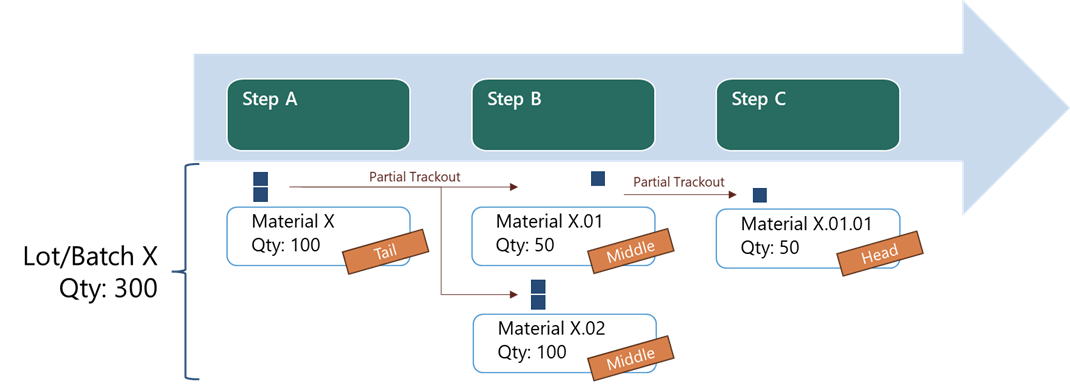
The Rank is automatically set on Partial Track Out, and re-calculated when merging back.
There is also the `In Rework` rank which is assigned to Materials within a Continuous Flow which are sent to a Rework flow.
Checklist and Data Collection contexts can be configured based on Rank, so that, for example, a Checklist can be triggered only for the Head material and a Data Collection can be filled only when the final Tail material passes through the step.
A step can be configured as a Merge Step, causing all partial Materials to be automatically merged together once they reach the Step.
### Assumptions
To use the Continuous Flow logic, the process should follow the following assumptions:
- The material quantity should represent a bulk of non-serialized units. If sub-materials are used, a Line-Flow based approach might be more adequate.
- The Partial Track-Out feature is used to Split the chunks of materials for the next Step.
- The processing of different material chunks will be executed in sequence, e.g. a Tail will not surpass its Head.
## Enabling Continuous Flows
This Feature can be enabled using two different alternatives:
### A) Global Configuration
To enable this feature globally across MES, the following actions need to be taken:
1. **Configurations**
- Enable Feature globally through `/MedDev/ContinuousFlows/EnableGlobalContinuousFlows`.
These optional configurations can also be enabled, to apply these functionalities globally:
- Enable Auto-Merging through `/MedDev/ContinuousFlows/EnableGlobalMergeFutureActionOnStepFeature`
- Enable Auto Re-Evaluation of Material Ranks through `/MedDev/ContinuousFlows/EnableGlobalAutoReEvaluationOfMaterialRanks`
- Enable Keep In-Process Rank on Rework Material Return through `/MedDev/ContinuousFlows/EnableGlobalKeepInProcessRankOnReworkMaterialReturn`
### B) Context-Specific Configuration
Instead of enabling the Continuous Flow feature globally, it is possible to enable it and its optional functionalities for specific contexts (e.g., per Flow, Product, or Production Order) using the `MedDevContinuousFlowFeaturesConfig` smart table:
1. Navigate to the `MedDevContinuousFlowFeaturesConfig` smart table.
2. Add a new row, filling in the key columns that define the context (one or more of: Flow, LogicalFlowPath, Product, ProductGroup, ProductionOrder).
3. Set the desired value column(s) to `true`: `ContinuousFlowsEnabled`, `AutoReEvaluationOfMaterialRanksEnabled`, `MergeFutureActionOnStepEnabled`, `KeepInProcessRankOnReworkMaterialReturnEnabled`.
!!! note
The global configuration entries need to be **disabled** for context-specific overrides to take effect. If a global entry is enabled, the smart table is ignored for that setting. The override logic is applied only for _enabling_ scenarios like the one described above, not _disabling_ ones (e.g., configuration entry is enabled, but the smart table has it set to false for a specific context).
For a full description of the smart table columns and their types, see the [Tables](../artifacts/tables.md) artifact reference.
### Continuous Flow Resolution Logic
Each Continuous Flows setting is resolved per material as follows:
1. **Global configuration is checked first.** If the corresponding global entry (e.g., `EnableGlobalContinuousFlows`) is enabled, that setting applies to all materials — no smart table lookup is performed.
2. **Context-specific Smart Table.** If the global entry is disabled, the system resolves the `MedDevContinuousFlowFeaturesConfig` smart table using the material's context (Flow, LogicalFlowPath, Product, ProductGroup, ProductionOrder). If a matching row is found with the relevant value set to `true`, the setting is enabled for that context only.
This allows, for example, enabling Continuous Flows for a specific product while keeping it globally disabled for everything else.
!!! note
If the material is in Rework, the context resolution will be performed using the material's main flow (i.e., the flow from where the material was sent to Rework), independently of the rework flow it is currently in.
If both the Global configuration is disabled and the Smart Table does not contain any entries, the Feature is considered disabled overall.
### Changing the Rank names
The default values for the Rank Names are `Head`, `Middle`, `Tail` and `InRework`. If required, these names can be changed by:
1. **Configurations**
- Set Material Rank Names:
- `/MedDev/ContinuousFlows/HeadRankName`
- `/MedDev/ContinuousFlows/MiddleRankName`
- `/MedDev/ContinuousFlows/TailRankName`
- `/MedDev/ContinuousFlows/InReworkRankName`
2. **Update Lookup Table 'MedDevMaterialRank'** with new names, so that the MedDev Smart Tables are prepared to use them.
### Table Context Resolution
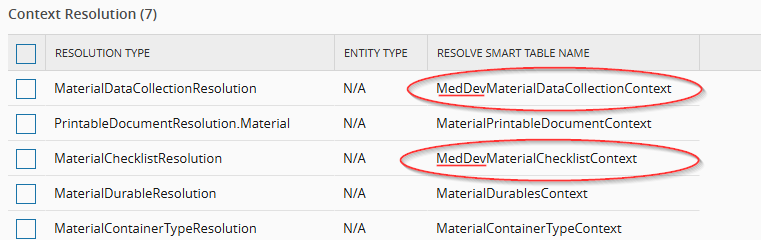
MES allows to configure specific Checklists or Data Collections based on the Continuous Flow rank of the Material. To configure this it's necessary to ensure that the `MedDevMaterialChecklistContext` and `MedDevMaterialDataCollectionContext` Smart Tables are enabled.
1. **Update Generic Table 'ContextResolution'** with both MedDev Smart Tables to ensure the resolution includes the Material `MedDevMaterialRank`:
- MaterialChecklistResolution: "MedDevMaterialChecklistContext"
- MaterialDataCollectionResolution: "MedDevMaterialDataCollectionContext"
!!! note
This will override the existing MaterialChecklistContext and MaterialDataCollectionContext tables - all data from the original context tables should be copied to the new MedDev equivalent tables before switching the ContextResolution settings.
## Ranking updates for Rework Scenarios
### Material is sent to Rework
When a Material which is part of a Continuous flow is sent to a Rework flow, it is always updated to the "In Rework" rank. In parallel, MES will update the ranking of the remaining Materials accordingly, to guarantee the integrity and continuity of the flow.
Additionally, MES will prevent the Track-In of a Material with the rank "Tail" in a certain step, if there is a Material of the same group in Rework, with the return path defined as that same step.
The rank updates for Rework Scenarios will follow the below logic:
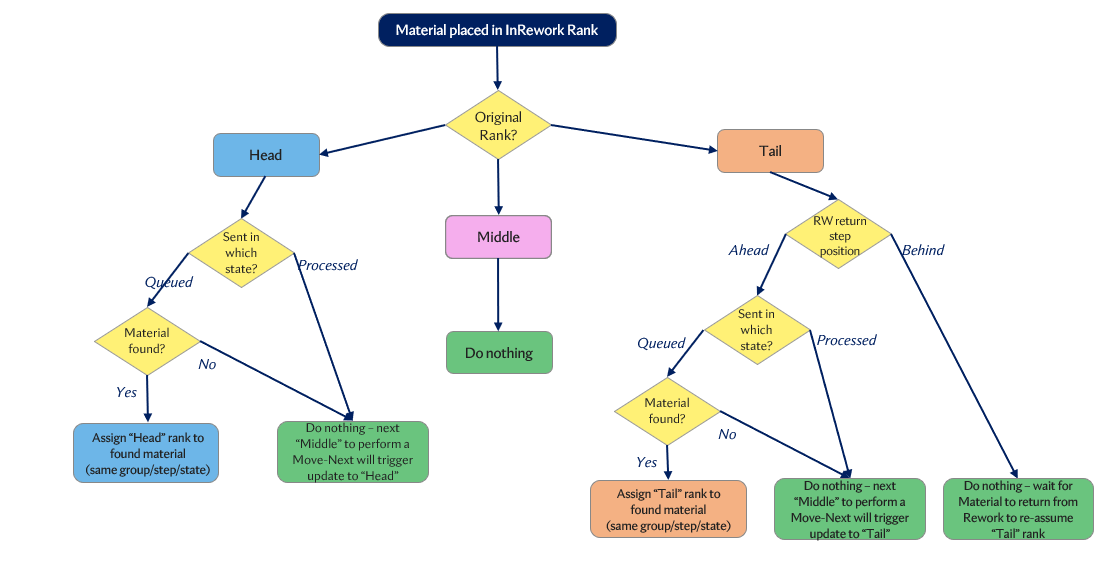
- If the Material's original Rank is "Head":
- If the Material's state is "Queued":
- MES will check if there is a Material of the same group with the same state present at the step.
- If found, "Head" rank is assigned to the next material.
- If not found, no action is taken. "Head" rank is only attributed when the next "Middle" performs a Move-Next, following the Auto Re-Evaluation of Material Ranks logic (if enabled).
- If the Material's state is "Processed":
- No action is taken. "Head" rank is only attributed when the next "Middle" performs a Move-Next, following the Auto Re-Evaluation of Material Ranks logic (if enabled).
- If the Material's original Rank is "Middle":
- No action is taken.
- If the Material's original Rank is "Tail":
- If the Rework flow's return step is Ahead of the current step:
- If the Material's state is "Queued":
- MES will check if there is a Material of the same group with the same state present at the step.
- If found, "Tail" rank is assigned to the next material.
- If not found, no action is taken. "Tail" rank is only attributed when the last "Middle" in the flow performs a Move-Next, following the Auto Re-Evaluation of Material Ranks logic (if enabled).
- If the Material's state is "Processed":
- No action is taken. "Tail" rank is only attributed when the last "Middle" in the flow performs a Move-Next, following the Auto Re-Evaluation of Material Ranks logic (if enabled).
- If the Rework flow's return step is Behind the current step:
- No action is taken. "Tail" rank is re-assigned to the Material when it returns from Rework.
### Material returns from Rework
When a Material returns from Rework, its Rank will be updated from "InRework" to "Head", "Middle" or "Tail" depending on its position on the flow and on the rank of the other Materials.
!!!Note
For the ranks to be updated when returning from Rework, the **Auto Re-Evaluation of Material Ranks** functionality must be enabled.
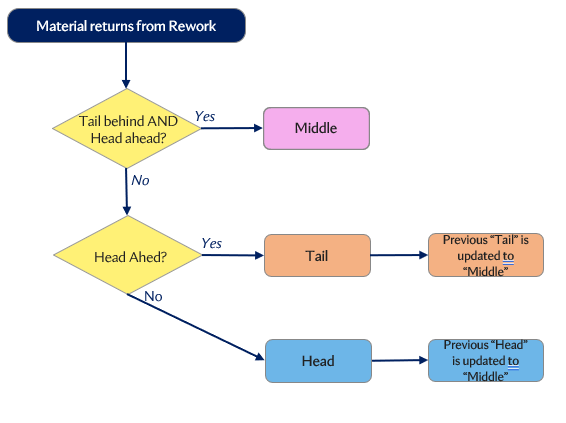
- Material returns to a step and MES verifies if there is a Material with rank "Tail" behind AND a Material with rank "Head" ahead:
- If Yes, rank "Middle" is assigned.
- If No, MES will verify if there is any Material with rank "Head" ahead:
- If Yes, Rank "Tail" is assigned. If existing, Material previously with rank "Tail" is updated to "Middle".
- If No, Rank "Head" is assigned. If existing, Material previously with rank "Head" is updated to "Middle".
### Full Loss in Rework
When a full loss is recorded for a material that is currently in an active rework flow, the system applies rework-specific behavior before resuming the normal Continuous Flows logic.
- If the rework material is not the main material, it is terminated and no update is made to the main flow.
- If the rework material is the main material, it is pushed through the remaining rework path, returns to the main flow, and then continues with the existing auto-movement and merge logic.
!!!Note
This behavior applies when the full loss is recorded through `Record Loss/Bonus` or through `Track-Out`.
## Ranking updates for Temporary Off-Flow Scenarios
### Material is sent to Temporary Off-Flow
The same as `Material is sent to Rework`.
### Material returns from Temporary Off-Flow
When a Material returns from Temporary Off-Flow, its Rank will be updated to "Head", "Middle" or "Tail" depending on its position on the flow and on the rank of the other Materials.
!!!Note
For the ranks to be updated when returning from Temporary Off-Flow, the **Auto Re-Evaluation of Material Ranks** functionality must be enabled.

How to determine if Tail material is behind?
- If the material returns to Queued state:
- Searches on same step / logicalflowpath for materials in same state;
- If not found, searches from previous step/ logicalflowpath backwards.
- If the material returns to Dispatched / Processed state: - Searches on same step / logicalflowpath for materials in state <= Dispatched / Processed; - If not found, searches from previous step/ logicalflowpath backwards.
How to determine if Head material is ahead?
- If the material returns to Queued / Dispatched state:
- Searches on same step / logicalflowpath for materials in state >= Queued / Dispatched;
- If not found, search from the next step / logicalflowpath forward.
- If the material returns to Processed state:
- Searches on same step / logicalflowpath for materials in same state;
- If not found, search from the next step / logicalflowpath forward.
- Other case, please refer to `Material returns from Rework` function.
## Configurable Functionalities
When Continuous Flows are enabled, either globally or context-based, there are a set of configurable functionalities that can be configured to tailor the solution to specific process needs:
### Auto Re-Evaluation of Material Ranks
This functionality will enable MES to automatically re-evaluate Material ranks, to ensure continuity on the flow when Materials overtake others during the process.
!!! Note
This is a core function of the Feature and thus it is recommended to always have it enabled. Otherwise, MES will assume that the rank update will be performed manually.
#### Pre-Conditions
**Configurations:**
- Enable Configuration Entry **/MedDev/ContinuousFlows/EnableGlobalAutoReEvaluationOfMaterialRanks** or enable Context-Specific setting on the Smart Table **AutoReEvaluationOfMaterialRanksEnabled**
It will guarantee that, even when the relative positions of the Materials change, the first Material in the Flow will always be the "Head", the last will always be the "Tail" and every one in between will be "Middle".
!!! Note
Having this functionality disabled will not affect the automatic update of ranks when a Material is sent to Rework. However, the ranks will not be updated when a Material returns from Rework, thus it will keep the "InRework" rank, which must be changed manually.
### Materials Final Merge
In order to define a step where the Continuous flow ends, where all the Materials of the group must be merged together before advancing.
#### Pre-Conditions
**Configurations:**
- Enable Configuration Entry **/MedDev/ContinuousFlows/EnableGlobalMergeFutureActionOnStepFeature** or enable Context-Specific setting on the Smart Table **MergeFutureActionOnStepEnabled**
**Set the Step attribute to True:**
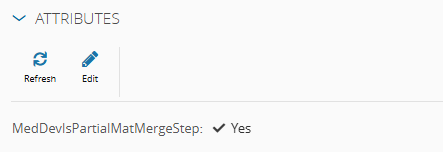
- Step attribute: **MedDevIsPartialMatMergeStep**
If the Flow contains a Step which is configured with `MedDevIsPartialMatMergeStep` flag as True, a Future Action will be created/updated during Partial Track-Out to automatically merge back the materials at the merge step.
When the Materials reach this step, they will automatically get blocked waiting for the Merge Future Action.
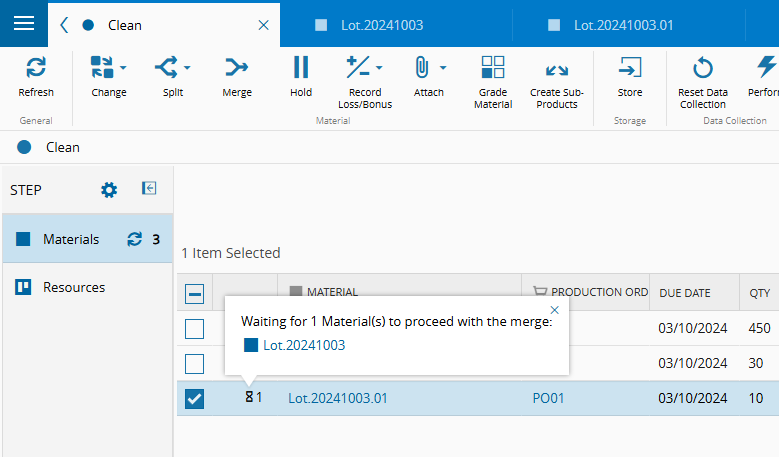
Once all Materials have reached the merge Step, the system will automatically merge and release the Material.
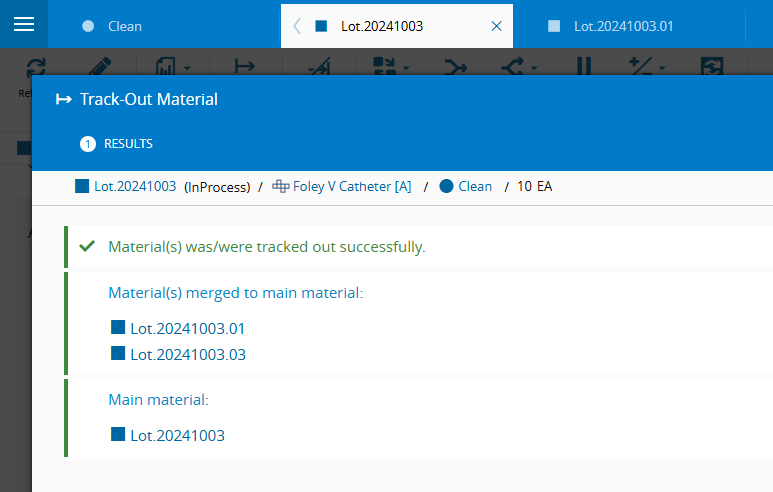
If no automatic merge was configured, the user should manually merge each partial Material as needed.
When recording full loss on a material, it will try to merge with the next material in the flow and this future action will also try to run and do the merge. If the future action merge is performed, the AutoReEvaluationOfMaterialRanks logic will not be executed.
If Materials with the ranks "Head" and "Tail" are in conditions to merge, MES will check if there is a Material of the same group in a Rework flow. If there isn't, MES will consider the Continuous flow to be over after the merge, removing any rank from the Material. If there is, this merge will result on the material to keep the "Head" rank, while keeping the Continuous flow active.
### Auto Partial Merge
If the cycle time is short, creating several Materials to be moved to the next process can lead to having many materials of the same group in the same step, under the same conditions, while in reality this could be represented by a single material.
#### Pre-Conditions
**Set the Step attribute to True:**
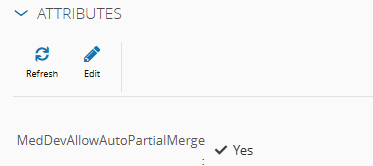
- Step attribute: **MedDevAllowAutoPartialMerge**
**The source material and the target material have the same conditions:**
- System State (Queued/In Process/ Processed)
- Production Order
- Manufacturer Lot Number
- Resource (applies only to "In Process")
- Resource Lane (if it exists, applies only to "In Process")
This functionality supports the auto partial merge of materials of the same group in the same step, under the same conditions. A partial merge operation is performed in any step where the attribute **MedDevAllowAutoPartialMerge** is set to True.
If Materials with the ranks "Head" and "Tail" are in conditions to merge, MES will check if there is a Material of the same group in a Rework flow. If there isn't, MES will consider the Continuous flow to be over after the merge, removing any rank from the Material. If there is, this merge will will result on the material to keep the "Head" rank, while keeping the Continuous flow active.
##### Schematic diagram
When the head material reaches a step that allows automatic partial merging, no action will be taken.
```mermaid
graph LR
A[Step A] --> B[Step B
MedDevAllowAutoPartialMerge : true] --> C[Step C]
subgraph Continuous Flow
A
B
C
end
M1[Material X
Qty: 250
PO001]
M2[Material X.01
Qty: 50
PO001]
T1[Tail]
H1[Head]
T1 --- M1
H1 --- M2
M1 -.- A
M2 -.- B
classDef step fill:#1f3a5f, color:white, stroke:#000, stroke-width:2px, rx:10, ry:10;
classDef Material fill:#fffff, color:black, stroke:#007acc, stroke-width:1px, rx:8, ry:8;
classDef label fill:#d38b4c, color:white, stroke:#000, stroke-width:1px, rx:6, ry:6;
class A,B,C step;
class M1,M2 Material;
class T1,H1 label;
```
When a non-head material reaches a step that allows automatic partial merging, the system searches for a target material in the current step with the same status and conditions. If such a material is found, it merges with it.
**The middle material enters the step that allows automatic partial merging**
```mermaid
graph LR
A[Step A] --> B[Step B
MedDevAllowAutoPartialMerge : true] --> C[Step C]
subgraph Continuous Flow
A
B
C
end
M1[Material X
Qty: 200
PO001]
M2[Material X.01
Qty: 50
PO001]
M3[Material X.02
Qty: 50
PO001]
T1[Tail]
Middle[Middle]
H1[Head]
T1 --- M1
H1 --- M2
Middle[Middle] --- M3
M1 -.- A
M2 -.- B
M3 -.- B
classDef step fill:#1f3a5f, color:white, stroke:#000, stroke-width:2px, rx:10, ry:10;
classDef Material fill:#fffff, color:black, stroke:#007acc, stroke-width:1px, rx:8, ry:8;
classDef label fill:#d38b4c, color:white, stroke:#000, stroke-width:1px, rx:6, ry:6;
class A,B,C step;
class M1,M2,M3 Material;
class T1,H1,Middle label;
```
**The middle material is merged to the head material**
```mermaid
graph LR
subgraph Continuous Flow
direction LR
A[Step A] --> B["Step B
MedDevAllowAutoPartialMerge : true"] --> C[Step C]
end
M1["Material X
Qty: 200
PO001"]
M2["Material X.01
Qty: 100
PO001"]
M3["Material X.02
(Terminated)
Qty: 50
PO001"]
T1[Tail]
Middle[Middle]
H1[Head]
T1 --- M1
H1 --- M2
Middle --- M3
M1 -.- A
M2 -.- B
M3 -.- B
M3 -- Merge --> M2
classDef step fill:#1f3a5f, color:white, stroke:#000, stroke-width:2px, rx:10, ry:10;
classDef Material fill:#fffff, color:black, stroke:#007acc, stroke-width:1px, rx:8, ry:8;
classDef label fill:#d38b4c, color:white, stroke:#000, stroke-width:1px, rx:6, ry:6;
classDef terminated fill:#fffff, color:black, stroke:#cc0000, stroke-width:2px, stroke-dasharray: 5 5, rx:8, ry:8;
classDef labelTerminated fill:#cc0000, color:white, stroke:#000, stroke-width:1px, rx:6, ry:6;
class A,B,C step;
class M1,M2 Material;
class T1,H1 label;
class M3 terminated;
class Middle labelTerminated;
```
When a non-head material reaches a step that allows automatic partial merging, the system searches for a target material in the current step with the same status and conditions. If such a material is found, it merges with it.
**The middle material is at the step that allows automatic partial merging**
```mermaid
graph LR
A[Step A] --> B[Step B
MedDevAllowAutoPartialMerge : true] --> C[Step C]
subgraph Continuous Flow
A
B
C
end
M1[Material X
Qty: 200
PO001]
M2[Material X.01
Qty: 50
PO001]
M3[Material X.02
Qty: 50
PO001]
T1[Tail]
Middle[Middle]
H1[Head]
T1 --- M1
H1 --- M2
Middle[Middle] --- M3
M1 -.- A
M2 -.- C
M3 -.- B
classDef step fill:#1f3a5f, color:white, stroke:#000, stroke-width:2px, rx:10, ry:10;
classDef Material fill:#fffff, color:black, stroke:#007acc, stroke-width:1px, rx:8, ry:8;
classDef label fill:#d38b4c, color:white, stroke:#000, stroke-width:1px, rx:6, ry:6;
class A,B,C step;
class M1,M2,M3 Material;
class T1,H1,Middle label;
```
**The main material enters the step**
```mermaid
graph LR
A[Step A] --> B[Step B
MedDevAllowAutoPartialMerge : true] --> C[Step C]
subgraph Continuous Flow
A
B
C
end
M1[Material X
Qty: 200
PO001]
M2[Material X.01
Qty: 50
PO001]
M3[Material X.02
Qty: 50
PO001]
T1[Tail]
Middle[Middle]
H1[Head]
T1 --- M1
H1 --- M2
Middle[Middle] --- M3
M2 -.- C
M3 -.- B
M1 -.- B
classDef step fill:#1f3a5f, color:white, stroke:#000, stroke-width:2px, rx:10, ry:10;
classDef Material fill:#fffff, color:black, stroke:#007acc, stroke-width:1px, rx:8, ry:8;
classDef label fill:#d38b4c, color:white, stroke:#000, stroke-width:1px, rx:6, ry:6;
class A,B,C step;
class M1,M2,M3 Material;
class T1,H1,Middle label;
```
**The middle material is merged to the main material**
```mermaid
graph LR
subgraph Continuous Flow
direction LR
A[Step A] --> B["Step B
MedDevAllowAutoPartialMerge : true"] --> C[Step C]
end
M1["Material X
Qty: 200
PO001"]
M2["Material X.01
Qty: 100
PO001"]
M3["Material X.02
(Terminated)
Qty: 50
PO001"]
T1[Tail/Main Material]
Middle[Middle]
H1[Head]
T1 --- M1
H1 --- M2
Middle --- M3
M2 -.- C
M3 -.- B
M1 -.- B
M3 -- Merge --> M1
classDef step fill:#1f3a5f, color:white, stroke:#000, stroke-width:2px, rx:10, ry:10;
classDef Material fill:#fffff, color:black, stroke:#007acc, stroke-width:1px, rx:8, ry:8;
classDef label fill:#d38b4c, color:white, stroke:#000, stroke-width:1px, rx:6, ry:6;
classDef terminated fill:#fff, color:black, stroke:#cc0000, stroke-width:2px, stroke-dasharray: 5 5, rx:8, ry:8;
classDef labelTerminated fill:#cc0000, color:white, stroke:#000, stroke-width:1px, rx:6, ry:6;
class A,B,C step;
class M1,M2 Material;
class T1,H1 label;
class M3 terminated;
class Middle labelTerminated;
```
### Save In-Process Material Rank for Rework Returns
When a Material is Tracked-In with a certain rank, the user may require it to maintain the same rank throughout the entire process, ensuring that it performs Checklists or Data Collections which are configured for Track-Out or Move-Next in the context of that rank, to guarantee continuity.
#### Pre-Conditions
**Configurations:**
- Enable Configuration Entry **/MedDev/ContinuousFlows/EnableGlobalKeepInProcessRankOnReworkMaterialReturn** or enable Context-Specific setting on the Smart Table **KeepInProcessRankOnReworkMaterialReturnEnabled**
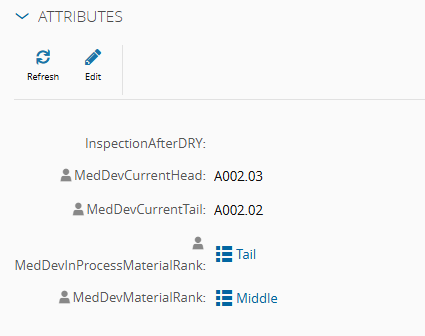
This functionality enables MES to keep track of the Material's rank when it was Tracked-In, even if the rank is afterwards updated due to a Material returning from rework, by saving it in the Material's attribute **MedDevInProcessMaterialRank**.
When a Material is In-Process and another Material returning from Rework triggers the update of its rank under the **MedDevMaterialRank** attribute, MES will at the same time save the original rank in the **MedDevInProcessMaterialRank** attribute. When filled, this attribute will always be considered as the driver to resolve the Checklist and Data Collection Context tables.
## Setting Up a Continuous Flow
### Step Configuration
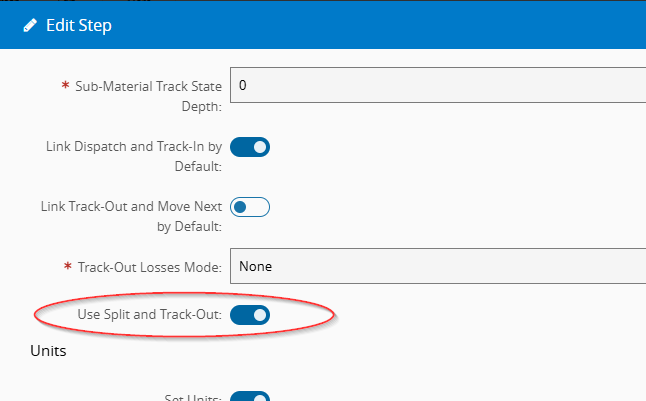
The Steps where a Material can be temporarily split into partial chunks, need to be configured to allow Partial Track-outs, by setting the `Use Split and Track-Out` flag. If needed, additional Split and Trackout settings can be configured in the StepSplitTrackOutContext Smart Table.
If it is intended to auto partial merge materials of the same group, under the same conditions when they reach the step, then the step should have the `MedDevAllowAutoPartialMerge` attribute set to True.
If it is intended to merge back the Materials automatically in the end of the flow block, the merge step should have the `MedDevIsPartialMatMergeStep` attribute set to True. If no step with this attribute is found in the flow, the system will assume the materials will be merged manually.
### Context Tables
The Material Checklists and Data Collections contexts need to be setup in the new default context tables - `MedDevMaterialChecklistContext` and `MedDevMaterialDataCollectionContext` respectively.
These tables have a new Column `Material Rank`, which can be used to specify if the Checklist or Data Collection applies only to Materials of that Rank.
Leaving the Material Rank blank means it will apply to any material, independently of rank (same behavior as before).
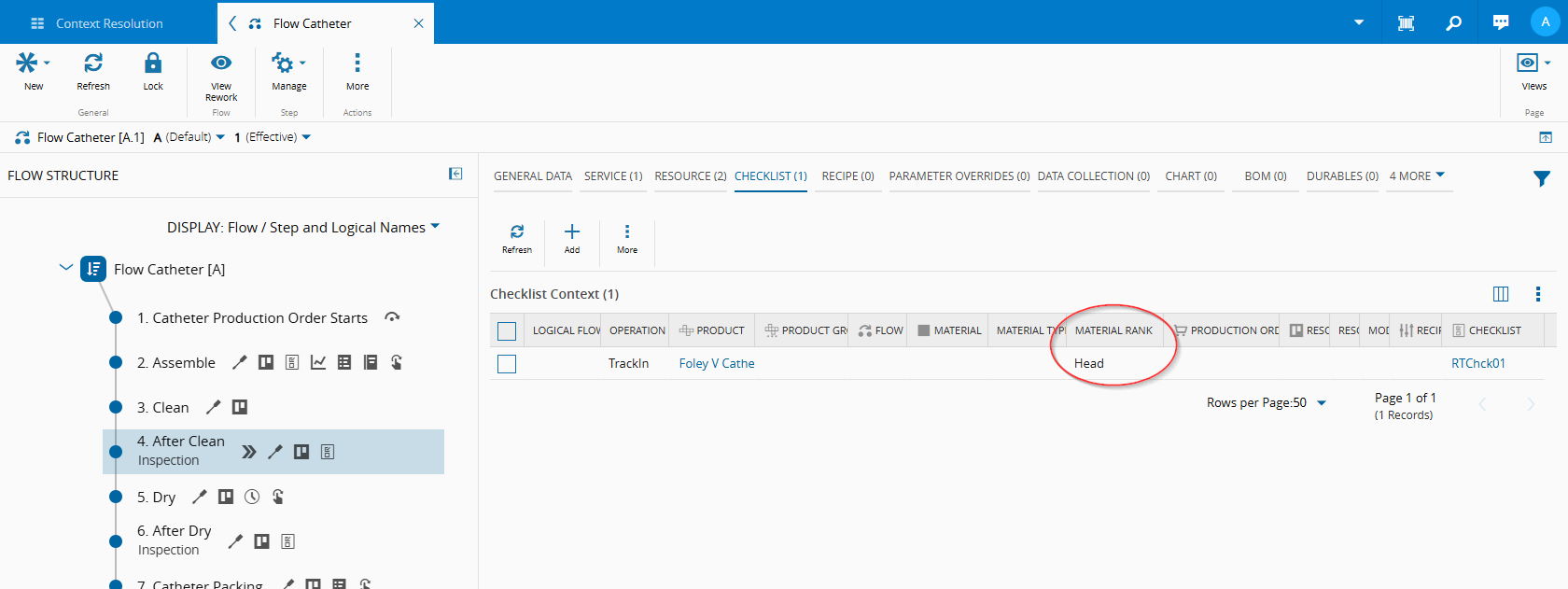
It is also possible to set different checklists/data collection variants for Head, Middle and Tail Materials, to provide the user different instructions depending on the Material stage.
## Executing a Continuous Flow
During the Track-Out operation, to perform a Partial Track-Out, ensure the primary quantity is set to a value below the main material's primary quantity.
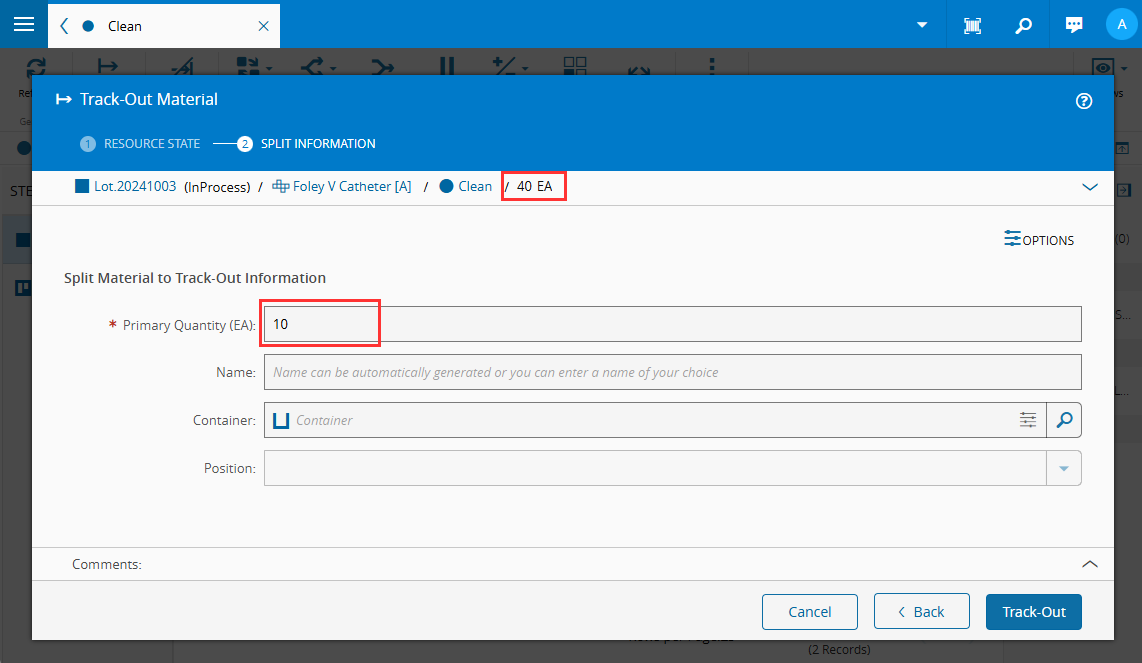
The first material Split and Tracked out will have the `MedDevMaterialRank` attribute set as "Head", and the main Material still InProcess will be ranked as "Tail". If additional Partial Track-Out splits are needed, the following splits will have the "Middle" rank.
If any of these materials is sent to a Rework flow it will be ranked as "In Rework". This may affect the rank of the other Materials of the same group according to the above mentioned logic.
In the Steps following the Partial Track-out, Checklists and Data Collections will only appear to the respective Head/Middle/Tail Materials as configured in the context tables.
There can be additional partial Track-Outs in subsequent steps, which will follow a similar logic, splitting the Head Material into a new Head and Middle Materials.