Experiments#
 The Experiments page in the Quality page group is associated with the security feature Quality.Experiments.
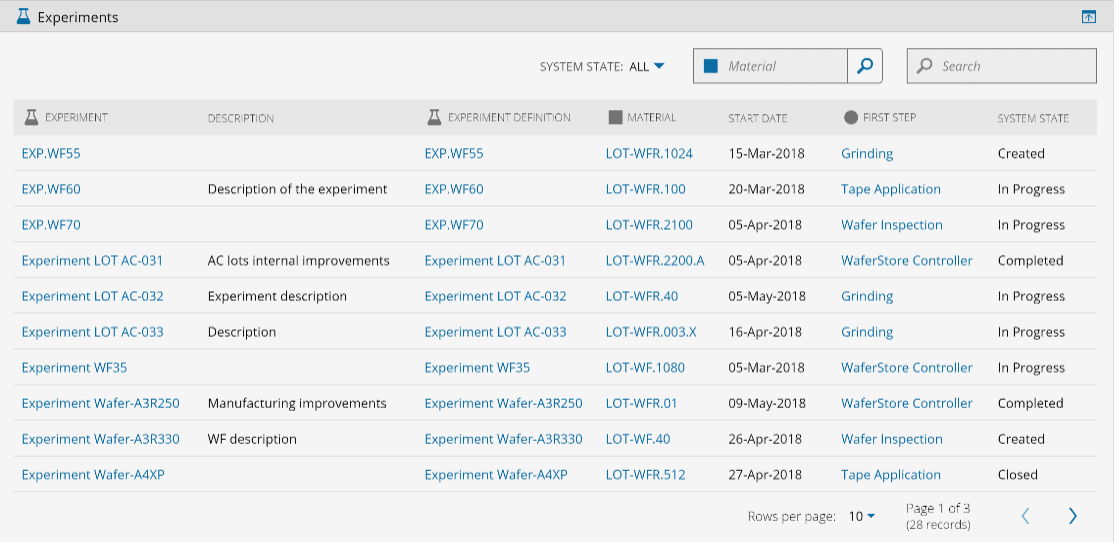
Through the Quality main tab, select Experiments to access a paged list of all active (non-Terminated) Experiments.
In the list, it is possible to see the name of the Experiment, its description (if one was entered), the name of the Experiment Definition, the Material name, the Experiment Start Date, the first Step and the current System State.
Use the State filter to display Open, Closed, or Canceled Experiments. You can also filter the list by start date, Experiment Definition, Material, or by using advanced filtering for additional properties, including System State.
When the list is refreshed, for example after applying filters or moving between pages, a progress indicator is displayed while data is loading.
In addition, you can search for a specific Experiment by using the Search box.
When selecting one of the Experiment's line (and not the Experiment name), the Open Experiment button will become active, allowing you to open and edit all the Experiment properties.
To see all available operations for Experiment, see Experiment.
Info
For more information, see the Experiment Management tutorial.