---
alias: tutorials-weigh-and-dispense-prerequisites
tags:
- "11.3"
description: "Security features, configuration entries, and master data required before you start the Weigh and Dispense scenarios"
---
# Prerequisites
Confirm the following items before you start the scenarios in [[tutorials-weigh-and-dispense-tutorial-index]].
## Permissions
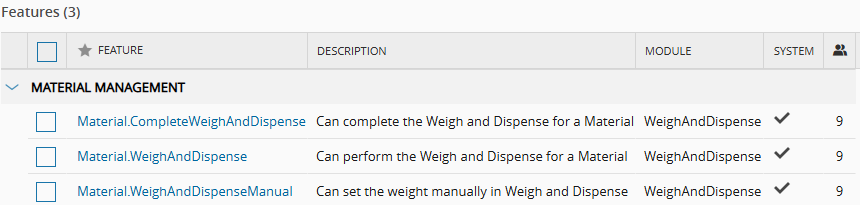
Your user must have a **Role** that grants the following security features, which you find under **Administration** > **Security** > **Feature**:
| Feature | Used to |
| --- | --- |
| `Material.WeighAndDispense` | Perform Weigh and Dispense for a **Material**. |
| `Material.WeighAndDispenseManual` | Enter the weight manually, without an electronic scale. |
| `Material.CompleteWeighAndDispense` | Complete Weigh and Dispense for a **Material**. |
| `ContextResolution.EditData` | Add rows to the context tables, such as the [[bomcontext-st]] smart table. |
Table: Security features for the scenarios
!!! info
To capture an electronic signature at each dispense, enable the **Force Signature** property of the `Material.WeighAndDispense` feature. Set `ForceVerification` to `true` to require a second person to verify each dispense, as in [[tutorials-weigh-and-dispense-single-step]].
To capture an electronic signature at the end of the transaction, enable the **Force Signature** property of the `Material.CompleteWeighAndDispense` feature. For more information, see [[user-guide-security-features]].
You also need an **Employee** that you associate with your user, and the features to configure the [master data file](master_data/weight-dispense-masterdata.xlsx) that the scenarios use, such as **Product**, **BOM**, and **Resource**.
## Configuration Entries
Weigh and Dispense uses the configuration entries under `/Cmf/System/Configuration/WeighAndDispense/`. To view them, go to **Administration** > **Configuration**.
| Entry | Default | Description |
| --- | --- | --- |
| `ScaleTimeOut` | `30` | Communication timeout of the electronic scale, in seconds. If the scale does not respond within this time, the system considers the connection lost. |
| `ScalePrecisionMatchingMethod` | Empty | Method to match the precision readings of the scale. Set the value to `Legacy` to use the legacy precision matching algorithm. When empty, the system uses the standard method. |
| `PrecisionQuantum` | `2` | Precision quantum of the process. It controls the number of decimal places, or precision steps, that the weigh calculations apply. |
| `HideContainerFields` | `false` | Controls the visibility of the container fields in the Weigh and Dispense wizard. Set the value to `true` to hide the fields when containers are not relevant to the process. |
| `ForceVerification` | `false` | When **Force Signature** is enabled for `Material.WeighAndDispense`, defines the signatures required at each dispense. When `false`, the system requires only the signature of the current user, with a password or PIN. When `true`, the system requires two signatures: Performed By, the operator who performed the operation, and Verified By, a second person who verified it. |
| `DefaultPartialDispenseButton` | `DispenseAndReset` | Default button for a partial dispense. `DispenseAndReset` resets the dispensed quantity to zero and adjusts the target quantity accordingly. `DispenseAndContinue` keeps the dispensed quantity, and the target quantity stays the same. |
| `AccuracyQuantum` | `1` | Accuracy quantum of the process. It controls the granularity step of the accuracy calculations during weighing. |
Table: Weigh and Dispense configuration entries
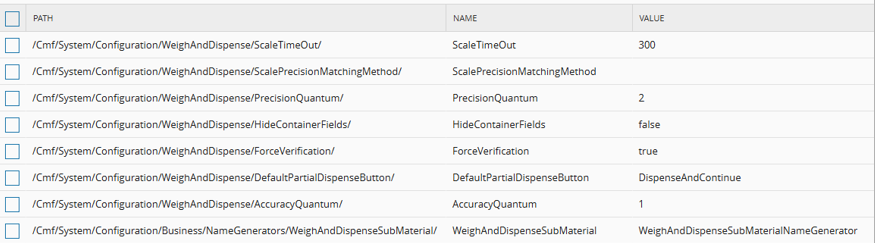
The [master data file](master_data/weight-dispense-masterdata.xlsx) sets `ScaleTimeOut` to `300` seconds for the scenarios. This example value overrides the system default of `30` seconds. Each scenario lists the other values that it requires.
## Use Case Data
The scenarios use the following example data. You can replace it with data from your own environment.
| Entity | Example | Used in |
| --- | --- | --- |
| Facility and Area | `Production` and `Assemble Preparation` | All scenarios |
| Steps | `Chemicals Preparation` and `Chemicals Preparation and Mixing`. The **Service Context** smart table links them to the **Services** `W&D Preparation` and `W&D Preparation and Mixing`. | - [[tutorials-weigh-and-dispense-single-step]]
- [[tutorials-weigh-and-dispense-multi-step]]
|
| Resources | `MDLWS#09`, a Process **Resource** for chemical Weigh and Dispense with the **Service** `W&D Preparation`, and `MDLMIX#02` and `MDLMIX#03`, Process **Resources** with the **Service** `W&D Preparation and Mixing` | - [[tutorials-weigh-and-dispense-single-step]]
- [[tutorials-weigh-and-dispense-multi-step]]
|
| Scales | `MDLWS#09` has the scales `MDLSCL#01` and `MDLSCL#10` (Instrument Type `Scale High Precision`), and `MDLSCL#02` and `MDLSCL#11` (Instrument Type `Standard Scale`). `MDLMIX#02` and `MDLMIX#03` have similar scales. | - [[tutorials-weigh-and-dispense-scenario-configure]]
- [[tutorials-weigh-and-dispense-single-step]]
- [[tutorials-weigh-and-dispense-multi-step]]
|
| Target Products | `Blue Compound` and `Green Compound`, of type `SFG` | All scenarios |
| Source Products | `Powdered chemical Blue`, `Powdered chemical Green`, `Phthalates`, and `Secret Chemical Recipe`, of type `RawMaterial` | All scenarios |
| BOMs | `BOM W&D Compound B` with the Relative formula type, and `BOM W&D Compound G` with the Absolute formula type, both with the Weigh and Dispense scope and `Kg` units | - [[tutorials-weigh-and-dispense-calculate-quantities]]
- [[tutorials-weigh-and-dispense-single-step]]
- [[tutorials-weigh-and-dispense-multi-step]]
|
| Target Materials | `Blue Compound#01` and `Green Compound#01`, with Primary Quantity `0 Kg`, and **Target Material Quantity** `25 Kg` | - [[tutorials-weigh-and-dispense-single-step]]
- [[tutorials-weigh-and-dispense-multi-step]]
|
| Source Materials | One **Material** for each source **Product**, for example `Powdered chemical Blue#04` and `Phthalates#04`. Each **Material** sits in a **Container** at the **Step** that the BOM defines. | - [[tutorials-weigh-and-dispense-single-step]]
- [[tutorials-weigh-and-dispense-multi-step]]
|
Table: Master data in the scenarios
The **Instrument Type** values come from the [[instrumenttype-lt]] lookup table.
!!! info
The configuration of the foundation model, including Calendar, Facility, Area, Steps, Services, Flows, and Containers, is outside the scope of this tutorial.
## Next Scenario
Continue with [[tutorials-weigh-and-dispense-scenario-configure]].