---
alias: user-guide-automation-task-core-adjuststate
tags:
- automation tasks
description: "This task modifies the state of an entity within the MES system"
---
# Adjust State
:iot-entitylogevent-lg:{style="font-size: 100px"}
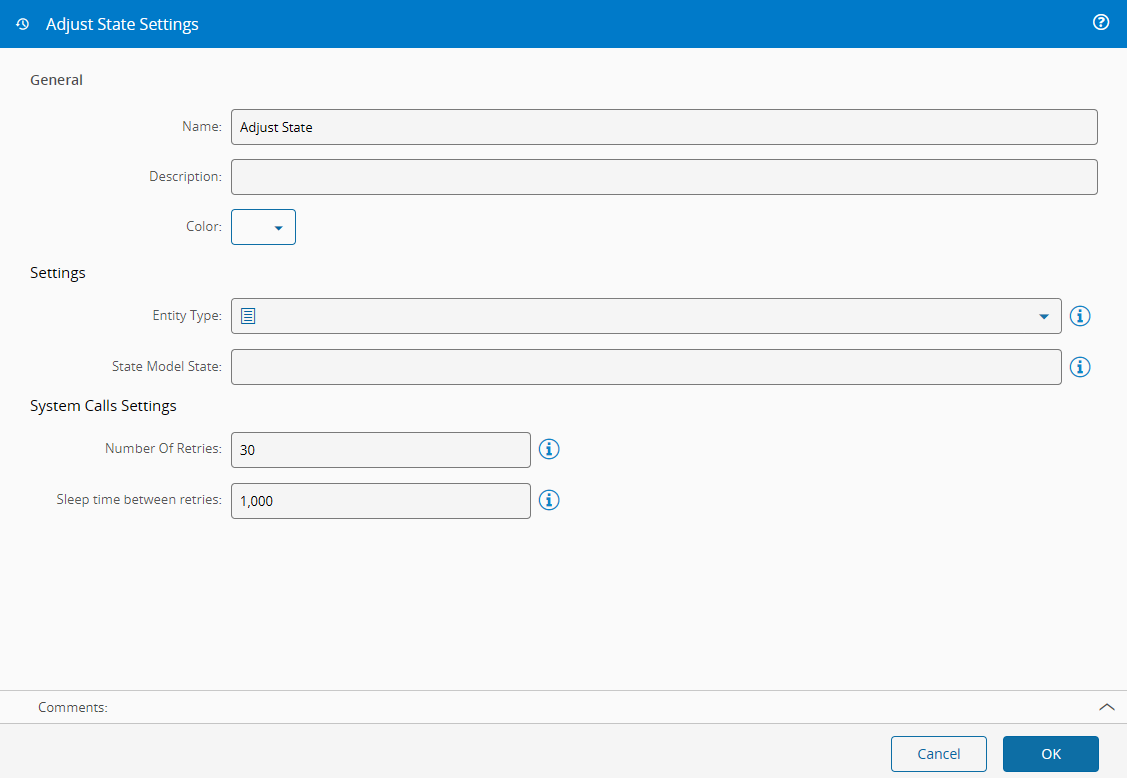
This task is used to change the state of an entity in the MES System. The entity must have a state model associated to it.
![image67][image67]
## Details
| Fields | Details |
| ----------------- | ---------------------------------------------------------------------------------- |
| Scope | Connect IoT
Data Platform
Enterprise Integration
Factory Automation |
| Workflow | Data flow
Control flow |
| `IsProtocol` flag | :material-check:{style="color:#4DB6AC"} |
## Inputs
| Name | Data Type | Description |
|----------|--------------|----------------------------------------|
| entity | `EntityType` | Entity whose state you wish to change |
| toState | `String` | State name to which you want to change |
| Activate | `any` | Activate the adjust state |
## Outputs
| Name | Data Type | Description |
|---------|-----------|--------------------------------------------------------|
| Success | `Boolean` | If there was no problem emits a true |
| Error | `Error` | Error that occurred during the processing of this task |
## Settings
On the `General` Tab, there are the following settings:
| Name | Data Type | Default | Description |
|-------------------|------------------|----------|----------------------------------------------------------------|
| Entity | `Resource` | Resource | Entity type that is going to change state (only the entities defined to be usable by Connect IoT will appear) |
| Instance | `EntityInstance` | | Instance that is going to change state |
| State model State | `String` | | Default state to which it will change when activated. Default states are dependent upon MES modelling |
{% include-markdown 'includes/pages/iot_tasks_retries_settings.md' %}
## Behavior
When the task is activated, it sets the entity to the state named on the `toState` input, or in the State model State setting, in the main state model of the entity.
- The task calls the MES service `AdjustObjectState` with the state name, the main state model of the entity, and `IgnoreLastServiceId` set to `true`. MES sets the named state directly, without walking the transitions of the state model, and the task sends no reason.
- In 12.0, only `Activate` runs the task. A value on `toState` alone changes nothing, and the task uses the value it holds when `Activate` arrives. In Data Flow, link `Activate` from the same run as the state value, so that every value sets the state, even the same state twice.
- When the entity carries no state model, for example the entity chosen in the Instance setting, the task first loads it from MES, two levels deep, by `Id` or else by `Name`. After each change, the task keeps the entity that MES returns and uses its state model for the next change.
- After you change the state model of the entity in MES, give the task a reloaded entity, for example from an **Entity Instance** task with Reload in every change on, or restart the instance. See [[operation-guide-connect-iot-change-rollout]].
MES reloads the entity before it changes the state, so an entity loaded earlier does not fail the call by itself. When the state model of the entity changed after the task loaded it, the task still sends the previous state model, and the call fails because the entity has no current state in that state model.
To generate a Control Flow workflow that sets the state from a driver event, use the State Model Integration Automation Business Scenario. See the [shipped Automation Business Scenarios](https://developer.criticalmanufacturing.com/explore/guides/customizations/automation/customization-components/customization_automationbusinessscenarios/#shipped-scenarios).
[image67]: ../images/image67.png