---
alias: user-guide-automation-task-core-messagebus-send
tags:
- automation tasks
description: "This task sends a message to a message bus subject, either as a notification or as a request that waits for a reply"
---
# Send Message Bus Message
:iot-messagebus-send-lg:
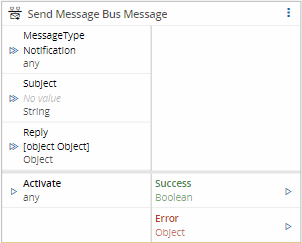
The Send Message Bus Message task sends a message to a message bus subject. The message is either a notification (fire and forget) or a request that waits for a reply.
## Details
| Fields | Details |
| ----------------- | ---------------------------------------------------------------------------------- |
| Scope | Connect IoT
Data Platform
Enterprise Integration
Factory Automation |
| Workflow | Data flow
Control flow |
| `IsProtocol` flag | :material-close:{style="color:#EF5350"} |
## Inputs
| Name | Data Type | Description |
| ----------- | --------- | ------------------------------------------------------------------------------------------------------ |
| MessageType | `String` | Type of message to send: `Notification` or `Request`. Overrides the **Message Type** setting. |
| Subject | `String` | Message bus subject to send the message to. Overrides the **Subject** setting. |
| Message | `Object` | Message to send. Overrides the **Message** setting. |
| Timeout | `Integer` | Maximum time, in milliseconds, to wait for a reply. Only available when the message type is `Request`. |
| Activate | `any` | Activates the task. |
## Outputs
| Name | Data Type | Description |
| ------- | --------- | ----------------------------------------------------------------------------------- |
| Reply | `Object` | Reply received for the request. Only available when the message type is `Request`. |
| Success | `Boolean` | Emits `true` when the message is sent or, for a request, when the reply arrives. |
| Error | `Error` | Error that occurred during the processing of this task. |
## Settings
On the `General` tab, the `Message` section has the following settings:
| Name | Data Type | Default | Description |
| ------------ | --------- | -------------- | --------------------------------------------------------------------------------------------------------------- |
| Message Type | `Enum` | `Notification` | `Notification` sends the message without waiting for a reply. `Request` sends the message and waits for a reply. |
| Subject | `String` | | Message bus subject to send the message to. |
| Message | `Object` | `{}` | Message to send using the message bus. |
| Timeout | `Integer` | `60000` | Maximum time, in milliseconds, to wait for a reply. Only available when the message type is `Request`. |
## Behavior
When activated, the task sends the message to the configured subject. Values received on the inputs take precedence over the settings.
- With the `Notification` message type, the task publishes the message and emits `true` on the **Success** output. It does not wait for a reply.
- With the `Request` message type, the task sends the message and waits for a reply for up to **Timeout** milliseconds. When the reply arrives, the task emits it on the **Reply** output and then emits `true` on the **Success** output. If no reply arrives in time or the request fails, the task emits the error on the **Error** output.
## Remarks
To answer a request inside another workflow, subscribe to the subject with the [[user-guide-automation-task-core-messagebus-listener]] task and reply with the [[user-guide-automation-task-core-messagebus-reply]] task.
Text received on `Message` together with the activation is parsed as JSON: text that is not JSON is sent as `{}`, and numeric text is sent as a number, which loses the last digits of a 19-digit MES `Id`.
A `MessageType` other than `Notification` or `Request` sends nothing and emits neither `Success` nor `Error`.