---
alias: user-guide-automation-task-core-logmessage
tags:
- automation tasks
description: "This task logs messages to configured transports with adjustable verbosity and input modes"
---
# Log Message

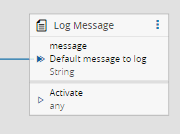
The `Log Message` Task allows messages to be logged in the controller configured log transports using a defined verbosity. This task is especially useful during development to validate output values from other Tasks.
## Inputs
| Name | Data Type | Description |
| -------- | --------- | -------------------------------------------------------------------------------------------- |
| message | `String` | Value to log |
| Activate | `any` | **Required.** Triggers the log message. The task only writes to the log when `Activate` fires. |
## Outputs
`Success` (`Boolean`) emits `true` once per activation, after the message is logged. `Error` (`Error`) emits any error that occurs while processing the task.
## Settings
| Name | Data Type | Value | Default | Description |
| ------------------------ | --------- | ------------------------------------------------------ | ------------- | ------------------------------------------------------------ |
| Mode | enum | `RawText`
`MultipleInputs` | `RawText` | Logging input mode |
| Default Message | `String` | | | Message to log if no other is supplied by the `message` input. Valid only for `RawText` mode. |
| Verbosity | `enum` | `Debug`
`Information`
`Error`
`Warning` | `Information` | Verbosity of the message to log |
| Reset inputs on activate | `Boolean` | | true | When `true`, clears every received input value after the log is written, so the next activation must receive the values again (or fall back to per-input defaults). When `false`, the last value received on each input is reused on subsequent activations until a new value arrives. |
| Custom Format | `Boolean` | | false | Whether the message can be customized to receive multiple formats. Valid only for `MultipleInputs` mode. |
| Message Format | `String` | | | Template string used when `Custom Format = true`. May contain `${inputName}` tokens that are replaced with the matching input's value. Valid only for `MultipleInputs` mode. |
Each input added in `MultipleInputs` mode also exposes its own *Default Value* property, used when the input has no value at activation time.
![logmessage01]
## Behavior
The task logs its message whenever the `Activate` input fires. The value written to the log comes from the `message` input when one was received before activation, otherwise from the configured *Default Message*.
In Control Flow, the `RawText` message is evaluated when the task runs: `{{ }}` expressions in it are replaced by their values, and line breaks become spaces.
!!! note
The `Activate` input must always be linked. If you want to log a value emitted by another task, wire that value to `message` and a triggering signal to `Activate` (for example, the same `Success` output from the upstream task).
### Modes
There are two modes of input for the message to be logged:
- `RawText` - the value from the `message` input is logged as-is
- `MultipleInputs` - the message is a multi-part string composed of several variable entries. Variables are referenced with the syntax `${VariableName}`.
### Serialization
Non-primitive inputs are serialized to text before being logged. The format depends on the runtime type of the value:
| Input value type | Logged representation |
| -------------------- | ---------------------------------------------------------------- |
| `Date` / moment | ISO 8601 string (`toISOString()`) |
| `Error` | JSON of the error's own properties (includes `message`, `stack`) |
| `Map` | JSON object built from the map entries |
| Plain object / array | `JSON.stringify(value)` |
| `undefined` / `null` | `` |
| Other primitives | `value.toString()` |
### Reset
When `Reset inputs on activate` option is `true` (the default), every received input value (including `message`) is cleared after the log is written. If only `Activate` fires on the next activation and no fresh value has arrived on `message`, the *Default Message* is logged. The same applies per-input in `MultipleInputs` mode, where each input falls back to its *Default Value*, or to `` if no default is set. When set to `false`, the last value received on each input is reused on subsequent activations until a new value arrives.
### Verbosity Filtering
The message is logged to any controller transport whose configured verbosity threshold meets or exceeds the level of this task.
## Examples
In `MultipleInputs` mode, link each value you want to log to the auto-port (the `Link here to add new` placeholder shown at the bottom of the task's input list). Every wired link adds a new named input. The `Activate` input must always be linked and is what triggers the log entry.
The three examples below build on each other: the first shows the default one-line-per-input output, the second composes those inputs into a single formatted message, and the third extends both formats to fields extracted from a complex object.
### 1. Logging Several Values
With `Custom Format = false`, the task writes one line per input, using each input's name (or its friendly name when set) as the label.
| Setting | Value |
| ------------- | ---------------- |
| Mode | `MultipleInputs` |
| Custom Format | `false` |
Wire the following inputs to the Log Message task:
| Input | Source |
| -------------- | --------------------------------------- |
| `materialName` | Linked from an upstream task output |
| `quantity` | Linked from an upstream task output |
| `Activate` | Linked from the upstream `Success` port |
When `Activate` fires with `materialName = "WaferLot-104"` and `quantity = 25`:
```log
materialName = WaferLot-104
quantity = 25
```
If an input has no value at activation time, its *Default Value* is used; if no default is set either, `` is logged.
### 2. Composing a Message with Tokens
Enable `Custom Format` and write a `Message Format` containing `${inputName}` tokens. The task replaces each token with the matching input's value and logs the result as a single line.
| Setting | Value |
| -------------- | ------------------------------------------------------- |
| Mode | `MultipleInputs` |
| Custom Format | `true` |
| Message Format | `Processing material ${materialName} (qty ${quantity})` |
Using the same inputs as the previous example:
```log
Processing material WaferLot-104 (qty 25)
```
A token whose input has no value falls back to that input's *Default Value*, or to `` if no default is set. A token that does not match any configured input is left unchanged in the output.
!!! info "Placeholder syntax"
`${inputName}` is a plain text token, not a JavaScript or TypeScript template literal. The task replaces each occurrence of the literal string `${inputName}` with the value of the input whose name matches exactly; nothing inside `${...}` is evaluated. Property access (`${object.field}`), method calls, indexing, and operators are not supported. To log a field of a complex value, extract it upstream and wire it as its own input (see the next example).
### 3. Logging Complex Object Fields
Given an upstream `result` object:
```json
{
"lot": "WaferLot-104",
"quantity": 25,
"step": "Lithography"
}
```
There are three ways to log it, depending on whether you care about the individual fields and how you want to extract them.
#### Option A - Log the Whole Object
Wire `result` to a single Log Message input named `result`. The object is serialized in one go (see [Input value serialization](#serialization)).
With `Custom Format = false`:
```log
result = {"lot":"WaferLot-104","quantity":25,"step":"Lithography"}
```
A format string like `Lot: ${result.lot}` would not work here as there is no input named `result.lot` (see the *Placeholder syntax* note above).
This option is the simplest, but the whole payload appears on one line and individual fields cannot be referenced by token.
#### Option B - Extract Each Field
To log fields individually (or reference them in a custom format), extract each one upstream and wire it to its own Log Message input. Any task that can return a single value works; the table below uses [JSONata](../parsers/task_jsonata.md), one task per field:
| JSONata task | Input (`value`) | Expression | Output wired to Log Message |
| ------------ | --------------- | ---------- | --------------------------- |
| Extract Lot | `result` | `lot` | `lot` |
| Extract Qty | `result` | `quantity` | `quantity` |
| Extract Step | `result` | `step` | `step` |
Share the same `Activate` signal across the extraction tasks and the Log Message task. With `Custom Format = false`, each field is logged on its own line:
```log
lot = WaferLot-104
quantity = 25
step = Lithography
```
With `Custom Format = true` and `Message Format = Lot: ${lot}, Qty: ${quantity}`, the parts are composed into a single sentence:
```log
Lot: WaferLot-104, Qty: 25
```
This option keeps each value individually inspectable and lets format tokens reference fields by name, at the cost of one extraction task per field. Alternatives to JSONata for this step include the [Generic Expression Evaluator](../parsers/task_expressionevaluatorgeneric.md) and [Custom Code](task_code.md) tasks.
#### Option C - Use Object Property Converter
A lightweight alternative to Option B is to wire `result` directly to each Log Message input and configure the [Object Property](../../../../converters/converter_objectproperty.md) converter on the link, with `path` set to the field name. No extraction task is needed in the flow.
| Log Message input | Converter `path` | Converter `type` |
| ----------------- | ---------------- | ---------------- |
| `lot` | `lot` | `String` |
| `quantity` | `quantity` | `Integer` |
| `step` | `step` | `String` |
All three inputs are sourced from the same upstream `result` object.
`Activate` is wired directly from the upstream `Success` port, same as in Options A and B. The Log Message output is identical to Option B. With `Custom Format = false`:
```log
lot = WaferLot-104
quantity = 25
step = Lithography
```
And with `Custom Format = true` and `Message Format = Lot: ${lot}, Qty: ${quantity}`:
```log
Lot: WaferLot-104, Qty: 25
```
The converter's `path` is dot-separated, so nested fields work too (for example, `path = inner.detail`). Use Option C when projecting a field is all you need (with optional type coercion); use Option B when you need richer transforms, such as filtering, computed values, or any expression beyond a single path lookup.
## See Also
External references for the serialization formats:
- [`JSON.stringify` (MDN)](https://developer.mozilla.org/en-US/docs/Web/JavaScript/Reference/Global_Objects/JSON/stringify) - used for plain objects, arrays, `Error` (own properties), and `Map`.
- [`Date.prototype.toISOString` (MDN)](https://developer.mozilla.org/en-US/docs/Web/JavaScript/Reference/Global_Objects/Date/toISOString) - produces an `ISO 8601` timestamp.
- [JSONata](https://docs.jsonata.org/) - full reference documentation for the JSONata expression language.
Ways to extract or transform values before they reach Log Message:
- [Object Property Converter](../../../../converters/converter_objectproperty.md) - extract a single field from an object using a dot-separated path, applied directly on the link. No extra task needed.
- [JSONata Task](../parsers/task_jsonata.md) - project, filter, or compute fields from a JSON object.
- [Generic Expression Evaluator Task](../parsers/task_expressionevaluatorgeneric.md) - evaluate expressions over multiple inputs.
- [Custom Code Task](task_code.md) - run arbitrary JavaScript or TypeScript to build the values you want to log.
[logmessage01]: ../images/logMessage_01.png