---
alias: user-guide-automation-task-core-objectdeserialize
tags:
- automation tasks
description: "This task extracts several values from an object in a single step, emitting each one as a typed output"
---
# Object Deserialize
:iot-switch-lg:{style="font-size: 100px"}
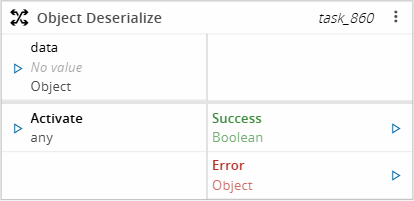
The **Object Deserialize** task extracts several values from an object and emits each one as its own output. Each output declares the path to read, the data type to convert the value to, an optional default value, and whether the value is mandatory.
!!! note
Use this task instead of chaining one converter per value. The object is read once, and every configured output is resolved from that same object.
## Details
| Fields | Details |
| ----------------- | ---------------------------------------------------------------------------------- |
| Scope | Connect IoT
Data Platform
Enterprise Integration
Factory Automation |
| Workflow | Data flow
Control flow |
| `IsProtocol` flag | :material-close:{ style="color:#EF5350" } |
## Inputs
| Name | Data Type | Description |
| -------- | --------- | ----------- |
| data | `Object` | The object to extract the values from |
| Activate | `any` | Triggers task execution |
## Outputs
| Name | Data Type | Description |
| --------------- | ---------- | ----------- |
| `` | `` | One output per configured entry, holding the extracted value converted to the configured type |
| Success | `Boolean` | Returns `true` if the task completes successfully |
| Error | `Error` | Contains information about any error that occurs |
## Settings
The Outputs Tab includes the following settings:
| Name | Data Type | Default Value | Description |
| ---- | --------- | ------------- | ----------- |
| Name | `String` | | Output Name. This value is required |
| Type | `ComplexType` | `Any` | Data type the extracted value is converted to. This value is required |
| Expression | `Text` | | Dot-separated path to the value inside the object. This value is required |
| Default Value | `String` | | Value emitted when the path resolves to no value |
| Mandatory | `Boolean` | `false` | When enabled, the task fails if the path resolves to no value |
## Behavior
### Path expressions
The Expression setting is a dot-separated path, where each segment is a property name. Array elements are read by their numeric index, used as a path segment:
| Expression | Reads |
| ---------- | ----- |
| `equipment` | The `equipment` property at the root of the object |
| `equipment.name` | The `name` property of the `equipment` object |
| `readings.0.value` | The `value` property of the first entry of the `readings` array |
Table: Object Deserialize path expression examples
Bracket notation, such as `readings[0].value`, is not supported. An expression with an empty segment, such as `equipment..name`, is invalid.
### Resolution of each output
For every configured output, the task reads the path and then:
- When the path resolves to a value, the value is converted to the configured type and emitted.
- When the path resolves to no value and the output is mandatory, the task emits an error and stops. A default value does not rescue a mandatory output in this case.
- When the path resolves to no value and a default value is configured, the default value is converted to the configured type and emitted.
- When the path resolves to no value and no default value is configured, the output is not emitted at all. The task continues with the remaining outputs.
If the path itself is invalid, or the conversion to the configured type fails, the configured default value is used. When there is no default value, the task emits an error and stops.
!!! note
An empty Default Value is treated as no default value. To emit an empty string, extract it from the object instead.
The task emits the Error output, and no other output, when the input object is null.
### Order of emission
All outputs are resolved before any of them is emitted. This means that a failure on one output prevents the earlier outputs from being emitted, so a workflow never observes a partially deserialized object.
## Examples
### Extract nested and array values
Configure the following outputs on the Outputs tab:
| Name | Type | Expression |
| ---- | ---- | ---------- |
| equipmentName | `String` | `equipment.name` |
| firstReading | `Number` | `readings.0.value` |
When the `data` input receives:
```json
{
"equipment": { "name": "Oven-01" },
"readings": [{ "value": 21.5 }, { "value": 22.1 }]
}
```
`equipmentName` emits `"Oven-01"`, `firstReading` emits `21.5`, and `Success` emits `true`.
### Fall back to a default value
Configure a single output:
| Name | Type | Expression | Default Value |
| ---- | ---- | ---------- | -------------- |
| status | `String` | `equipment.status` | `Unknown` |
When the `data` input receives:
```json
{ "equipment": { "name": "Oven-01" } }
```
The `status` path does not resolve to a value, so `status` emits `"Unknown"` and `Success` emits `true`.
### Fail on a missing mandatory output
Configure:
| Name | Type | Expression | Mandatory |
| ---- | ---- | ---------- | --------- |
| serialNumber | `String` | `equipment.serialNumber` | `true` |
When the `data` input receives:
```json
{ "equipment": { "name": "Oven-01" } }
```
The `serialNumber` path does not resolve to a value. Since the output is mandatory, the task emits `Error` with a message that includes "Mandatory output 'serialNumber' not found at path 'equipment.serialNumber'", and no other output is emitted — even if a Default Value had been configured for this output.
### Fail when the input object is null
Configure any output, for example:
| Name | Type | Expression |
| ---- | ---- | ---------- |
| equipmentName | `String` | `equipment.name` |
When the `data` input receives `null`, the task does not attempt to resolve any output. It emits `Error` with the message "Input object is null or undefined", and no other output is emitted.