---
alias: user-guide-automation-task-dataplatform-posttelemetry
tags:
- automation tasks
description: "This task posts collected telemetry values to Data Platform, batched and aggregated by ISA-95 plant context"
---
# Post Telemetry
:iot-automationevent-lg:{style="font-size: 100px"}
The **Post Telemetry** task sends collected data to Data Platform as telemetry. It posts the `PostTelemetry` IoT Event Definition, so you do not have to assemble the event yourself with a generic API Post Event task. In the workflow designer, the task is listed under the **Data Platform Tasks** category, in the **Actions** section.
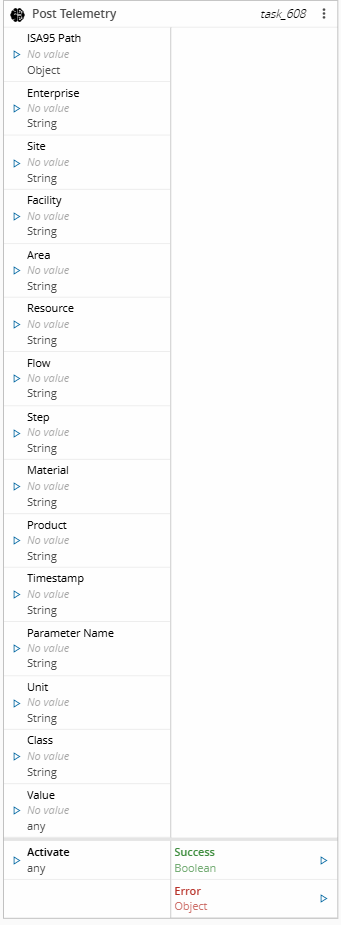
Unlike the [Post Measurement](task_postmeasurement.md) task, which posts one event per activation, **Post Telemetry** batches and aggregates the values collected across activations before posting them, according to the configured Post Mode.
## Details
| Fields | Details |
| ----------------- | ---------------------------------------------------------------------------------- |
| Scope | Connect IoT
Factory Automation
Enterprise Integration
Data Platform |
| Workflow | Data flow
Control flow |
| `IsProtocol` flag | :material-close:{ style="color: #EF5350" } |
## Inputs
| Name | Data Type | Description |
| -------------- | --------- | -------------------------------------------------------------------------------------------------------- |
| ISA95 Path | `Object` | The resolved ISA-95 hierarchy, as emitted by the raw output of the ISA-95 Decoder task |
| Enterprise | `String` | The name of the Enterprise |
| Site | `String` | The name of the Site |
| Facility | `String` | The name of the Facility |
| Area | `String` | The name of the Area |
| Resource | `String` | The name of the Resource |
| Flow | `String` | The name of the Flow |
| Step | `String` | The name of the Step |
| Material | `String` | The name of the Material |
| Product | `String` | The name of the Product |
| Timestamp | `String` | The timestamp of the value. Falls back to the current UTC time when not set or invalid |
| Parameter Name | `String` | The name of the telemetry parameter. Falls back to the Parameter Name setting |
| Class | `String` | The class of the telemetry parameter (`Sensor`, `State`, or `Property`). Falls back to the Class setting |
| Unit | `String` | The unit of measure of the telemetry parameter. Falls back to the Unit setting |
| Value | `Any` | The value of the telemetry parameter |
| Activate | `any` | Triggers task execution |
Table: Post Telemetry inputs
## Outputs
| Name | Data Type | Description |
| ------- | --------- | --------------------------------------------------------------------------------------- |
| Success | `Boolean` | Returns `true` when the value is added to the current batch |
| Error | `Error` | Contains information about any error that occurs while posting a batch to Data Platform |
## Settings
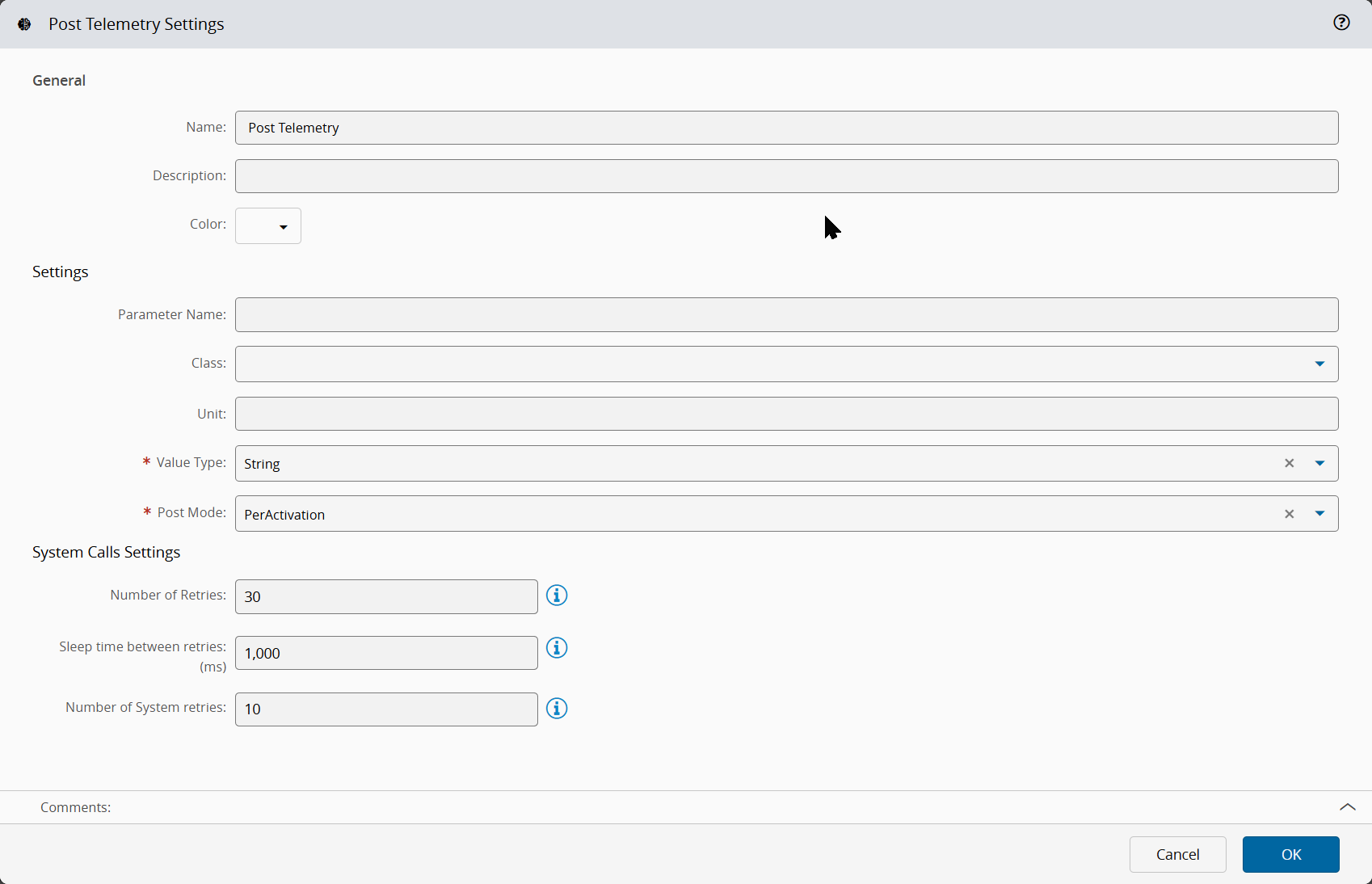
The General tab includes standard task settings and the following parameters:
| Name | Data Type | Default Value | Description |
| -------------- | --------- | --------------- | ----------------------------------------------------------------------------------------------------------------------- |
| Parameter Name | `String` | | Default telemetry parameter name, used when the Parameter Name input has no value |
| Class | `Enum` | | Default telemetry parameter class (`Sensor`, `State`, or `Property`), used when the Class input has no value |
| Unit | `String` | | Default telemetry parameter unit, used when the Unit input has no value |
| Value Type | `Enum` | `String` | Data type used to store the posted parameter value: `String` or `Numeric`. This value is required |
| Post Mode | `Enum` | `PerActivation` | Condition that triggers posting telemetry. This value is required |
| Interval | `Integer` | `60` | Number of seconds to wait before posting the batched values. Applies only when Post Mode is `PerInterval` or `Combined` |
| Counter | `Integer` | `10` | Number of values to wait for before posting the batched values. Applies only when Post Mode is `PerCount` or `Combined` |
Table: Post Telemetry general settings
The System Calls Settings section includes the following parameters:
| Name | Data Type | Default Value | Description |
| -------------------------- | --------- | ------------- | -------------------------------------------------------------------------------------------- |
| Number of Retries | `Integer` | `30` | Number of attempts to repeat the call to the system until a successful reply is received |
| Sleep time between retries | `Integer` | `1000` | Number of milliseconds to wait between retries. It applies only when the previous call fails |
| Number of System retries | `Integer` | `10` | Number of times that the system retries to process the system call |
Table: Post Telemetry system call settings
## Behavior
### Plant context
The task resolves each ISA-95 level from the dedicated input first, and falls back to the ISA95 Path object when that input has no value:
| Level | Resolution order |
| ---------- | ------------------------------------------------------------------------------ |
| Enterprise | Enterprise input, then the enterprise property of ISA95 Path |
| Site | Site input, then the site property of ISA95 Path |
| Facility | Facility input, then the facility property of ISA95 Path |
| Area | Area input, then the area property of ISA95 Path |
| Resource | Resource input, then the workCell, then the storageUnit property of ISA95 Path |
Table: Resolution of the ISA-95 levels
This lets you wire the raw output of the **ISA-95 Decoder** task straight into ISA95 Path and still override any single level with an explicit input.
The **Flow**, **Step**, **Material**, and **Product** are taken only from their own inputs, they are not resolved from ISA95 Path.
### Post Mode
At each activation, the task queues the current value into a batch scoped to the task instance, without posting an event straight away. The batch is flushed and posted according to the configured Post Mode:
| Post Mode | Behavior |
| --------------- | ------------------------------------------------------------------------------------------------------------ |
| `PerActivation` | Posts a telemetry event after every activation |
| `PerInterval` | Posts the batched values once the configured Interval elapses since the first queued value |
| `PerCount` | Posts the batched values once the configured Counter of queued values is reached |
| `Combined` | Posts the batched values once either the Interval or the Counter threshold is reached, whichever comes first |
Table: Post Telemetry post modes
When the task instance is destroyed, any values still pending in its batch are flushed and posted before the batch is discarded.
### Posted values
When a batch is flushed, its entries are aggregated by plant context (**Enterprise**, **Site**, **Facility**, **Area**, **Resource**, **Flow**, **Step**, **Material**, **Product**) and by telemetry parameter (**Parameter Name**, **Class**, **Unit**). Entries that share the same context and parameter are combined into a single parameter with one value and one timestamp per queued entry, and one `PostTelemetry` event is posted per distinct plant context.
### Errors
The task emits the Error output when Data Platform rejects an event, or when the system call fails after the configured retries.