---
alias: user-guide-automation-task-mes-isa95decoder
tags:
- automation tasks
description: "This task resolves the ISA-95 hierarchy of a MES entity, emitting each level as its own output"
---
# ISA-95 Decoder
:iot-intance-lg:{style="font-size:100px"}
The **ISA-95 Decoder** task resolves the ISA-95 equipment hierarchy of a MES entity. Given an **Enterprise**, **Site**, **Facility**, **Area**, or **Resource**, it emits the name of each ISA-95 level that can be derived from that entity, along with the complete resolution as a single object.
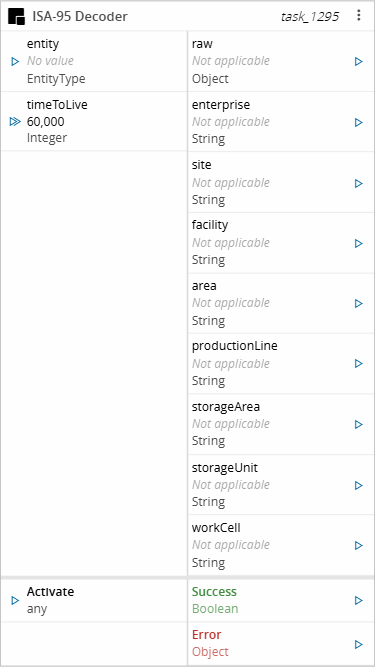
Use it together with the **Entity Instance** task to enrich equipment data with its plant location, for example before posting a measurement to Data Platform.
## Details
| Fields | Details |
| ----------------- | ---------------------------------------------------------------------------------- |
| Scope | Connect IoT
Data Platform
Enterprise Integration
Factory Automation |
| Workflow | Data flow
Control flow |
| `IsProtocol` flag | :material-close:{style="color:#EF5350"} |
## Inputs
| Name | Data Type | Description |
| ---------- | ------------ | -------------------------------------------------------------------------------------------------------------- |
| entity | `EntityType` | The MES entity whose ISA-95 hierarchy is resolved. It must be an Enterprise, Site, Facility, Area, or Resource |
| timeToLive | `Integer` | Overrides the Time To Live setting for this activation, in milliseconds |
| Activate | `any` | Triggers task execution |
## Outputs
| Name | Data Type | Description |
| -------------- | --------- | -------------------------------------------------------------------------------------------------------- |
| raw | `Object` | The complete resolution, with one property per ISA-95 level |
| enterprise | `String` | The name of the Enterprise |
| site | `String` | The name of the Site |
| facility | `String` | The name of the Facility |
| area | `String` | The name of the Area |
| productionLine | `String` | The name of the Production Line Area or of the Line Resource |
| storageArea | `String` | The name of the Area, when it is a Storage Area |
| storageUnit | `String` | The name of the Resource, when its processing type is Storage |
| workCell | `String` | The name of the Resource, when its processing type is Process, or of its closest Process parent Resource |
| Success | `Boolean` | Returns `true` if the task completes successfully |
| Error | `Error` | Contains information about any error that occurs |
Table: ISA-95 Decoder outputs
## Settings
The General tab includes standard task settings and the following parameters:
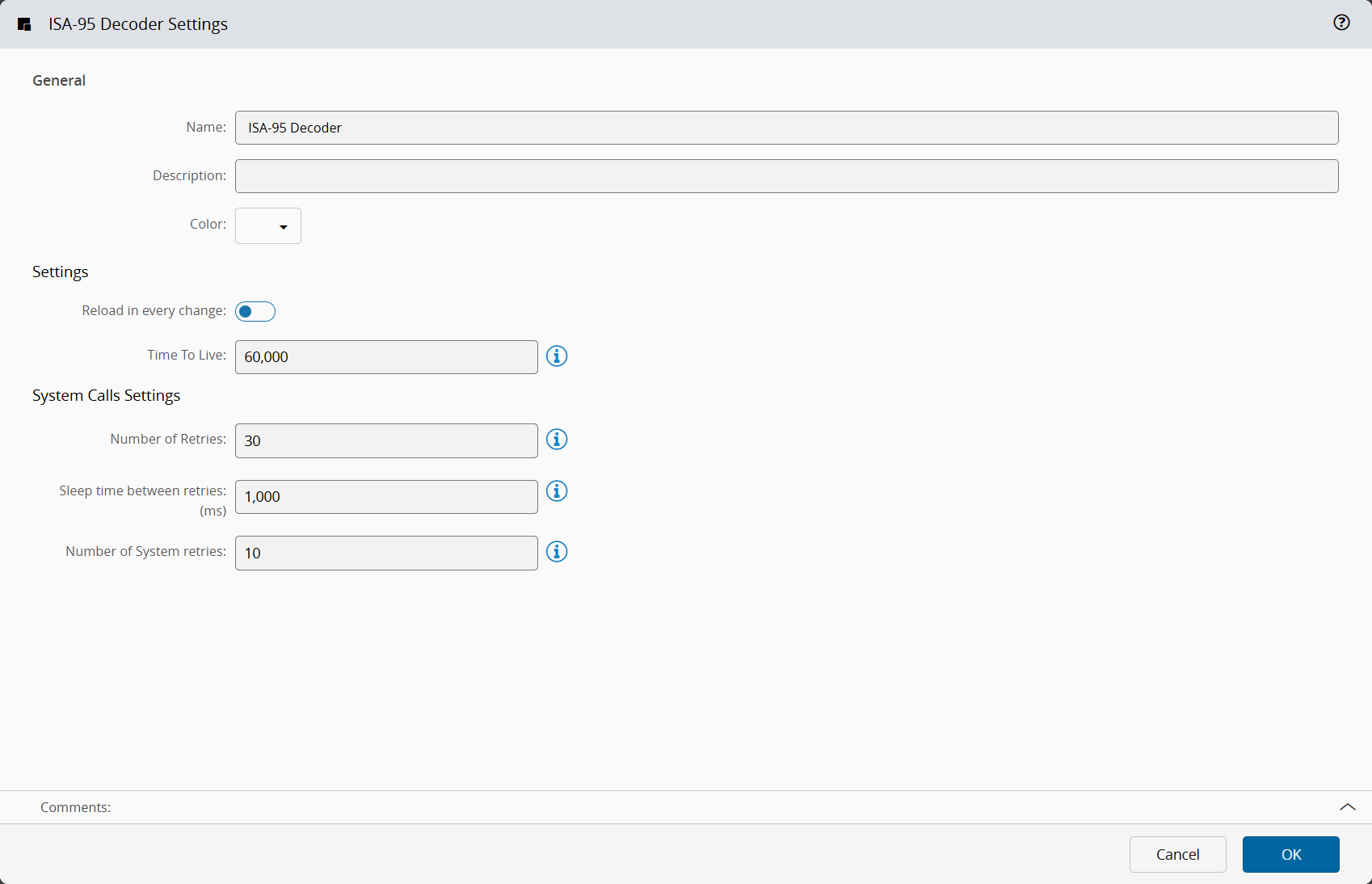
| Name | Data Type | Default Value | Description |
| ---------------------- | --------- | ------------- | --------------------------------------------------------------------------------------------------------------- |
| Reload in every change | `Boolean` | `false` | When enabled, the hierarchy is resolved from the system on every activation, ignoring the cache |
| Time To Live | `Integer` | `60000` | Amount of time, in milliseconds, that a resolved hierarchy is kept in the cache. Set it to 0 to disable caching |
Table: ISA-95 Decoder general settings
{% include-markdown 'includes/pages/iot_tasks_retries_settings.md' %}
## Behavior
### Resolution
The task resolves the hierarchy upwards from the entity it receives, so the outputs it can fill depend on the entity type:
| Entity | Resolved levels |
| ---------- | ----------------------------------------------------------------------------------- |
| Enterprise | Enterprise |
| Site | Enterprise, Site |
| Facility | Enterprise, Site, Facility |
| Area | Enterprise, Site, Facility, and the Area itself |
| Resource | Enterprise, Site, Facility, its Area, the Resource itself, and its parent Resources |
Table: ISA-95 levels resolved per entity type
Enterprise, Site, and Facility are read from the Facility of the entity's Area. Because a Site and its Enterprise are optional in the plant model, the enterprise and site outputs can have no value even when the facility output has one.
An Area is mapped according to its area type:
- A plain Area fills the area output with its own name, even when it is nested under another Area.
- A Production Line Area fills the productionLine output, and a Storage Area fills the storageArea output. In both cases, the area output holds the name of the top-most Area above it.
A Resource is then mapped according to its processing type and its parent Resources. The Resource mapping is applied after the Area mapping, so a Line Resource replaces the Production Line Area in the productionLine output.
| Processing type | Mapping |
| --------------- | --------------------------------------------------------------------------------------------------------------- |
| Storage | Fills the storageUnit output. Parent Resources are ignored, so workCell has no value |
| Line | Fills the productionLine output |
| Process | Fills the workCell output. If its top-most parent Resource is a Line, that Line fills the productionLine output |
| Any other | The closest parent Resource with the Process processing type, if any, fills the workCell output |
Table: Resource mapping per processing type
A Line parent is only used for a Process Resource. Any other Resource under a Line, such as a Load Port, gets the productionLine output from its Area, which is the Production Line Area if there is one.
### Examples
The examples below use the following plant model. Each Resource belongs to the nearest Area above it.
```mermaid
flowchart TD
enterprise[Enterprise1] --> site[Site1] --> facility[Facility1] --> area1[Area1
Area]
area1 --> plArea1[PLArea1
Production Line Area]
area1 --> sArea1[SArea1
Storage Area]
plArea1 --> line1[Line1
Line] --> process1[Process1
Process] --> loadPort2[LoadPort2
Load Port]
plArea1 --> process0[Process0
Process] --> process2[Process2
Process]
sArea1 --> storage1[Storage1
Storage]
area1 --> line2[Line2
Line] --> process3[Process3
Process] --> process4[Process4
Process]
area1 --> process5[Process5
Process]
process5 --> loadPort1[LoadPort1
Load Port]
process5 --> storage2[Storage2
Storage]
```
The following table shows the outputs when each of these Resources is the input entity. All of them also fill enterprise (`Enterprise1`), site (`Site1`), and facility (`Facility1`). Empty cells have no value.
| Input Resource | area | productionLine | storageArea | storageUnit | workCell |
| -------------- | ----- | -------------- | ----------- | ----------- | -------- |
| Process1 | Area1 | Line1 | | | Process1 |
| Line1 | Area1 | Line1 | | | |
| LoadPort2 | Area1 | PLArea1 | | | Process1 |
| Process0 | Area1 | PLArea1 | | | Process0 |
| Process2 | Area1 | PLArea1 | | | Process2 |
| Storage1 | Area1 | | SArea1 | Storage1 | |
| Process4 | Area1 | Line2 | | | Process4 |
| LoadPort1 | Area1 | | | | Process5 |
| Storage2 | Area1 | | | Storage2 | |
Table: Resolution examples
When the input entity is above the Area level, only the levels down to that entity are filled. For example, Site1 as the input entity fills enterprise and site, and every other output has no value.
The raw output holds all levels in one object. Levels with no value are `undefined`, so they are left out when the object is serialized. For Process1, raw is:
```json
{
"enterprise": "Enterprise1",
"site": "Site1",
"facility": "Facility1",
"area": "Area1",
"productionLine": "Line1",
"workCell": "Process1"
}
```
### Typical Uses
- Add the plant location to equipment data before posting it to Data Platform with the [Post Telemetry](../dataplatform/task_posttelemetry.md) or [Post Measurement](../dataplatform/task_postmeasurement.md) task.
- Build a hierarchical name, such as a topic or a tag path, from the enterprise, site, area, productionLine, and workCell outputs, skipping the levels that have no value.
- Resolve the location of a Resource other than the one the controller is connected to, by passing that Resource from the [Entity Instance](../core/mes/actions/task_entityinstance.md) task.
### Caching
Resolutions are cached per entity, using the entity type and identifier as the key. While a cached entry is valid, the task reuses it instead of calling the system, which keeps repeated activations for the same equipment inexpensive.
- The cache entry is valid for the number of milliseconds set in Time To Live. Set it to 0 to resolve the hierarchy on every activation.
- Enable Reload in every change to bypass the cache without disabling it, so an entry is refreshed instead of reused.
- Only successful resolutions are cached. A failed call is retried on the next activation.
- Concurrent activations for the same entity share one system call.
The cache is kept per Automation Controller and is not shared between controllers.
!!! note
A hierarchy that changes in the MES is only reflected after the cached entry expires. Lower Time To Live if your plant model changes often, at the cost of additional system calls.
### Errors
The task emits the Error output when:
- The entity has no identifier or no type.
- The entity type is not one of Enterprise, Site, Facility, Area, or Resource.
- The entity has no ISA-95 hierarchy in the system.