---
description: Set up and explore the sample Master Data provided for Industrial Equipment use-cases.
alias: userguide-modellingguides-samplemasterdata
---
# Industrial Equipment Model - Master Data Guide
## Overview
A sample Master Data specifically designed to cover Industrial Equipment Industry use-cases is available for download for each Industrial Equipment release in the [Industrial Equipment Template Releases](https://info.criticalmanufacturing.com/releases/industry/indeq/).
This modelling guide intends to guide the user on:
1. How to setup and upload the Master Data into a CM MES environment.
2. Explain the business context included in the Master Data.
3. Which MES features are included in the Master Data, and which processes - both Base and Engineering - are covered by these features.
By providing a sample Master Data set that users can upload directly into the MES and start using immediately, we intend to:
- **Illustrate how the MES standard functionalities work:** Show users concrete examples of Products, Flows, Resources, BOMs and other entities so they can understand how the out-of-the-box MES features are meant to be used, particularly in Industrial Equipment business scenarios.
- **Showcase best-practice usage patterns for Industrial Equipment use-cases:** Showcase recommended patterns for Flows, Products, Resources, Material Tracking, and overall model, that align with MES best practices for common Industrial Equipment business scenarios.
- **Provide a ready-to-use baseline:** Give customers a starting point they can upload "as-is" or adapt, so they don't have to build all master data from scratch before using core MES capabilities.
- **Accelerate training and configuration:** Help users get up and running faster by showing what a minimal, working master data set looks like, shortening the learning curve for new instances.
- **Provide a quick Setup data for MES Demos:** Provide a sample master data that can be used to quickly configure and run MES demonstrations in an industrial equipment business context.
---
## Master Data Setup
Master Data is organized in several model blocks, with only the Core Model being mandatory. Based on the needs and objectives, additional blocks can be uploaded on top of the **Core Model** Master Data.
- **Core**: consists of the following Master Data - **Core**, Storage Bins, Materials, Costing, Production Order.
By uploading the other blocks the user will be able to explore other features of the MES, included in additional MES modules:
- **Engineering Model**: Recipe Management, Documents Management.
- **Quality Model**: Sampling, SPC, Exceptions Management, Mapping.
- **Labor Management**: Teams, Shift Plan.
- **Material Logistics**: Logistic Areas, Transfer Orders, Storage Replenishment.
- **Industrial Equipment Template**: Process Activities, Checklist Execution Cockpit, OPC UA Standard Equipment Integration.
**How to load Master Data files into CM MES:**
Each file (`.zip` or `.xlsx`) must be loaded individually using the MES Master Data Package tool. Repeat the following steps for each file in the order specified in the sections below:
1. Navigate to **Administration > Master Data Packages > New**.
2. Enter a **Name**, select the **Type**, and upload the file using **Browse File** (accepted formats: `.zip`, `.xlsx`, `.xml`, `.json`).
3. Click **Create**. The package record opens automatically.
4. Click **Run > Load**. A dialog titled **"Load Master Data Package"** opens, listing all objects available in the package. Click **Select All Items** to select all, then click **Load**. The MES processes each object type sequentially and displays a detailed result log (objects created, updated, or skipped) with a status indicator per object type upon completion.
> **Note:** If any error occurs during loading, the entire operation is rolled back and no data is loaded into the system.
Within each Excel file, objects are loaded in the order defined by the worksheet sequence.
*See also: [Master Data Packages](https://help.criticalmanufacturing.com/userguide/administration/master_data_packages/) in the CM MES Documentation.*
---
## Core Master Data
By using the provided Core Master Data, users will be able to perform the core operations of the MES, such as running a Material through a Production Flow. The main Production Flows are enriched to simulate activities commonly found in a real industrial equipment manufacturing facility, giving users the opportunity to explore MES capabilities in a realistic environment. By moving a Material through the Flow, users can experience functionalities such as automatic and manual material consumption based on BOM, Rework Flows, Time Constraints, Material Logistics, Kanban Replenishment, Production Orders, Notifications and other core features.
The Core Master Data model that contains all the basic entities to create the manufacturing baseline. This file is required always to be imported first before any of the following Master Data files.
This folder contains additional files that expand the Core Model. Namely:
- **Materials**: contains Material definitions.
- **Storage Bins**: contains the Storage BIN definition example for a Storage Resource.
- **Business Workflows**: contains an example on how to build business workflows to trigger notifications on MES.
- **Production Order**: contains the Production Order definitions and adds Materials to the Production Orders. Requires license.
- **Costing**: contains the costing definitions for Resources, Employee. Requires license.
- **Reports**: contains the Report Folder definitions and role access.
### Core
1. Load the file [001_1_masterdata_indeq_Core.zip](https://info.criticalmanufacturing.com/releases/industry/indeq/version_2_0/masterdata/001_core/001_1_masterdata_indeq_Core.zip) from the folder **001_core** using the Master Data Package tool (see loading instructions above).
- In this file, you can find the modelling for Security & Roles, State Model, DEE Actions & Rules, Sort Rule, Calendar & Shift, Name Generator, Enterprise, Site, Facility, Service, Area, Employee, Business Partners, Reasons, Steps, Flows, Products, Product Group, Label Specification, Resources, BOMs.
**Additional Note:** To ensure the Core objects are loaded in the appropriate order, please follow the three steps below instead of using **Select All Items** for the initial load. Use **Run > Load** for each step, select only the specified objects, and wait for the load to complete successfully before proceeding:
1. Select and load only **Config**, **Role**, **Features**, and **DataGroup**.
2. Select and load only **User** and **Calendar**.
3. Select and load all remaining objects, excluding **Config**, **Role**, **Features**, **DataGroup**, **User**, and **Calendar**, which were already imported.
2. Load the file [001_2_masterdata_indeq_Materials.xlsx](https://info.criticalmanufacturing.com/releases/industry/indeq/version_2_0/masterdata/001_core/001_2_masterdata_indeq_Materials.xlsx) from the folder **001_core** using the Master Data Package tool (see loading instructions above).
- This file is an expansion of the **Core** Master Data file.
- In this file, you can find the modelling for Raw Material, Durable, Semi & Finished Good Materials.
3. Load the file [001_3_masterdata_indeq_StorageBins.xlsx](https://info.criticalmanufacturing.com/releases/industry/indeq/version_2_0/masterdata/001_core/001_3_masterdata_indeq_StorageBins.xlsx) from the folder **001_core** using the Master Data Package tool (see loading instructions above).
- This file is an expansion of the **Core** Master Data file.
- In this file, you can find the modelling for Resources with Storage Bins.
4. Load the file [001_4_masterdata_indeq_BusinessWorkflows.zip](https://info.criticalmanufacturing.com/releases/industry/indeq/version_2_0/masterdata/001_core/001_4_masterdata_indeq_BusinessWorkflows.zip) from the folder **001_core** using the Master Data Package tool (see loading instructions above).
- This file is an expansion of the **Core** Master Data file.
- In this file, you can find the modelling for Business Workflows.
**Additional Notes:**
- Future actions “Send e-mail” were set for the Step **SHIPPING FINAL CUSTOMER**. Please change the e-mail defined in the Distribution List by:
- Navigate to **Business Data > Step**, search for STEP **SHIPPING FINAL CUSTOMER**, open it, and click **Future Actions** in the right panel. Then click **Special Manage**, under **Manage** in the Future Action tab. Change the e-mail defined in the *Distribution List*. Confirm by clicking **Update** in the Special Manage Future Actions wizard.
*See also: [Manage Future Actions](https://help.criticalmanufacturing.com/userguide/business-data/step/manage_future_actions/?h=future+action) in the CM MES Documentation.*
- If you are not using a User from the Master Data, create a new User and Employee. Navigate to **Business Data > Employee > New**. A two-step wizard opens:
- **Step 1 - User:** select an existing User, or click **Create** to open the **Create New User** form. Fill in the required fields (**Account**, **Name**) and define a **PIN**. Click **Create** - the wizard returns automatically to step 1 with the new User selected. Click **Next**.
- **Step 2 - General Data:** fill in the required fields: **Name**, **Type**, **Number**, and **Calendar**. Click **Create**.
**Note:** The PIN is required to perform certain operations in the MES Shop Floor interface.
---
### Production Order
1. Load the file [001_5_masterdata_indeq_ProductionOrder.xlsx](https://info.criticalmanufacturing.com/releases/industry/indeq/version_2_0/masterdata/001_core/001_5_masterdata_indeq_ProductionOrder.xlsx) from the folder **001_core** using the Master Data Package tool (see loading instructions above).
- This file is an expansion of the **Core** Master Data file.
- This requires the Production Order license.
- In this file, you can find the modelling for Production Order.
---
### Costing
1. Load the file [001_6_masterdata_indeq_Costing.xlsx](https://info.criticalmanufacturing.com/releases/industry/indeq/version_2_0/masterdata/001_core/001_6_masterdata_indeq_Costing.xlsx) from the folder **001_core** using the Master Data Package tool (see loading instructions above).
- This file is an expansion of the **Core** Master Data file.
- This requires the Costing license.
- In this file, you can find the modelling for Costing.
---
### Reports
1. Load the file [001_7_masterdata_indeq_SQLReportFolderSecurity.xlsx](https://info.criticalmanufacturing.com/releases/industry/indeq/version_2_0/masterdata/001_core/001_7_masterdata_indeq_SQLReportFolderSecurity.xlsx) from the folder **001_core** using the Master Data Package tool (see loading instructions above).
- This file is an expansion of the **Core** Master Data file.
- It defines the Report Folders and grants the **Administrators** role write access to them.
- Load this package only in environments where the Report Server is configured.
---
## Model Expansion
It is possible to enhance the Core Model with further model expansions. Users will be able to perform Checklists and Data Collections, consult relevant Documents for a given operation (such as assembly procedures and equipment manuals), review the Recipe to be used in a specific Resource, ensure that Employees have the required Certifications to operate a Resource and/or Process Activity or to perform a given operation, and carry out Setup and Line Clearance when needed, among other functionalities.
---
### Engineering Base
1. The file `Masterdata_indeq_engineering_base.xlsx` is included inside [002_1_masterdata_indeq_engineering_Base.zip](https://info.criticalmanufacturing.com/releases/industry/indeq/version_2_0/masterdata/002_engineering/002_1_masterdata_indeq_engineering_Base.zip) from the folder **002_engineering**.
- In this file, you can find the modelling for BOMs, data collections and checklists.
**Additional Note:** To ensure the Engineering Base objects are loaded in the appropriate order, please load this package in two steps. Use **Run > Load** for each step and wait for the load to complete successfully before proceeding:
1. Select and load only **Protocol**.
2. Select and load all remaining objects, excluding **Protocol**, which was already imported.
2. The file [002_2_masterdata_indeq_engineering_Instrument.xlsx](https://info.criticalmanufacturing.com/releases/industry/indeq/version_2_0/masterdata/002_engineering/002_2_masterdata_indeq_engineering_Instrument.xlsx) from the folder **002_engineering**.
- In this file, you can find the modelling for Resource of Instrument Type.
---
### Recipe
1. The file [002_3_masterdata_indeq_engineering_Recipe.xlsx](https://info.criticalmanufacturing.com/releases/industry/indeq/version_2_0/masterdata/002_engineering/002_3_masterdata_indeq_engineering_Recipe.xlsx) from the folder **002_engineering**.
- This requires the Recipe Management license.
- In this file, you can find the modelling for Recipe.
---
### Maintenance
1. The file `Masterdata_indeq_engineering - Maintenance.xlsx` is included inside [002_4_masterdata_indeq_engineering_Maintenance.zip](https://info.criticalmanufacturing.com/releases/industry/indeq/version_2_0/masterdata/002_engineering/002_4_masterdata_indeq_engineering_Maintenance.zip) from the folder **002_engineering**.
- This requires the Maintenance Management license.
- In this file, you can find the modelling for Checklist, Maintenance Plans, Maintenance Activities.
---
### Documents
1. The file `masterdata_indeq_engineering - Document.xlsx` is included inside [002_5_masterdata_indeq_engineering_Document.zip](https://info.criticalmanufacturing.com/releases/industry/indeq/version_2_0/masterdata/002_engineering/002_5_masterdata_indeq_engineering_Document.zip) from the folder **002_engineering**.
- This requires the Document Management license.
- In this file, you can find the modelling for Documents.
---
### Printable Documents
1. The file `Masterdata_indeq_engineering - PrintableDocument.xlsx` is included inside [002_6_masterdata_indeq_engineering_PrintableDocument.zip](https://info.criticalmanufacturing.com/releases/industry/indeq/version_2_0/masterdata/002_engineering/002_6_masterdata_indeq_engineering_PrintableDocument.zip) from the folder **002_engineering**.
- This requires the Printable Documents Management license.
- In this file, you can find the modelling for Printable Documents.
---
### Exception Management
1. The file [003_1_masterdata_indeq_ExceptionManagement.xlsx](https://info.criticalmanufacturing.com/releases/industry/indeq/version_2_0/masterdata/003_quality/003_1_masterdata_indeq_ExceptionManagement.xlsx) from the folder **003_quality**.
- This requires the Exception Management license.
- In this file, you can find the modelling for Protocols.
---
### SPC
1. The file [003_2_masterdata_indeq_SPC.xlsx](https://info.criticalmanufacturing.com/releases/industry/indeq/version_2_0/masterdata/003_quality/003_2_masterdata_indeq_SPC.xlsx) from the folder **003_quality**.
- This requires the SPC - Statistical Process Control license.
- In this file, you can find the modelling for Data Collection, Data Collection Limits, Charts.
---
### Sampling
1. The file [003_3_masterdata_indeq_Sampling.xlsx](https://info.criticalmanufacturing.com/releases/industry/indeq/version_2_0/masterdata/003_quality/003_3_masterdata_indeq_Sampling.xlsx) from the folder **003_quality**.
- This requires the Sampling license.
- In this file, you can find the modelling for Data Collection, Sampling Plans and Inspection.
---
### Labor Management
1. The file `004_1_masterdata_indeq_labor_management.xlsx` is included inside [004_1_masterdata_indeq_labor_management.zip](https://info.criticalmanufacturing.com/releases/industry/indeq/version_2_0/masterdata/004_labour_management/004_1_masterdata_indeq_labor_management.zip) from the folder **004_labour_management**.
- This requires the Labor Management license.
- In this file, you can find the modelling for Qualification, Certification, Employee, Shift Definition, Teams, Shift Plan.
---
### Material Logistic
1. The file `005_1_masterdata_indeq_material_logistic.xlsx` is included inside [005_1_masterdata_indeq_material_logistic.zip](https://info.criticalmanufacturing.com/releases/industry/indeq/version_2_0/masterdata/005_logistic/005_1_masterdata_indeq_material_logistic.zip) from the folder **005_logistic**.
- This requires the Material Logistic license.
- In this file, you can find the modelling for Area, Transfer Requirements, Steps configured to enable Material Logistic process.
---
### Industrial Equipment Template
The **100_template** folder contains the Industrial Equipment Template Master Data, which must be the last Master Data to be loaded. It sets up the Process Activities and the Checklist Execution Cockpit on dedicated Products and Flows. The folder also includes a ready-to-use example of the [OPC UA Standard](../equipmentintegration/opcua-standard/index.md) equipment integration.
#### Process Activities and Checklist Execution Cockpit Example
This example adds Products, Flows, Steps and Production Orders, identified by the suffix **PA**, to explore the [Process Activities](../features/processactivities.md) and the [Checklist Execution Cockpit](../features/checklistexecutioncockpit.md) features, as described in [Industrial Equipment Template - Functionalities](#industrial-equipment-template-functionalities).
1. The file [100_1_masterdata_indeq_template.xlsx](https://info.criticalmanufacturing.com/releases/industry/indeq/version_2_0/masterdata/100_template/100_1_masterdata_indeq_template.xlsx) from the folder **100_template**.
- This file is an expansion of the **Core** and **Engineering Base** Master Data files: it reuses the Role from the **Core**, and the Checklists and Certifications used by the Process Activity Definitions from the **Engineering Base**.
- In this file, you can find the modelling for Security Features, Lookup Table Values, Steps, Flows, Products, Product Characteristics, Product Characteristic Rules, Production Orders and Process Activity Definitions.
**Additional Notes:**
- The following information is not included in this file, as it is already available in the **Engineering Base** Master Data files:
- The Checklists used by the Process Activity Definitions, the assembly scenario for the Checklist Execution Cockpit (BOM with Data Collection), and the BOM Items with Position, Location and Substitutes, in [002_1_masterdata_indeq_engineering_Base.zip](https://info.criticalmanufacturing.com/releases/industry/indeq/version_2_0/masterdata/002_engineering/002_1_masterdata_indeq_engineering_Base.zip).
- The Certifications used by the Process Activity Definitions, and the Employee Certifications, in [004_1_masterdata_indeq_labor_management.zip](https://info.criticalmanufacturing.com/releases/industry/indeq/version_2_0/masterdata/004_labour_management/004_1_masterdata_indeq_labor_management.zip).
#### OPC UA Standard Integration Example
This example connects the Resource **MAIN BOARD**, used at the Step **MAIN BOARD** of the **Fabrication_Electric** Flow, to a machine through **Connect IoT**, making Track In, Recipe Download, Data Collection, Track Out, Abort and State Synchronization available on the sample model.
1. The file [100_2_IoT_masterdata_indeq_template.xlsx](https://info.criticalmanufacturing.com/releases/industry/indeq/version_2_0/masterdata/100_template/100_2_IoT_masterdata_indeq_template.xlsx) from the folder **100_template**.
- This requires the Recipe Management and the Connect IoT licenses.
- This file is an expansion of the **Core** and **Engineering Base** Master Data files: it reuses the Resource, Service and Step **MAIN BOARD** from the **Core**, and the Recipe, Parameter and Data Collection types from the **Engineering Base**.
- In this file, you can find the modelling for Automation Manager, Automation Controller and Driver Instances, Recipe, Sub-Recipes, Recipe Context, Data Collection, Material Data Collection Context and Resource State Resolution, as detailed below.
| Entity | Content |
| -------------------------------------------------- | ---------------------------------------------------------------------------------------------------------------------------------------------------------------------------- |
| **Automation Manager** | `ind-eq-ua-standard-manager`, in Manual deployment mode |
| **Automation Controller and Driver Instances** | Association of the **OPC UA Standard Controller** and the **Generic Driver** with the Resource **MAIN BOARD** |
| **Recipe, Sub-Recipes and Recipe Parameters** | `assembly-main-recipe` with the sub-recipes `sub-recipe-1` and `sub-recipe-2`, and the Recipe Parameters downloaded to the machine |
| **Recipe Context** | Resolution of `assembly-main-recipe` for the Service **MAIN BOARD**, which is the Service provided by the Resource **MAIN BOARD** |
| **Data Collection and Data Collection Parameters** | `AssemblyDataCollection` with the process readings reported by the machine |
| **Material Data Collection Context** | Resolution of `AssemblyDataCollection` on **Track In** at the Step **MAIN BOARD**, as a long-running Data Collection |
| **Resource State Resolution** | Mapping of the machine main states and main/substate combinations to the MES Resource states, for the Resource **MAIN BOARD** |
| **Lookup Table Values and Parameters** | `RecipeType`, `ParameterType` and `DataCollectionType` values, and the Recipe/EDC Parameters with the attribute `IndEqOpcUaParameterDataType` used for the OPC UA conversion |
**Additional Notes:**
- This file only creates the MES modelling. To actually run the integration, the Connect IoT setup must be completed as described in [Configure Connect IoT](../equipmentintegration/opcua-standard/configuration/connect-iot-setup.md):
- Deploy and start the Automation Manager `ind-eq-ua-standard-manager`.
- Configure the OPC UA Server profile (address, namespace and timeouts) as described in [Configure the OPC UA Connection](../equipmentintegration/opcua-standard/configuration/opcua-connection.md).
- Start the equipment connection for the Resource **MAIN BOARD**.
- On the Resource **MAIN BOARD**, verify the configuration described in [Configure MES and the Resource](../equipmentintegration/opcua-standard/configuration/mes-resource-configuration.md):
- For Connect IoT scenarios, edit the Resource, open the **Automation** step, set **Enable Automation Scenarios** to `true`, and save.
- Enable **Recipe Management Enabled** so that Track In resolves and downloads the Recipe.
- Verify that the attribute `IndEqOpcUaBaseNodeId` is populated after the controller setup and that it matches the machine address space.
- Verify that the assigned **State Model** contains every target state used by the mappings: `Productive`, `Standby`, `Engineering`, `Scheduled Down`, `Unscheduled Down` and `Nonscheduled`.
- The state mappings included in this file apply only to the Resource **MAIN BOARD**. They cover the machine main states and main/substate combinations used by the example. If your machine publishes other state names, add the corresponding entries to the Smart Table `IndEqResourceStateResolution` as described in [State Mappings](../equipmentintegration/opcua-standard/configuration/state-mappings.md). A mapping is only required when the value published by the machine is not the exact name of a state in the Resource state model.
---
## Business Case Context
The sample Master Data portrays a fictional company, **InduTech**, a global leader in industrial equipment, deploying CM MES across its new European RTU factory in a single, coordinated rollout.
The site produces two Finished Good products. The RTU size and color of each Finished Good are defined by characteristics when the Production Order is sent from ERP to MES. At the end of the process, the RTU unit is shipped to the customer. The site has a production facility and a warehouse where consumables are controlled, managed, and sent to production when stocks run low or whenever requested by the production team.
**Production Process:**

**Site Overview:**
The InduTech site is structured across three levels:
| Level | Entities |
| ----------------------- | ------------------------------------------------------------------------------------ |
| **Facility** | Warehouse InduTech, Production InduTech, Final Customer |
| **Areas** | Warehouse InduTech, Fabrication, Final Assembly, RTU Packing, Shipping |
| **Sub-Areas (Storage)** | Warehouse InduTech Store, Fabrication Store, Final Assembly Store, RTU Packing Store |
Materials flow from the Warehouse InduTech Store into Fabrication and Final Assembly via Transfer Requirements (Kanban), and from Final Assembly into RTU Packing and then to Shipping.

---
## Products and Flows Structure
The InduTech model is built around two Finished Good products, each produced in its own dedicated Final Assembly flow. The components consumed during Final Assembly are Semi-Finished Goods (SFGs), each produced in independent Fabrication flows. All Fabrication flows share the same last step, **Kanban Final Assembly**, which acts as the stock source for the Final Assembly flows.
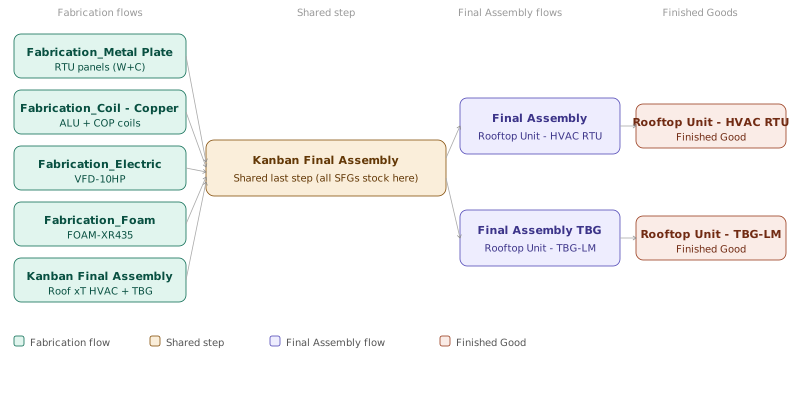
**Finished Goods:**
| Product | Flow |
| ----------------------- | ------------------ |
| Rooftop Unit - HVAC RTU | Final Assembly |
| Rooftop Unit - TBG-LM | Final Assembly TBG |
Both Final Assembly flows share the same steps. The SFGs consumed at each step are determined by Product Characteristics (Size and Color) defined on the material being produced.
**Semi-Finished Goods and their Fabrication Flows:**
| Flow | SFGs Produced |
| ------------------------- | ------------------------------------------------------------------------------------- |
| Fabrication_Metal Plate | RTU-LATERAL W, RTU-FRONT W, RTU-FRAME W, RTU-LATERAL C, RTU-FRONT C, RTU-FRAME C |
| Fabrication_Coil - Copper | ALU-COIL-4ROW, COP-COIL-4ROW |
| Fabrication_Electric | VFD-10HP |
| Fabrication_Foam | FOAM-XR435 |
| Kanban Final Assembly | Roof 10T HVAC, Roof 20T HVAC, Roof 30T HVAC, Roof 10T TBG, Roof 20T TBG, Roof 30T TBG |
Within the **Fabrication_Metal Plate** flow, the material follows one of two alternate sub-flows depending on the product color:
| Sub-Flow | Products |
| ------------------------- | --------------------------------------- |
| Fabrication_Paint White | RTU-LATERAL W, RTU-FRONT W, RTU-FRAME W |
| Fabrication_Paint Colours | RTU-LATERAL C, RTU-FRONT C, RTU-FRAME C |
All Fabrication flows share the same last step, **Kanban Final Assembly**. After production, all SFGs are stocked at this step and consumed from there into the respective Finished Good materials in the Final Assembly flows, according to the Product Characteristic conditions (Size and Color) defined on each BOM.
---
## Core Model - Functionalities
The following sections describe which MES functionalities are available in each Flow and Step of the Core Model. Tables are organized by Flow, with columns indicating whether the functionality belongs to the **Base**, **Engineering**, or **Quality** layer.
> **Note:** Quality functionalities are not yet available in this release. The Quality column is included for reference only.
---
### Fabrication Flows
#### Flow: Fabrication_Metal Plate

| Step | Base | Engineering | Quality |
| ---------------------------------------------------------------- | ------------------------------------------------------------------------ | -------------------------------------------------------------- | ------- |
| **PUNCH** | - Automatic Consumption
- BOM with By-Product & Shared Feeder
- Durables | - Recipe with Running Mode | - |
| **BEND** | - Durables | - Recipe
- Line Clearance on Changeover | - |
| *(Alternate Flow - Product Group = "Fabrication_Paint White")* | | | |
| **COATING** | - Automatic Consumption
- Minimum Time Constraint | - | - |
| **PLATE PAINTING** | - Automatic Consumption
- Shared Feeder
- Rework *(Limit by Step)* | - Recipe with Sub-Recipe
Step Certification *(Qualification)* | - |
| *(Alternate Flow - Product Group = "Fabrication_Paint Colours")* | | | |
| **PLATE COLORING** | - Automatic Consumption
- Shared Feeder
- Rework *(Limit by Reason)* | - Recipe
Step Certification *(Qualification)* | - |
| **Kanban Final Assembly** | - Materials stored in this step to be consumed in the Final Assembly Flow | - | - |
> **Note:** Line Clearance on Changeover at BEND requires Setup Characteristic = Recipe. A known product issue means this feature is not fully operational in this step at this time.
---
#### Flow: Fabrication_Coil - Copper

| Step | Base | Engineering | Quality |
| -------------------------- | ----------------------------------------------------------------------- | ------------------------------------------------------------------------------------------------------------------ | --------------- |
| **START COIL - COPPER** | - | Printable Document | - |
| **COIL BEND** | - Step with Conditions
- Durables
- Manual Consumption *(Retrieve RM)* | - Checklist linked with DC and BOM | - |
| **COPPER BEND** | - Step with Conditions
- Durables
- Manual Consumption *(Retrieve RM)* | - Checklist linked with DC and BOM | - SPC |
| **INDOOR BRAZE** | - Manual Consumption *(Retrieve RM)*
- Resource Check-in | - Line Clearance Always
- Checklist linked with BOM
- Resource Check-in with Certification *(Trainer and Trainee)* | - |
| **OUTDOOR BRAZE** | - Manual Consumption with Tolerance | - Checklist linked with DC and BOM
- Calculated DC Parameter | - |
| **COMPRESSOR TUB BRAZE** | - Split and Track-out | - Document
- Calculated DC Parameter | - |
| **COIL TREATMENT** | - Batch Management
- Minimum Time Constraint
- Rework *(Global Limit)* | - Recipe | - Inspection Plan |
| **Kanban Final Assembly** | - Materials stored in this step to be consumed in the Final Assembly Flow | - | - |
---
#### Flow: Fabrication_Electric

| Step | Base | Engineering | Quality |
| ------------------------- | ----------------------------------------------------------------------- | ------------------------------------------------ | ------- |
| **MAIN BOARD** | - Manual Consumption with Substitute *(Retrieve RM)* | - | - |
| **DOOR PREP** | - Manual Consumption *(Retrieve RM)*
- Resource Check-in | - Document
- Resource Check-in with Certification | - |
| **FILTER PREP** | - Manual Consumption *(Retrieve RM)* | - Checklist linked with DC and BOM | - SPC |
| **STAGING MB** | - Manual Consumption *(Retrieve RM)*
- Maximum Time Constraint | - Printable Document | - |
| **Kanban Final Assembly** | - Materials stored in this step to be consumed in the Final Assembly Flow | - | - |
> **Note:** The Resource **MAIN BOARD** is the Resource used by the [OPC UA Standard Integration Example](#opc-ua-standard-integration-example) to demonstrate the equipment integration.
---
#### Flow: Fabrication_Foam

| Step | Base | Engineering | Quality |
| ------------------------- | ----------------------------------------------------------------------- | --------------------------- | ----------------- |
| **FOAM PREP** | - Future Note | - Document | - |
| **FOAM** | - Manual Consumption *(Retrieve RM)* | - Data Collection
- Document | - SPC *(Attribute)* |
| **Kanban Final Assembly** | - Materials stored in this step to be consumed in the Final Assembly Flow | - | - |
---
### Flow: Final Assembly
> PCR = Product Characteristic Rule
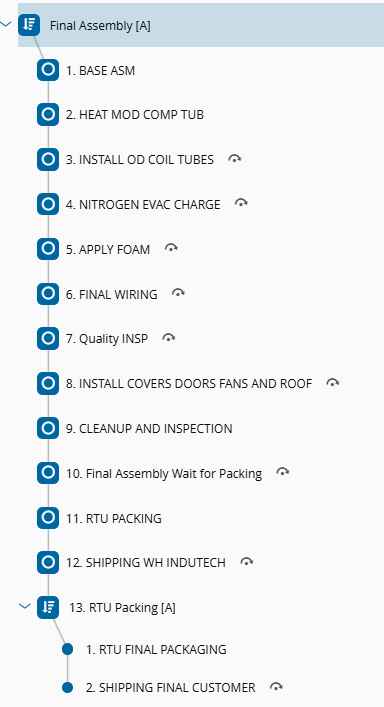
| Step | Base | Engineering | Quality |
| ------------------------------------------------------- | ------------------------------------------------------------------ | ------------------------------------------------------------------------------------------------------ | ------------- |
| **BASE ASM** | - Manual Consumption - BOM Variant *(Retrieve RM)* | - Line Clearance on Changeover
- Line Verification → PCR
- Checklist linked with BOM
- Document → PCR | - |
| **HEAT MOD COMP TUB** | - | - Step Certification
- Document → PCR | - |
| **INSTALL OD COIL TUBES** | - Manual Consumption - BOM Variant *(Retrieve RM)* | - Step Certification
- Document → PCR
- Checklist linked with BOM and DC | - |
| **NITROGEN EVAC CHARGE** | - Manual Consumption - BOM Variant *(Retrieve RM)* | - Step Certification
- Document → PCR
- Checklist linked with BOM | - |
| **APPLY FOAM** | - Manual Consumption - BOM Variant & Tolerance *(Retrieve RM)* | - Step Certification
- Document → PCR
- Checklist linked with BOM | - |
| **FINAL WIRING** | - Mixed Assemble - BOM Variant & Information Capture *(Retrieve RM)* | - Step Certification
- Document → PCR
- Checklist linked with BOM | - |
| **Quality INSP** | - Step with Conditions
- Future Hold | Data Collection with Calculated Parameters | - SPC |
| **INSTALL COVERS DOORS FANS AND ROOF** | - Mixed Assemble - BOM Variant & Fixed Quantity | - Step Certification
- Document → PCR
- Checklist linked with BOM | - |
| **CLEANUP AND INSPECTION** | - | - Printable Document
- Data Collection → PCR | - Sampling Plan |
| **Final Assembly Wait for Packing** | - | - | - |
| **RTU PACKING** | - Packing Level 1 | - Printable Document
- Data Collection | - |
| **SHIPPING WH INDUTECH** | - Automatic Shipping *(Low Code)* | - | - |
| *Sub-Flow: RTU PACKING (final packaging and shipping)* | | | |
| **RTU FINAL PACKAGING** | - Packing Level 2 | - Printable Document | - |
| **SHIPPING FINAL CUSTOMER** | - Future Action: Send e-mail with Notification
- Shipping | - | |
---
### Rework Flows
#### Rework Flow: RWK_Metal Plate

Linked to Steps:
- **PLATE COLORING** → Return Step: **PLATE COLORING**
- **PLATE PAINTING** → Return Step: **COATING**
| Step | Base | Engineering | Quality |
| ---------------- | ------------------------------- | ----------- | ------- |
| **RwPolish** | - Automatic Track-in *(Low Code)* | - | - |
| **RwInspection** | - | - Checklist | - |
---
#### Rework Flow: RWK_Coil

Linked to Steps:
- **COIL TREATMENT** → Return Step: **COIL TREATMENT**
| Step | Base | Engineering | Quality |
| ---------------- | ------------------------------- | ----------- | ------- |
| **RwPolish** | - Automatic Track-in *(Low Code)* | - | - |
| **RwInspection** | - | - Checklist | - |
---
### Material Logistics
#### Flow: Store InduTech Warehouse

| Step | Base | Engineering | Quality |
| ---------------------------- | ---------------------------- | ------------------ | --------------- |
| **Reception InduTech** | - | - Printable Document | - |
| **Incoming InduTech** | - | - | - Inspection Plan |
| **Store InduTech Warehouse** | - Automatic Store *(Low Code)* | - | - |
From the Store InduTech Warehouse step, Materials are moved via Transfer Requirements to specific Storage Resources in the production areas, based on Material Logistics configurations:
| Flow | Step |
| --------------------- | --------------------- |
| Kanban Fabrication | Kanban Fabrication |
| Kanban Final Assembly | Kanban Final Assembly |
| Kanban RTU Packing | Kanban RTU PACKING |
---
## Simplified Process Flow
The Basic flow consists of a simplified version of the Fabrication and Final Assembly flows, that allow an easier execution of the steps, using only the essential functionality required to characterize the scenario.
- **Basic Flow** - the proposal is to have a simple Flow with a set of extended quality and engineering functionalities that allows the user to focus mainly in the production process.
- The use case reuses the Copper Production and Final Assembly of an HVAC unit. The production is simplified as these particular productions are performed in a different department and the end Product has reduced complexity.
> **Note:** The Basic Flow model elements have the nomenclature "Basic" on the naming for the PRODUCT, FLOWS, STEP, MATERIALS.
### Product
**Semi-Finished Goods:**
| Product | Flow |
| ------------------- | ----------------------- |
| ALU-COIL-4ROW Basic | SFG_Coil - Copper Basic |
| COP-COIL-4ROW Basic | SFG_Coil - Copper Basic |
**Finished Goods:**
| Product | Flow |
| ----------------------------- | ---------------------------------- |
| Rooftop Unit - HVAC RTU Basic | FG_Final Assembly - HVAC RTU Basic |
#### Flow: SFG_Coil - Copper Basic
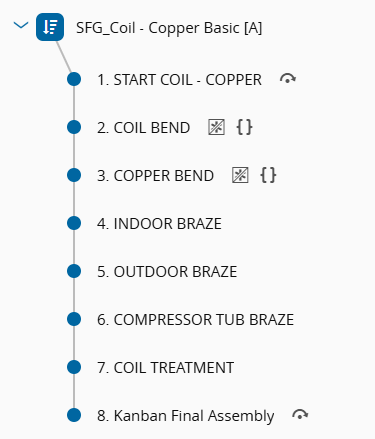
| Step | Base | Engineering | Quality |
| ------------------------- | ------------------------------------------------------------------------------------------- | ------------------------ | ------- |
| **START COIL - COPPER** | - | - Printable Document | - |
| **COIL BEND** | - Step with Conditions
- Durables
- Manual Consumption | - Checklist linked with DC | - |
| **COPPER BEND** | - Step with Conditions
- Durables
- Manual Consumption | - Checklist linked with DC | - SPC |
| **INDOOR BRAZE** | - Resource Check-in
Manual Consumption | - | - |
| **OUTDOOR BRAZE** | - | - | - |
| **COMPRESSOR TUB BRAZE** | - Split and Track-out | - Document | - |
| **COIL TREATMENT** | - Batch Management
- Minimum Time Constraint | - Recipe | - |
| **Kanban Final Assembly** | - Materials stored in this step to be consumed in the FG_Final Assembly - HVAC RTU Basic Flow | - | - |
---
#### Flow: FG_Final Assembly - HVAC RTU Basic
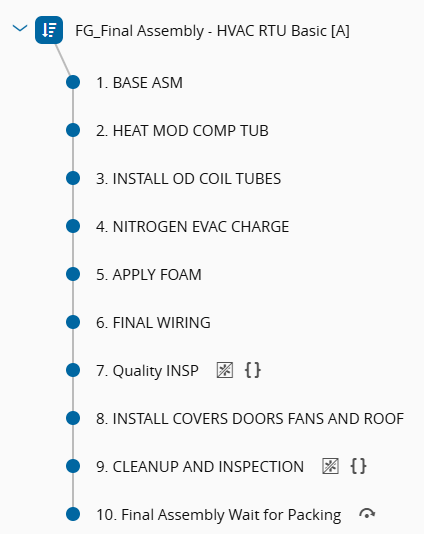
| Step | Base | Engineering | Quality |
| -------------------------------------- | -------------------------------------------- | ------------------------ | --------------- |
| **BASE ASM** | - | - Checklist with condition | - |
| **HEAT MOD COMP TUB** | - | - Step Certification | - |
| **INSTALL OD COIL TUBES** | - Manual Consumption - BOM Variant | - | - |
| **NITROGEN EVAC CHARGE** | - | - Step Certification | - |
| **APPLY FOAM** | - Manual Consumption - BOM Variant & Tolerance | - | - |
| **FINAL WIRING** | - | - | - |
| **Quality INSP** | - Future Hold | - Data Collection | - Inspection Plan |
| **INSTALL COVERS DOORS FANS AND ROOF** | - | - Step Certification | - |
| **CLEANUP AND INSPECTION** | - | - | - Sampling Plan |
| **Final Assembly Wait for Packing** | - | - | - |
---
### Other Functionalities - Core Model
**Security:**
- Roles, Users, Employees, Features, DataGroup, Report Folder
*See also: [Security](https://help.criticalmanufacturing.com/userguide/administration/security/) in the CM MES Documentation.*
**Attributes:**
- Material Attributes
*See also: [Attributes](https://help.criticalmanufacturing.com/userguide/general/screen-layout/page-sections/attributes/?h=attrib) in the CM MES Documentation.*
**State Model:**
- SEMI E58
- Custom Resource State Model
*See also: [State Models](https://help.criticalmanufacturing.com/userguide/administration/state_models/) in the CM MES Documentation.*
**Name Generators:**
- A set of Name Generators for Material, Split, and Expand operations
*See also: [Name Generators](https://help.criticalmanufacturing.com/userguide/administration/name_generator/) in the CM MES Documentation.*
**DEEs & Rules:**
- DEEs and Rules for Steps with Conditions
*See also: [DEE Actions](https://help.criticalmanufacturing.com/userguide/administration/dee_actions/) and [Rules](https://help.criticalmanufacturing.com/userguide/administration/rule/) in the CM MES Documentation.*
**Sorter Rules:**
- Sorter Rules for Resources, Materials and Material Logistics
*See also: [Sort Rule Set](https://help.criticalmanufacturing.com/userguide/business-data/sort-rule-set/) in the CM MES Documentation.*
**Alarm Management:**
- Notification triggered through Event Rules when a Material is put on Hold
- Notifications in Business Rules
- Notification when a Material reaches or leaves a Step
- Notification when a Material is sent to Rework
*See also: [Event Rules](https://help.criticalmanufacturing.com/userguide/administration/event-rules/) in the CM MES Documentation.*
**Business Rules:**
- Material is automatically stored in the Warehouse
- Material is automatically shipped to Facility "Warehouse InduTech" + Notification
- When sent to Rework, Material is automatically tracked-in to the Rework Station
*See also: [Business Workflows](https://help.criticalmanufacturing.com/userguide/low-code/business-workflow/) in the CM MES Documentation.*
**Calendar & Scheduling:**
- CalendarDay with holidays removed
- ShiftLogBook
*See also: [Calendar](https://help.criticalmanufacturing.com/userguide/business-data/calendar/) and [Shift Logbook](https://help.criticalmanufacturing.com/userguide/business-data/shift-logbook/) in the CM MES Documentation.*
**Material Logistics:**
- Material Logistics with Resource Automatic Replenishment
*See also: [Material Logistics](https://help.criticalmanufacturing.com/userguide/planning-and-logistics/material-logistics/) in the CM MES Documentation.*
**Partners & Compliance:**
- Business Partner
- Moisture Sensitive Level for Raw Materials
- Product Manufacturers
*See also: [Business Partner](https://help.criticalmanufacturing.com/userguide/business-data/business-partner/), [Moisture Sensitive Level](https://help.criticalmanufacturing.com/tutorials/modules/material-logistics/moisture-sensitive-level/?h=moisture) and [Product Manufacturers](https://help.criticalmanufacturing.com/userguide/business-data/product/manage_product_manufacturers/?h=manufactu) in the CM MES Documentation.*
**Reasons:**
- Reasons for Rework, Loss, Hold, Bonus, Defect
- Reason Repair Actions
- Global Rework Limit for Products
*See also: [Reason](https://help.criticalmanufacturing.com/userguide/business-data/reason/) in the CM MES Documentation.*
**Cost:**
- Cost context for Products, Steps, Resources, Employees and Calendar
*See also: [Material Costing](https://help.criticalmanufacturing.com/userguide/business-data/material/material_costing/?h=costi#material-cost-transactions) in the CM MES Documentation.*
**Other:**
- Material Defect (*see also: [Material Defects](http://help.criticalmanufacturing.com/tutorials/modules/materials-and-containers/materialdefects/?h=defect) in the CM MES Documentation*)
- Product Characteristics (*see also: [Product Characteristics](https://help.criticalmanufacturing.com/tutorials/modules/order-management/productcharacteristics/?h=charact) in the CM MES Documentation*)
- Storage Resources with and without Binning, with and without Floor Life Save
- Instruments with Capability Set (*see also: [Data Collection with Instruments](https://help.criticalmanufacturing.com/tutorials/modules/data-collection/electronic-data-collection/data_collection_with_instruments/?h=instrume) in the CM MES Documentation*)
- Resource Group
- Production Orders (*see also: [Production Orders](https://help.criticalmanufacturing.com/userguide/business-data/production-order/?h=instrume) in the CM MES Documentation*)
- Keyboard Shortcuts (*see also: [Keyboard Shortcuts](https://help.criticalmanufacturing.com/userguide/general/shortcuts/?h=shortcut) in the CM MES Documentation*)
- Layout for Step View and Resource View
- ResourceIdealCycleTime
- StepProductYieldAndCycleTimeContext
- Containers with Restrictions *(MaterialContainerTypeContext)*
---
## Engineering Model - Functionalities
The Engineering Model adds a layer of process control and traceability on top of the Core Model. The functionalities available per Step and Flow are the same regardless of whether Option A or Option B was used during setup. The difference between the two options lies exclusively in the setup process and in the Smart Table configurations that are pre-loaded: Option B includes additional Smart Table contexts that automatically associate Checklists, Data Collections, Documents and Durables to Materials by product, flow and step.
The Engineering column in all tables above reflects the Engineering Model content applicable to both options.
**Additional Engineering Model entities loaded across all Flows:**
- Checklists
*See also: [Checklist](https://help.criticalmanufacturing.com/userguide/business-data/checklist/) in the CM MES Documentation.*
- Data Collections and Data Collection Limit Sets *(DCLS)*
*See also: [Data Collection](https://help.criticalmanufacturing.com/userguide/business-data/data-collection/) in the CM MES Documentation.*
- Documents
*See also: [Document](https://help.criticalmanufacturing.com/userguide/business-data/document/) in the CM MES Documentation.*
- Recipes and Sub-Recipes
*See also: [Recipe](https://help.criticalmanufacturing.com/userguide/business-data/recipe/) in the CM MES Documentation.*
- Employee Qualifications and Certifications
*See also: [Qualification](https://help.criticalmanufacturing.com/userguide/business-data/qualification/) and [Certification](https://help.criticalmanufacturing.com/userguide/business-data/certification/) in the CM MES Documentation.*
- Setup Matrix for Line Clearance configurations
*See also: [Setup and Line Clearance](https://help.criticalmanufacturing.com/tutorials/modules/resource-tracking/setuplineclearance/?h=line+clear) in the CM MES Documentation.*
- Qualification Checks
*See also: [Qualification Check](https://help.criticalmanufacturing.com/userguide/business-data/qualification-check/) in the CM MES Documentation.*
- Label Specifications and Printable Documents
*See also: [Printable Document](https://help.criticalmanufacturing.com/userguide/business-data/printable-document/) in the CM MES Documentation.*
---
## Industrial Equipment Template - Functionalities
The Industrial Equipment Template Master Data contains new Products, Flows and Steps, so that the operator can test the Process Activities and the Checklist Execution Cockpit features.
> **Note:** The Industrial Equipment Template model elements have the nomenclature "PA" on the naming for the Product, Flows, Steps and Production Orders.
### Product
**Finished Goods:**
| Product | Flow |
| -------------------------- | --------------------- |
| Rooftop Unit - HVAC RTU PA | Final Assembly PA |
| Rooftop Unit - TBG-LM PA | Final Assembly TBG PA |
The Production Orders **PO FA.0070 PA** to **PO FA.0085 PA** are created for these Products.
#### Flow: Final Assembly PA

| Step | Process Activity Definition |
| ----------------------------------------- | --------------------------- |
| **BASE ASM PA** | - |
| **HEAT MOD COMP TUB PA** | - |
| **INSTALL OD COIL TUBES PA** | PAD_3 Assembly IE HVAC PA |
| **NITROGEN EVAC CHARGE PA** | - |
| **APPLY FOAM PA** | PAD_4 Assembly IE HVAC PA |
| **FINAL WIRING PA** | - |
| **Quality INSP PA** | - |
| **INSTALL COVERS DOORS FANS AND ROOF PA** | PAD_5 Assembly IE HVAC PA |
| **CLEANUP AND INSPECTION PA** | - |
| **Final Assembly Wait for Packing PA** | - |
---
#### Flow: Final Assembly TBG PA

| Step | Process Activity Definition |
| ----------------------------------------- | --------------------------- |
| **BASE ASM PA** | - |
| **HEAT MOD COMP TUB PA** | - |
| **INSTALL OD COIL TUBES PA** | PAD_3 Assembly IE TBG PA |
| **NITROGEN EVAC CHARGE PA** | - |
| **APPLY FOAM PA** | PAD_4 Assembly IE TBG PA |
| **FINAL WIRING PA** | - |
| **Quality INSP PA** | - |
| **INSTALL COVERS DOORS FANS AND ROOF PA** | PAD_5 Assembly IE TBG PA |
| **CLEANUP AND INSPECTION PA** | - |
| **Final Assembly Wait for Packing PA** | - |
---
### Process Activity Definitions
Each Process Activity Definition is shown in the Flow tables above in its Main Step. The range of Steps where it can be performed is defined by its Earliest and Latest Steps.
| Process Activity Definition | Earliest Step | Main Step | Latest Step | Checklist | Role | Certification |
| --------------------------- | ----------------------- | ------------------------------------- | ------------------------------------- | --------------------- | ----------------- | ------------------- |
| PAD_3 Assembly IE HVAC PA | HEAT MOD COMP TUB PA | INSTALL OD COIL TUBES PA | APPLY FOAM PA | CL-Assembly PAD3 HVAC | InduTech Operator | - |
| PAD_4 Assembly IE HVAC PA | NITROGEN EVAC CHARGE PA | APPLY FOAM PA | FINAL WIRING PA | CL-Assembly PAD4 HVAC | - | BAY 2 Certification |
| PAD_5 Assembly IE HVAC PA | FINAL WIRING PA | INSTALL COVERS DOORS FANS AND ROOF PA | INSTALL COVERS DOORS FANS AND ROOF PA | CL-Assembly PAD5 HVAC | InduTech Operator | BAY 3 Certification |
| PAD_3 Assembly IE TBG PA | HEAT MOD COMP TUB PA | INSTALL OD COIL TUBES PA | APPLY FOAM PA | CL-Assembly PAD3 TBG | InduTech Operator | - |
| PAD_4 Assembly IE TBG PA | NITROGEN EVAC CHARGE PA | APPLY FOAM PA | FINAL WIRING PA | CL-Assembly PAD4 TBG | - | BAY 2 Certification |
| PAD_5 Assembly IE TBG PA | FINAL WIRING PA | INSTALL COVERS DOORS FANS AND ROOF PA | INSTALL COVERS DOORS FANS AND ROOF PA | CL-Assembly PAD5 TBG | InduTech Operator | BAY 3 Certification |