Shift Logbook#
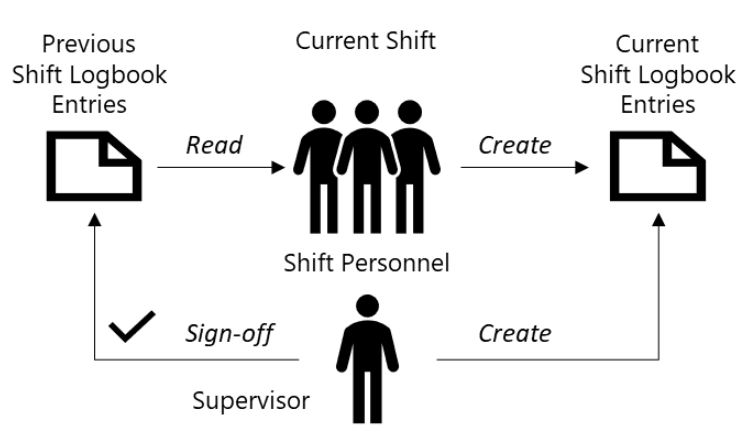
In Critical Manufacturing MES, a Shift Logbook captures and passes shift-relevant information from one team to the next. This process is also known as shift pass-down.
The Shift Logbook belongs to the Labor Management module. When Shift Logbook is enabled on an Area and a valid Calendar with Shift Definitions is configured, the system creates a new Shift Logbook automatically at the beginning of each shift.
Access Points#
You can access Shift Logbooks from:
- Manufacturing > fabExplorer, under the relevant Area.
- The Area details page, in the Shift Logbooks section.
- Business Data > Shift Logbook.
Shift Logbook Model#
| Entity | Description |
|---|---|
| Shift Logbook | Main object created automatically per Area and shift. |
| Shift Logbook Entry | Record created by an operator or supervisor during or after the shift. |
| Calendar Day | Defines the working day and time scope for the Shift Logbook. |
| Shift Definition Shift | Defines start and end time for the shift period. |
| Team | Optional assignment that identifies the team on duty. |
| Area | Logical owner of Shift Logbooks. |
Table: Shift Logbook model entities
Info
Sub-areas do not have their own Shift Logbooks.
Why Shift Logbook Is Important#
In multi-shift manufacturing operations, important information can be lost between shifts if handover is informal. Shift Logbook provides a structured and auditable process.
| Benefit | Operational Impact |
|---|---|
| Structured shift pass-down | Prevents knowledge loss through a formal sign-off process. |
| Categorized and prioritized entries | Helps incoming teams identify critical items quickly. |
| Resource-level linkage | Connects observations to a specific Resource history. |
| Formal acknowledgement | Records accountability through supervisor sign-off. |
| Immutable audit trail | Signed-off logbooks are terminated and preserved for audits. |
| Attachment support | Supports evidence and supporting files at logbook level. |
| Email distribution | Sends signed-off logbooks to configured recipients. |
Table: Shift Logbook operational benefits
Security#
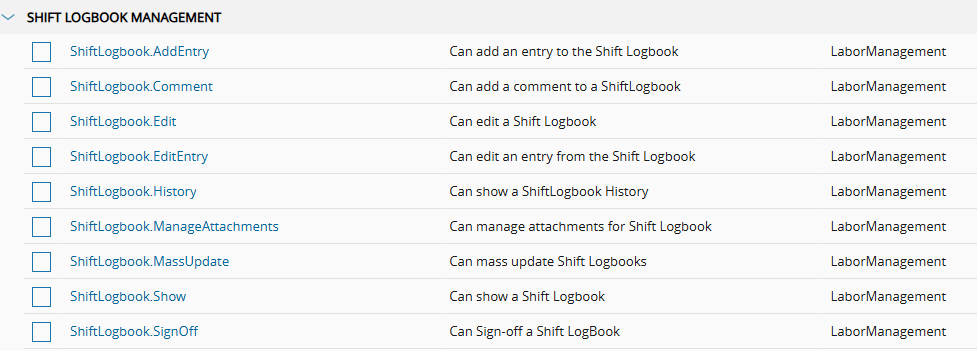
Permissions for Shift Logbook management are available under Administration > Security > Feature, in the SHIFT LOGBOOK MANAGEMENT group.
Confirm that the Labor Management module is licensed and active before you execute this tutorial.
Next Steps#
- Complete the setup in Configuration.
- Execute the scenarios in Scenarios.