---
pdfexport: true
alias: tutorials-productcharacteristics
timetoread: true
glightbox: false
tutorial: full
description: "Product characteristics define configurable attributes impacting production processes and data management"
---
# Product Characteristics
In a manufacturing environment, products often come with various configurable characteristics that demand for flexibility in production. These characteristics define specific attributes of a product, such as material type, size, color, or additional features. These different configurations can play a key role in managing BOM Variants and process-related entities, including services, documents, checklists, and data collections, among others.
## Overview
This tutorial will walk you through the setup and usage of the **Product Characteristics** functionality in Critical Manufacturing MES.
We will explore:
- **BOM** variants
- **Product** Characteristic and Rules, including context for **Data Collection**, **Checklists**, and **Documents**
- Single Alternate **Flows** with condition expressions
- **Checklist** Items with condition expressions
## Scenario
For this scenario, consider a Louvers **Product**, an air conditioning device. The product structure can vary based on two key characteristics:
- Number of blades - either 3 or 4
- Finishing type - Paint, Polish, or Varnish
As a result, a single product (Louvers) can have six different configurations based on these characteristics.
This tutorial will follow the production **Flow** outlined below:
```mermaid
flowchart LR
A[Assembly Step] --> B{Metal Finish}
B --> |Varnish|C[Varnish Finish Step]
B -->|Paint| D[Paint Finish Step]
B -->|Polished| E[Polished Finish Step]
classDef mermaid_title fill:#fafafa, stroke:#fafafa, stroke-width:0x, font-size:100%, font-weight:200;
classDef mermaid_start fill:#fafafa, stroke:#fafafa, color:#fafafa, stroke-width:0x, font-size:100%, visibility: hidden;
classDef mermaid_initial_state fill:#274b76, stroke-width:0px, color:#fafafa, font-size:100%;
class Title mermaid_title
class Start mermaid_start
class A,B,C,D,E mermaid_initial_state
```
### Assembly Step
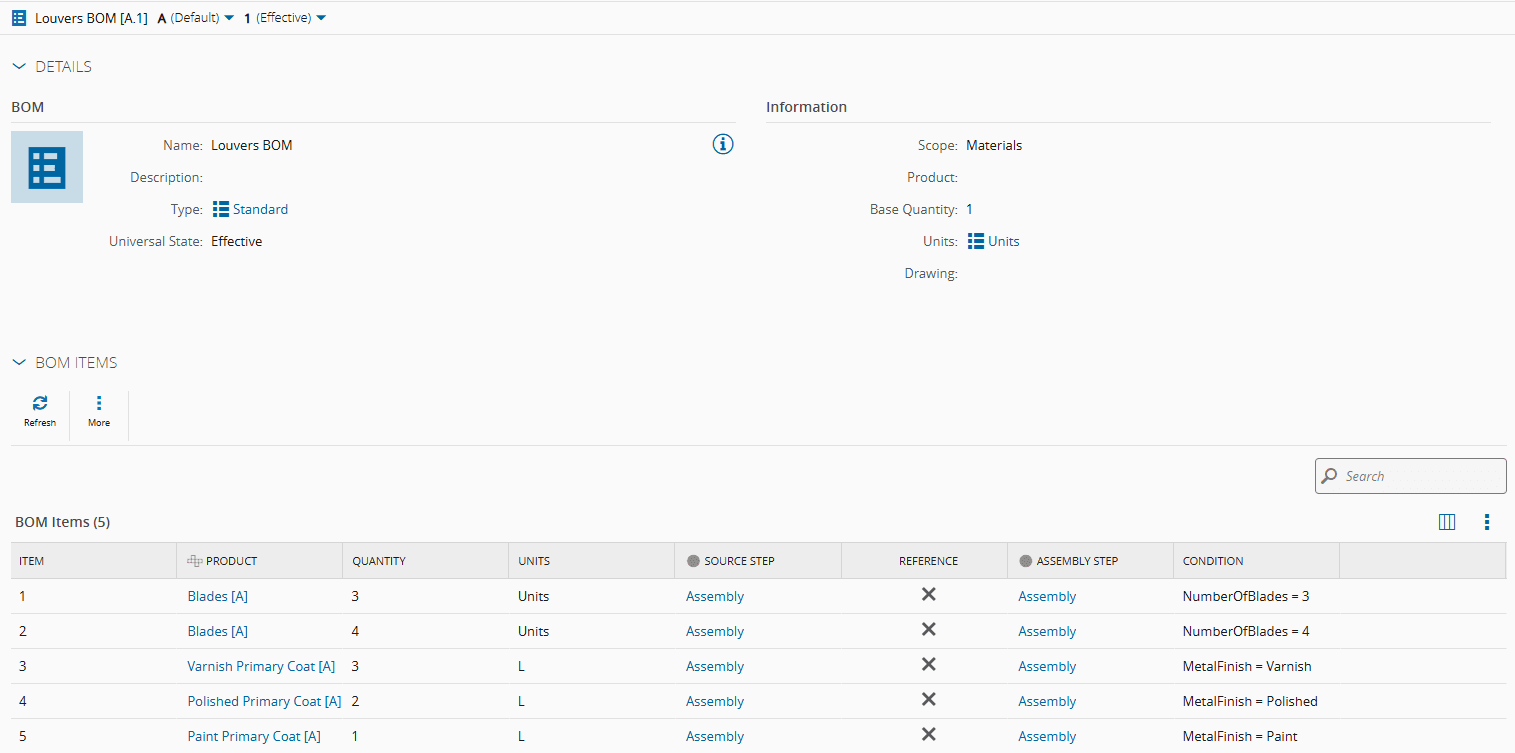
In the Assembly **Step**, two major consumptions must be considered:
- Blades - The quantity varies depending on the number of blades.
- Primary Coat - The type of coating depends on the metal finishing type.
```mermaid
graph TD
A[Louvers] --> B{Number Of Blades}
B -->|3| D[Blade
BOM Item Consumption
3 Units]
B -->|4| E[Blade
BOM Item Consumption
4 Units]
A --> C{Metal Finish}
C -->|Paint| G[Paint Primary Coat
BOM Item Consumption
1 L]
C -->|Polished| H[Polished Primary Coat
BOM Item Consumption
2 L]
C -->|Varnish| F[Varnish Primary Coat
BOM Item Consumption
3 L]
classDef mermaid_title fill:#fafafa, stroke:#fafafa, stroke-width:0x, font-size:100%, font-weight:200;
classDef mermaid_start fill:#fafafa, stroke:#fafafa, color:#fafafa, stroke-width:0x, font-size:100%, visibility: hidden;
classDef mermaid_initial_state fill:#274b76, stroke-width:0px, color:#fafafa, font-size:100%;
class Title mermaid_title
class Start mermaid_start
class A,B,C,D,E,F,G,H mermaid_initial_state
```
Additionally, for each combination of Number of Blades and Metal Finishing, specific **Checklist**, **Data Collection**, and **Document** need to be triggered.
### Finishing Step
In the Finishing **Step**, there will be a single **Checklist**, but the items displayed will vary based on the **Product** Characteristics. The **Checklist** will have six different items, each corresponding to a unique Number of Blades and Metal Finishing combination.
## Modeling
In this section, we will build the model to accommodate **Product Characteristics** and their impact on context variations.
In the following video, we cover:
- **Product Characteristics** Management - Defining and handling **Product** attributes.
- **Product Rule** Configuration - Defining context rules for **Data Collections**, **Checklists**, and **Documents**.
- **BOM** Configuration - Setting up the Bill of Materials and its variants.
- Single Alternate **Flow** Configuration - Configuring condition expressions for process variations.
- **Checklist** Item Configuration - Setting up conditional **Checklist** items.
!!! warning
Basic model configurations will not be covered in this video.
{% set video_id = 'bb75e70bdfa3e19833725d71b45f669a' %}
{% include-markdown 'includes/cloudflare_stream.md' %}
!!! note
You may have noticed that for the Assembly Step, where Product Characteristic Rules were set, there was no Smart Table context configuration for Data Collection, Checklists, or Documents. This is because when a Production Order is created a new entry is automatically generated based on its Product Characteristics.
### Product Characteristics
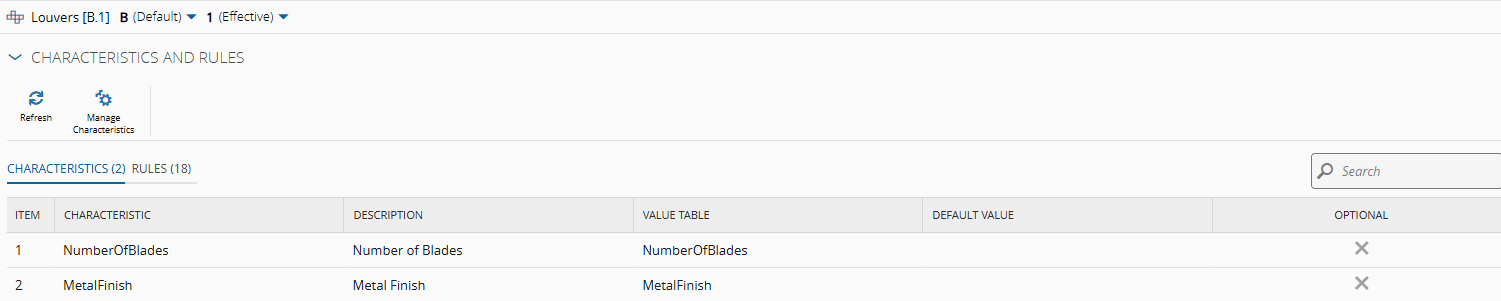
The first crucial configuration is to [[user-guide-manage-product-characteristics]] of the **Product** , where specific characteristics are defined. This data can have free-text values or reference predefined values from Lookup Tables.
!!! info "Useful documentation"
- [[tutorials-howto-createlookuptable]]
- [[tutorials-howto-editlookuptable]]
### BOM
When performing [[user-guide-manage-bomitems]] of the Material **BOM**, both the quantities and the items themselves can vary depending on the characteristics of the **Product**.
In more complex scenarios, these variations may depend on a combination of multiple characteristics rather than just one. For example, in this scenario, the Blades BOM item could vary based on both the Number of Blades and the Metal Finish.
!!! info "Useful documentation"
- [[tutorials-howto-createbom]]
- [[tutorials-howto-managebomitems]]
### BOM Context
Since the **BOM** remains the same across all **Product** variations, and the BOM Items account for those variants, it can be configured in the [[bomcontext-st]] Smart Table.

!!! info "Useful documentation"
- [[tutorials-howto-addvaluetosmarttable]]
### Data Collection Example
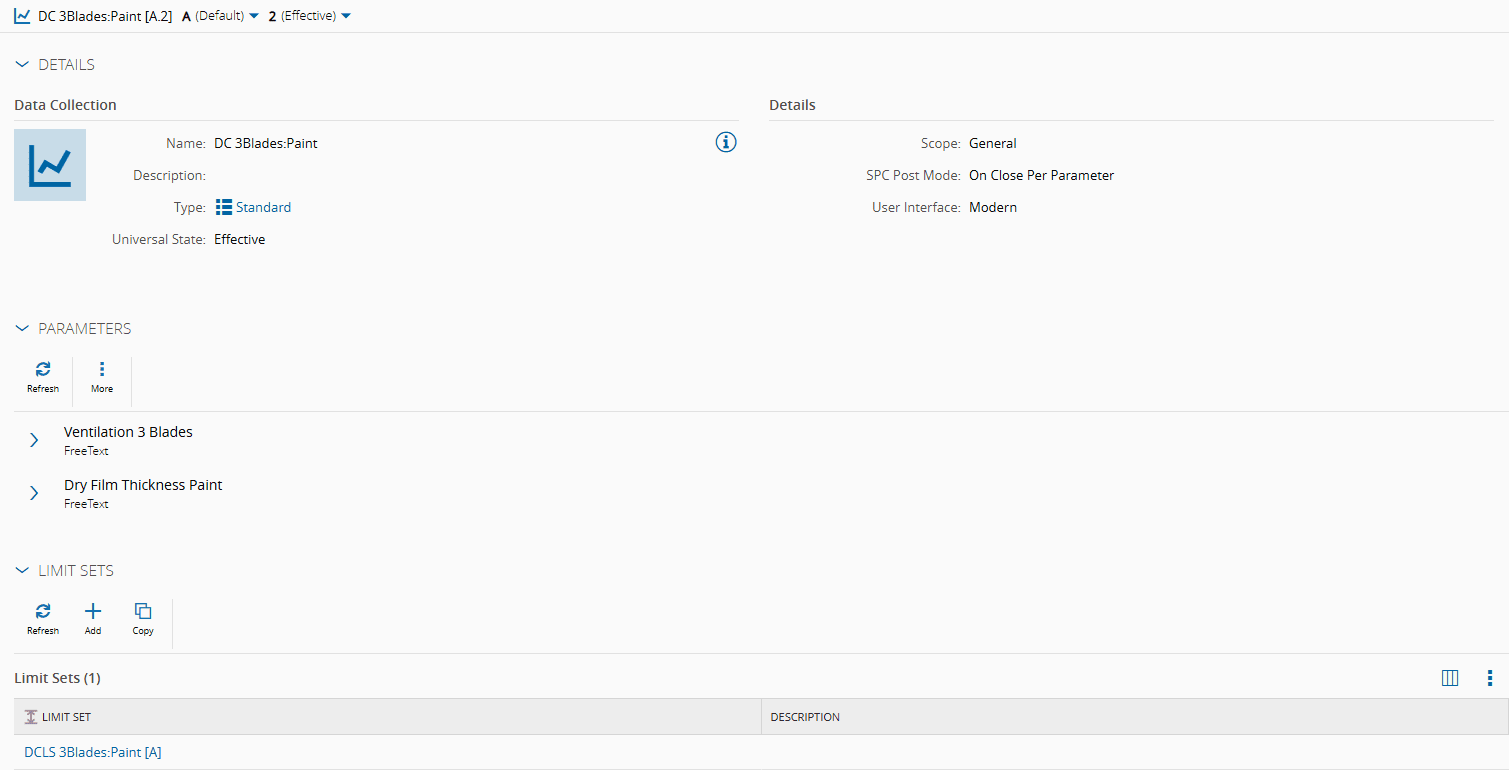
There is a **Data Collection** and a **Data Collection Limit Set** to be triggered for each combination of characteristics.
!!! info "Useful documentation"
- [[tutorials-howto-createparameter]]
- [[tutorials-howto-createdatacollection]]
- [[tutorials-howto-createdatacollectionlimitset]]
### Document Example
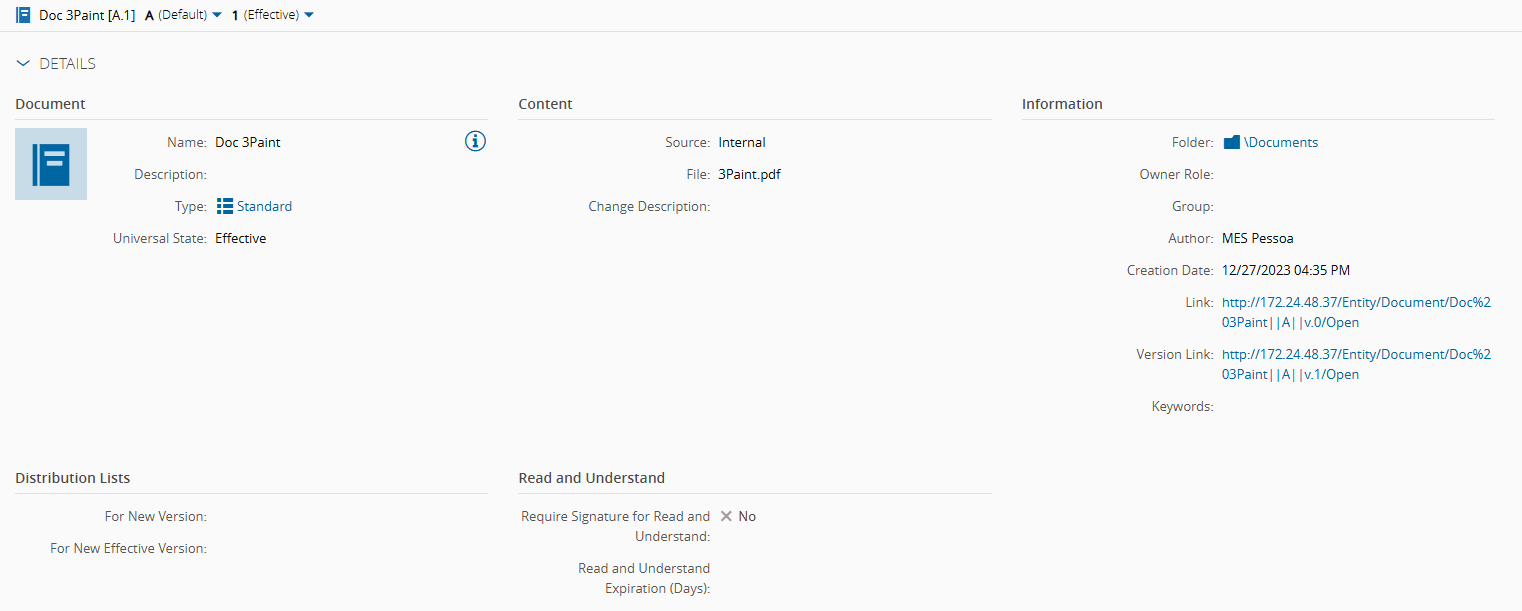
There is a **Document** to be triggered for each combination of characteristics.
!!! info "Useful documentation"
- [[tutorials-howto-createdocument]]
### Checklist Example: Assembly step
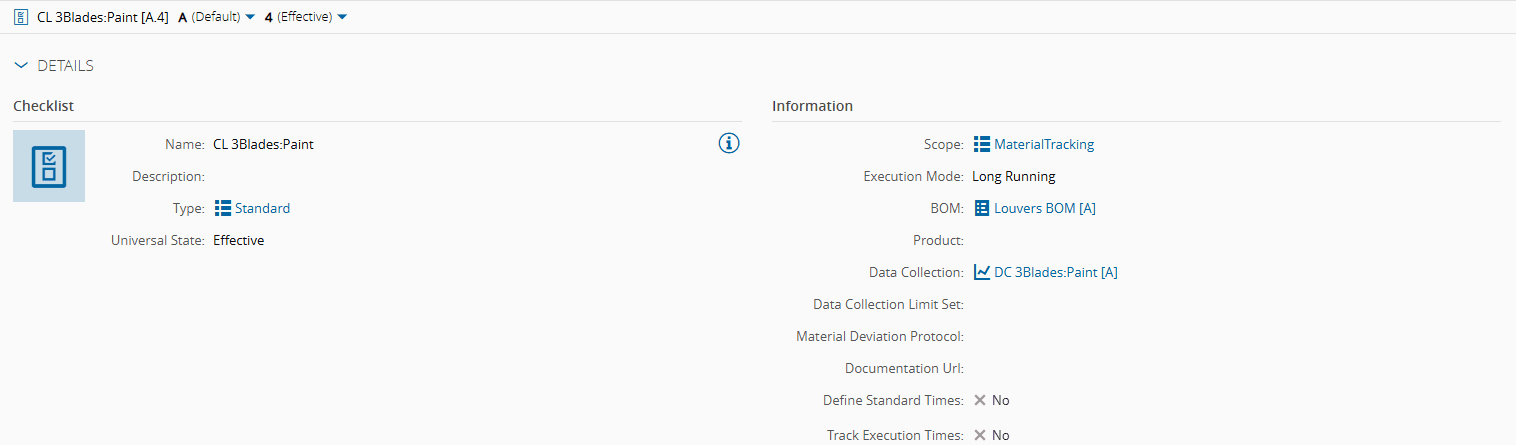
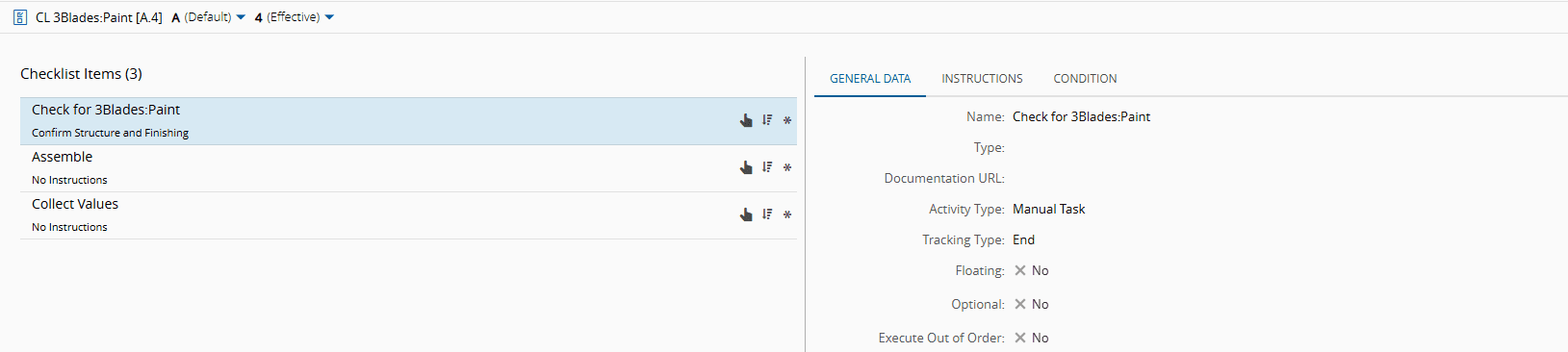
For the Assembly Step, a **Checklist** needs to be triggered for each combination of characteristics. This **Checklist** consists of tree items: a generic manual task, a **BOM** assembly manual task, and a **Data Collecion** manual task.


!!! info "Useful documentation"
- [[tutorials-howto-material-createchecklist]]
### Product Rules
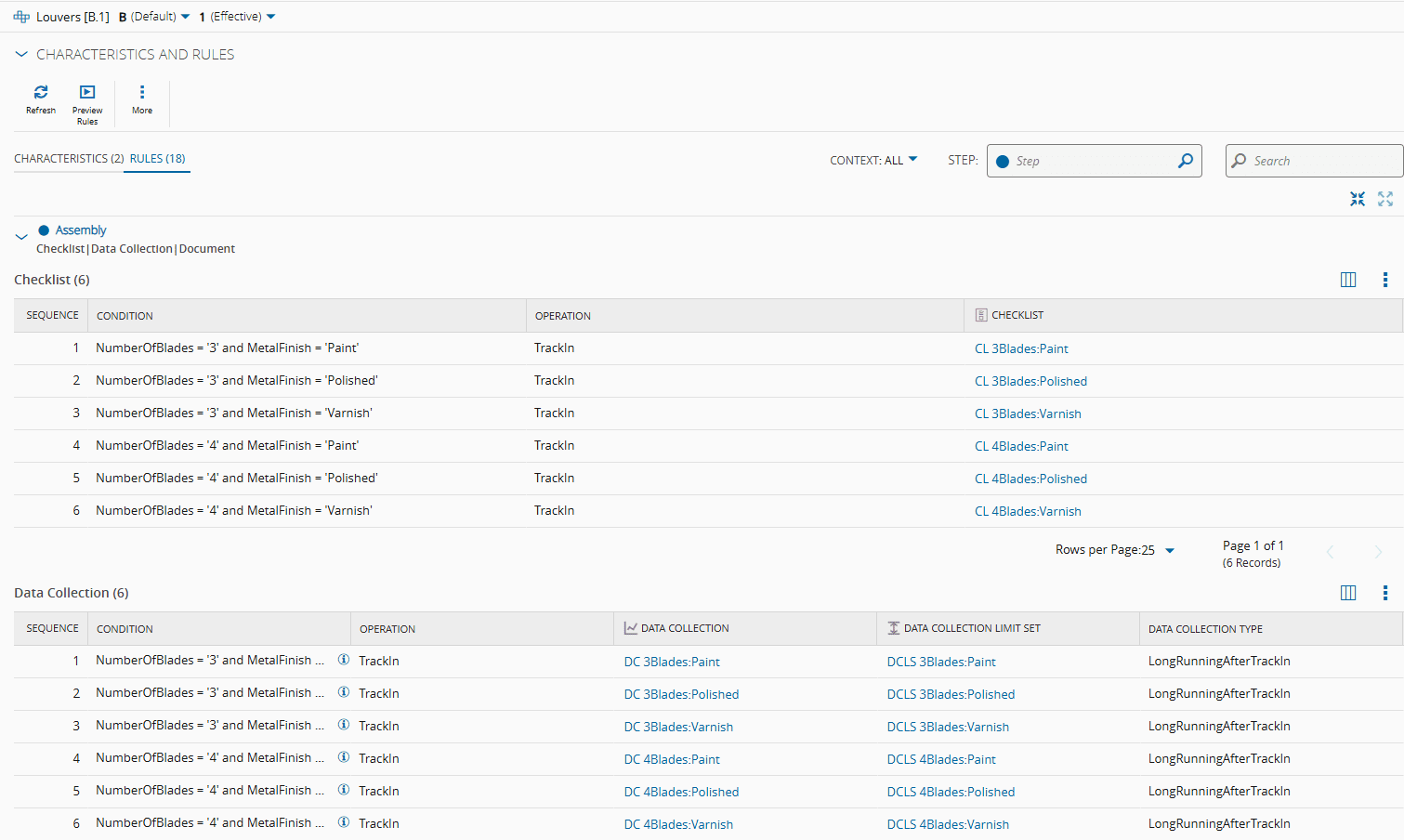
Considering all the necessary variations, the **BOM** configuration already accounts for the product configuration variants.
The setup for **Data Collection**, **Documents**, and **Checklists** is managed by performing [[user-guide-manage-product-rules]] on the page of the main **Product**.

### Checklist Example: Finishing Step
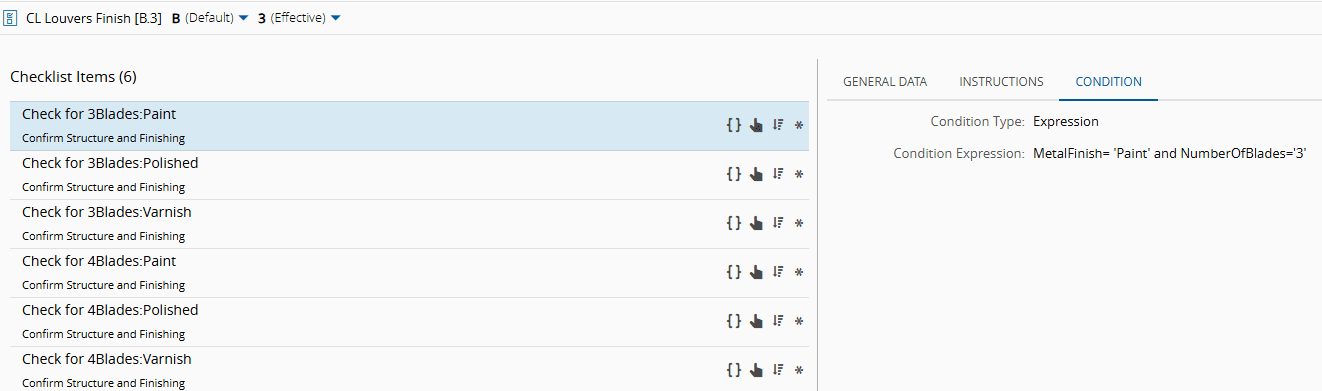
For all Finishing Steps, the same **Checklist** is triggered, but the displayed items vary based on the **Product Characteristics** combination. Each of the six items has a condition expression that defines its specific combination.
![Screenshot showing a checklist with items "CLlowers", "Fe sh", "[B3]", "Cetst e", and "Eee y" in a finished state.](images/pc_checklistfinish1.png)
!!! info "Useful documentation"
- [[tutorials-howto-material-createchecklist]]
### Material Checklist Context
The Finishing **Checklist** must be included in the [[materialchecklistcontext-st]] Smart Table, as its configuration already determines which items will be displayed.

!!! info "Useful documentation"
- [[tutorials-howto-addvaluetosmarttable]]
### Flow
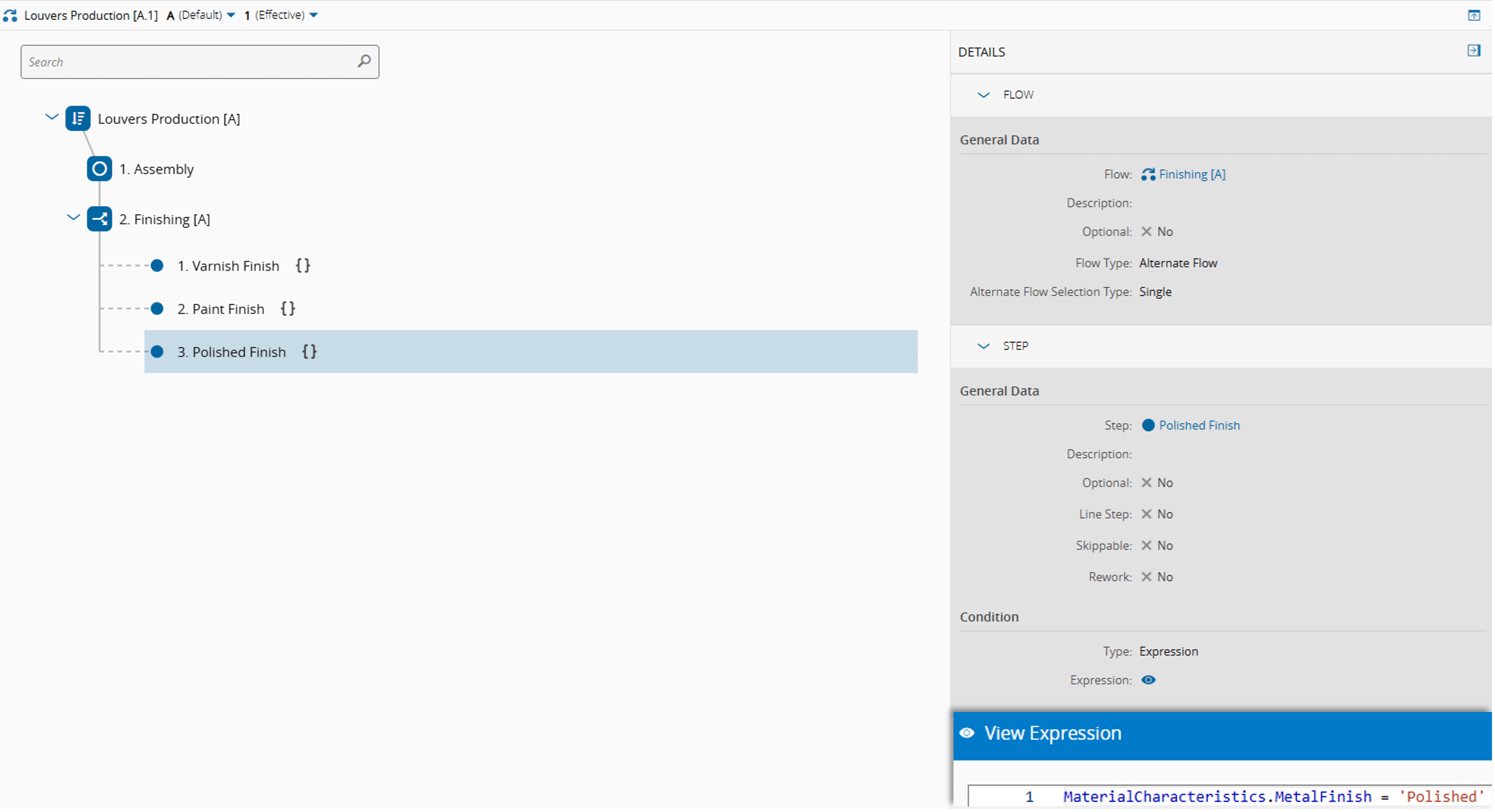
The **Flow** begins with an Assembly **Step**, after which the **Material** enters a Single Alternate Flow. Based on its characteristics, it is directed to one of three available steps.
!!! info "Useful documentation"
- [[tutorials-howto-createflow]]
### Modeling Notes
#### Managing Rules
When managing product rules, multiple entities can be selected to define a context rule, including:
- [[user-guide-bom-page]] for Material or Durable scope
- [[user-guide-checklist-page]]
- [[user-guide-data-collection-page]]
- [[user-guide-document-page]]
- [[user-guide-inspection-plan-page]]
- [[user-guide-recipe-page]] and Recipe Parameter
- [[user-guide-service-page]]
#### Expressions for Rules
Here are some more examples of Product Characteristic Rules:
- `NumberOfBlades>='4' and MetalFinish!='Varnish'`: Applies when the product has 4 or more blades, but the metal finish is not varnish
- `NumberOfBlades>'3' and (MetalFinish ='Polished' or MetalFinish ='Paint')`: Applies when the product has more than 3 blades and the metal finish is either polished or painted
- `(NumberOfBlades='4' or NumberOfBlades ='3') and MetalFinish!='Paint'`: Applies when the product has 4 or 3 blades, as long as the metal finish is not painted.
For more details on JSONata query syntax for Product Characteristic Rule Conditions, see [[user-guide-manage-product-rules]] or [JSONata Homepage](https://jsonata.org/).
#### GUI Element Default Value
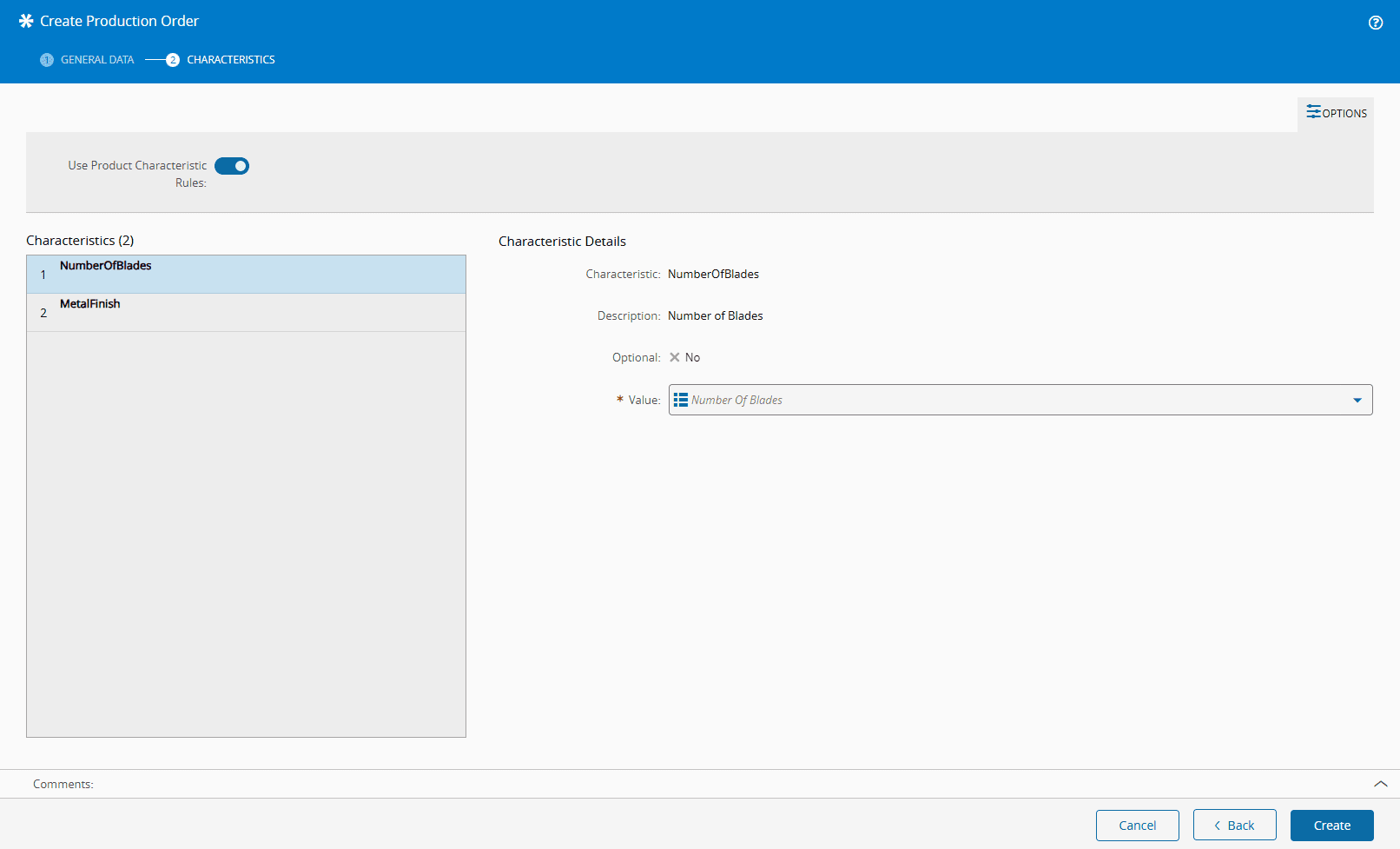
When a **Production Order** is created and the **Product** has characteristics, there is an option to "Use Product Characteristic Rules". If this setting is enabled, the system automatically generates a new entry in the Smart Tables involved in the Product Rule Context, based on the **Product Characteristics** assigned to the **Production Order**.
This option can have a default value (true or false), which can be set in the [[guielementdefaultvalue-gt]] Table under: `ProductionOrder.Create` context, `UseProductCharacteristicRules` element.
## Execution
In this section, we will follow the configured model in action, from **Production Order** creation to **Flow** completion.
{% set video_id = 'f6f81944281311c2cb2fde665e015371' %}
{% include-markdown 'includes/cloudflare_stream.md' %}
If the configuration is complete and you need a summary of the existing rules for a specific **Product Characteristic** combination, the Preview option provides that overview.
{% set video_id = 'beb82f1e058df8f26df7ba98b411d776' %}
{% include-markdown 'includes/cloudflare_stream.md' %}
### Execution Notes
#### Inheritance and Characteristics Change
- When a **Product** of a **Production Order** has characteristics and rules, an entry is automatically created in the Smart Tables upon its creation (example of the Material Checklist, Document and Data Collection Context of the scenario of this tutorial)
- If the **Product Characteristic** values are modified, the system updates the corresponding Smart Tables entry to reflect the new contexts. These high-precedence key rows are resolved when processing **Materials** associated with that **Production Order**
- When a **Material** is created through the **Production Order**, it inherits the **Product Characteristic** values.
!!! Warning
If the Product Characteristic values in the Material are changed and no longer match the Production Order, the required entities associated with Smart Tables may not be triggered correctly.
#### Context Conflicts
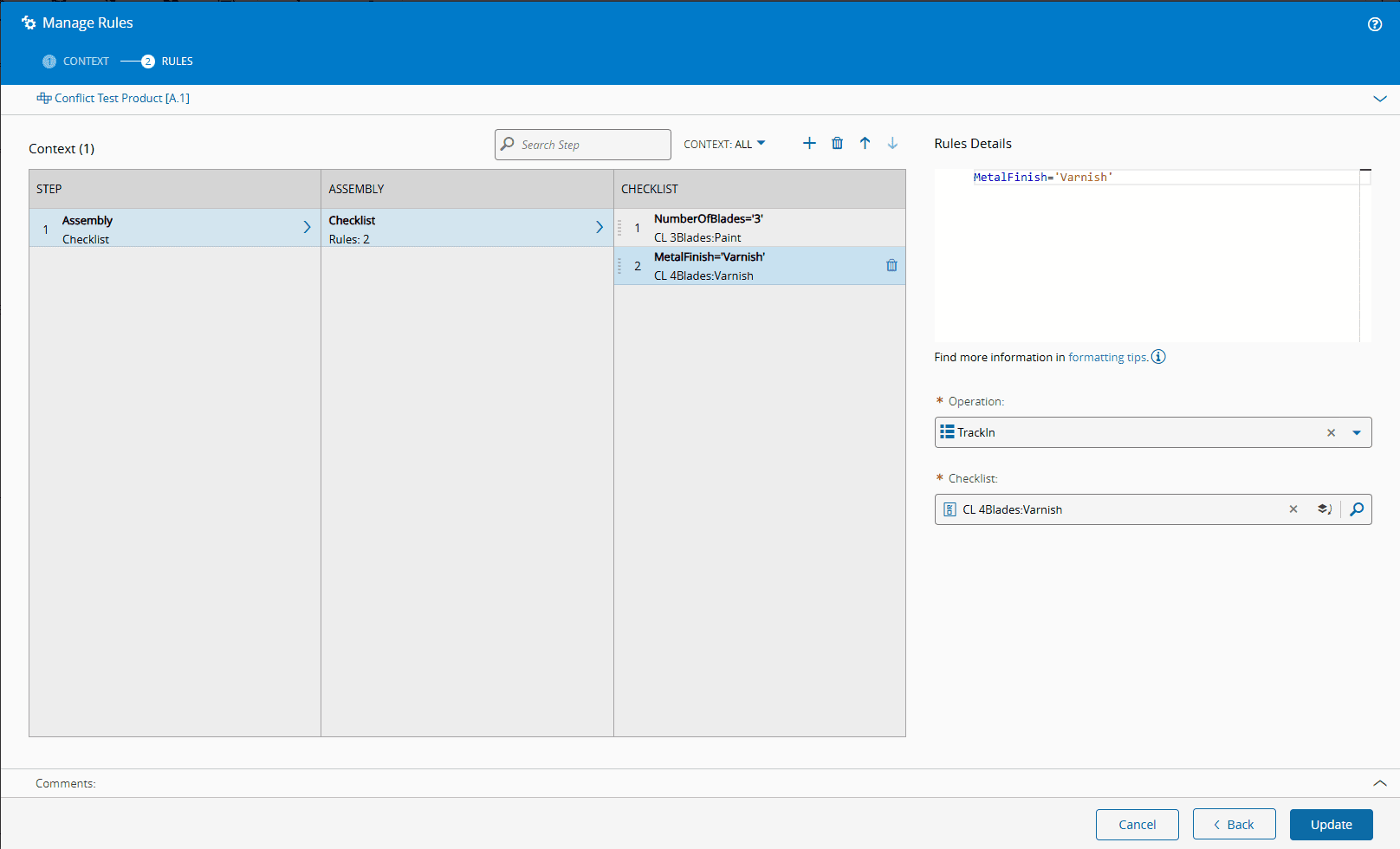
To prevent conflicts when multiple rules apply to the same **Step** and context, the system uses the rule sequence to determine the evaluation order.
To illustrate this, consider a **Production Order** where the **Product Configuration** has 3 blades and a varnish metal finish. The following rules are defined:
- Rule 1: If the number of blades is 3, the system needs to display the checklist "CL 3Blades:Paint".
- Rule 2: If the metal finis is varnish, the system needs to display the checklist "CL 4Blades:Varnish".
Since both rules apply, this would create a conflict. To resolve this, the system evaluates rules in sequence and applies the first one that evaluates to true. In this case, the system will add the CL "3Blades:Paint" checklist to the [[materialchecklistcontext-st]], and the second rule is ignored.
## Master Data
This is the [Master Data file](masterdatafile/pc_masterdata.zip) used to create this model.
Please Note:
- This feature is available in version 11.0.
- The model was created in version 11.1.
- At the time this tutorial was written, the Master Data file should be uploaded in two phases:
- Phase I: Load the entire file excluding `ProductCharacteristicRule`.
- Phase II: Load the entire file or only `Product` and `ProductCharacteristicRule`.