---
pdfexport: true
alias: tutorials-flowmodeling
timetoread: true
description: "The documentation outlines core concepts for a manufacturing flow model, defining terms like Step, Flow, and Product, and illustrating their"
---
# Creating a Flow Model
## Overview
The following table defines some key concepts that are relevant for this tutorial:
| Concept | Description |
|-------------|---------------------------------------|
| **Step** | A **Step** is the smallest process tracking unit for a **Material**.|
| **Flow** | A **Flow** defines a sequence of **Steps** that a certain **Material** must follow. It’s possible to define a default **Flow** for every **Product** and **Product Group** that will be assigned automatically by the system when first creating a **Material** of that **Product**. A **Flow** can contain **Flow Items** of type **Flow** or **Step**. Since a **Flow** may contain duplicate **Flow Items**, the specific position within the **Flow** is called a **Flow Path** and it has a unique address within the **Flow**. |
| **Product** | A **Product** is a specification of what a current **Material** is or what it’s intended for the **Material** to become. A **Product** being a specification has no physical existence.|
| **Material** | A **Material** is a physical instantiation of a **Product** and it has a quantity associated with it. A **Material**, in Critical Manufacturing MES, is a very generic object and it can represent raw materials, semi-finished and finished goods, durables and work-in-progress (WIP). In addition to a reference to a **Product**, it is associated with a **Flow**, a **Step**, and a **Facility**.|
| **Service** | A **Service** is a certain process capability that is required by a **Material** for a certain context, and that are provided by **Resources**. When a **Resource** provides the **Service** that is required by the **Material**, the **Material** can be dispatched and processed at that **Resource**.|
| **Reason** | A **Reason** is used to categorize losses and bonuses as well as to justify Reworks, Off-Flows and Holds.|
Table: Core concepts
The next figure describes the simplified Flow object model:
```mermaid
graph TD
A1[Flow] -.- A2[Child Flow]
A1 -.- A3[Step]
A3 --> A4[Reason]
classDef mermaid_title color:#000, fill:#fafafa, stroke:#fafafa, stroke-width:0x, font-size:100%, font-weight:200;
classDef mermaid_start color:#000, fill:#fafafa, stroke:#fafafa, color:#fafafa, stroke-width:0x, font-size:100%, visibility: hidden;
classDef mermaid_businessdata color:#000, fill:#65CDE8, stroke:#65CDE8, stroke-width:0px, font-size:100%;
classDef mermaid_nonbusinessdata color:#000, fill:#B7DEE8, stroke:#B7DEE8, stroke-width:0px, font-size:100%;
classDef mermaid_entity color:#000, fill:#FB9F53, stroke:#FB9F53, stroke-width:0px, font-size:100%;
classDef mermaid_entitylinked color:#000, fill:#FCD5B5, stroke:#FCD5B5, stroke-width:0px, font-size:100%;
classDef mermaid_context color:#000, fill:#B9CDE5, stroke:#B9CDE5, stroke-width:0px, font-size:100%;
classDef mermaid_optional color:#000, fill:#B7DEE8, stroke:#65CDE8, stroke-width:1px, font-size:100%, stroke-dasharray: 5 5;
class Main mermaid_entity
class A1 mermaid_businessdata
class A2,A3 mermaid_entitylinked
class A4 mermaid_context
```
## Flow Item
As previously mentioned, a **Flow** consists of a combination of **Flow Items**, which can be of type **Step** or **Flow**. So, a **Flow** may contain exclusively **Steps**, **Flows**, or a mixture of both **Flows** and **Steps**.
```mermaid
graph TD;
A[TopMost Flow]
A --> B(Step 1)--> C(Step 2)--> D(Step 3)--> E(Step 4)
A --> F(Flow 1)--> G(Flow 2)--> H(Flow 3)--> I(Flow 4)
A --> J(Flow 1)--> K(Step 1)--> L(Step 2)--> M(Flow 2)
classDef mermaid_title color:#000, fill:#fafafa, stroke:#fafafa, stroke-width:0x, font-size:100%, font-weight:200;
classDef mermaid_start color:#000, fill:#fafafa, stroke:#fafafa, color:#fafafa, stroke-width:0x, font-size:100%, visibility: hidden;
classDef mermaid_businessdata color:#000, fill:#65CDE8, stroke:#65CDE8, stroke-width:0px, font-size:100%;
classDef mermaid_nonbusinessdata color:#000, fill:#B7DEE8, stroke:#B7DEE8, stroke-width:0px, font-size:100%;
classDef mermaid_entity color:#000, fill:#FB9F53, stroke:#FB9F53, stroke-width:0px, font-size:100%;
classDef mermaid_entitylinked color:#000, fill:#FCD5B5, stroke:#FCD5B5, stroke-width:0px, font-size:100%;
classDef mermaid_context color:#000, fill:#B9CDE5, stroke:#B9CDE5, stroke-width:0px, font-size:100%;
classDef mermaid_optional color:#000, fill:#B7DEE8, stroke:#65CDE8, stroke-width:1px, font-size:100%, stroke-dasharray: 5 5;
classDef mermaid_state color:#000, fill:#d7e4bd, stroke:#000, stroke-width:1px, font-size:100%, font-weight:300;
class A mermaid_businessdata
class F,G,H,I,J,M mermaid_entity
class B,C,D,E,K,L mermaid_entitylinked
```
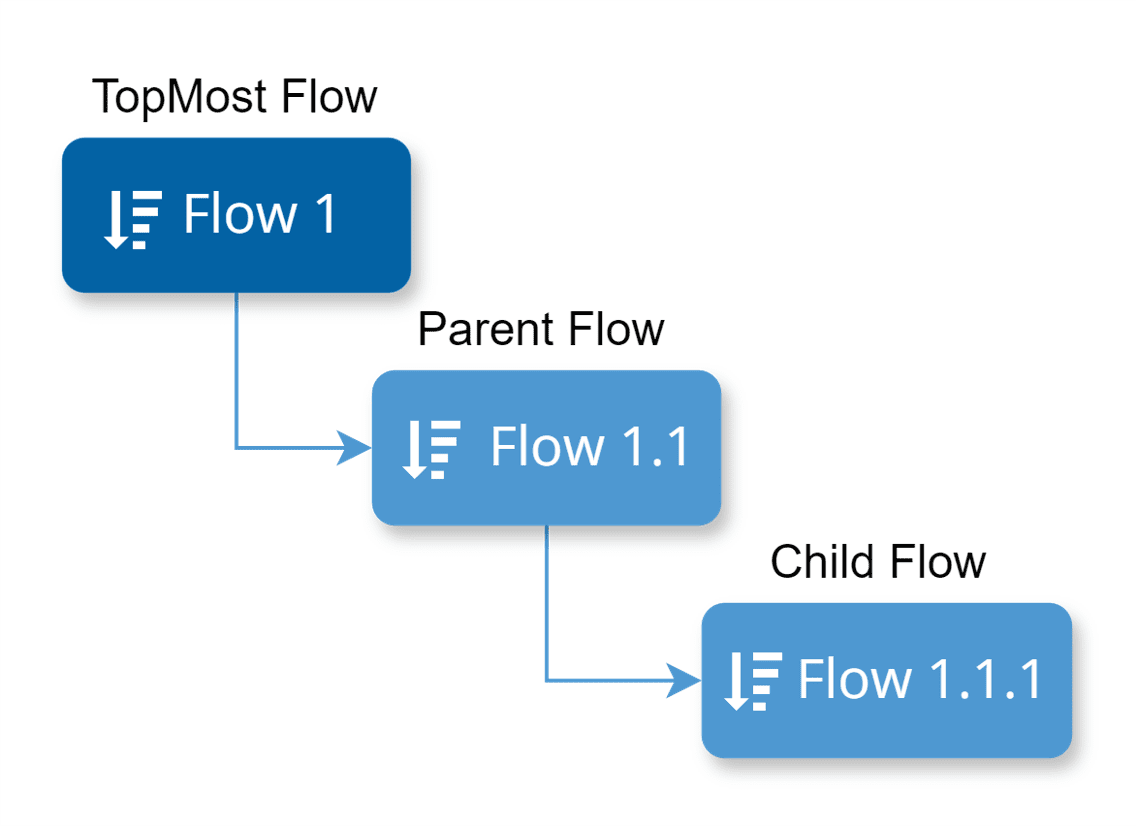
Since **Flows** can contain other **Flows**, it is important to understand the correct referencing approach. In the provided scenario, where a **Flow** has two **Child Flows**, Flow 1 would be the **TopMost Flow**, Flow 1.1 would be the **Parent Flow**, and Flow 1.1.1 would be the **Child Flow**. However, when delineating the relation between Flow 1 and Flow 1.1, we could also define Flow 1.1 as a **Child Flow** of the **TopMost Flow**.
{width=300}
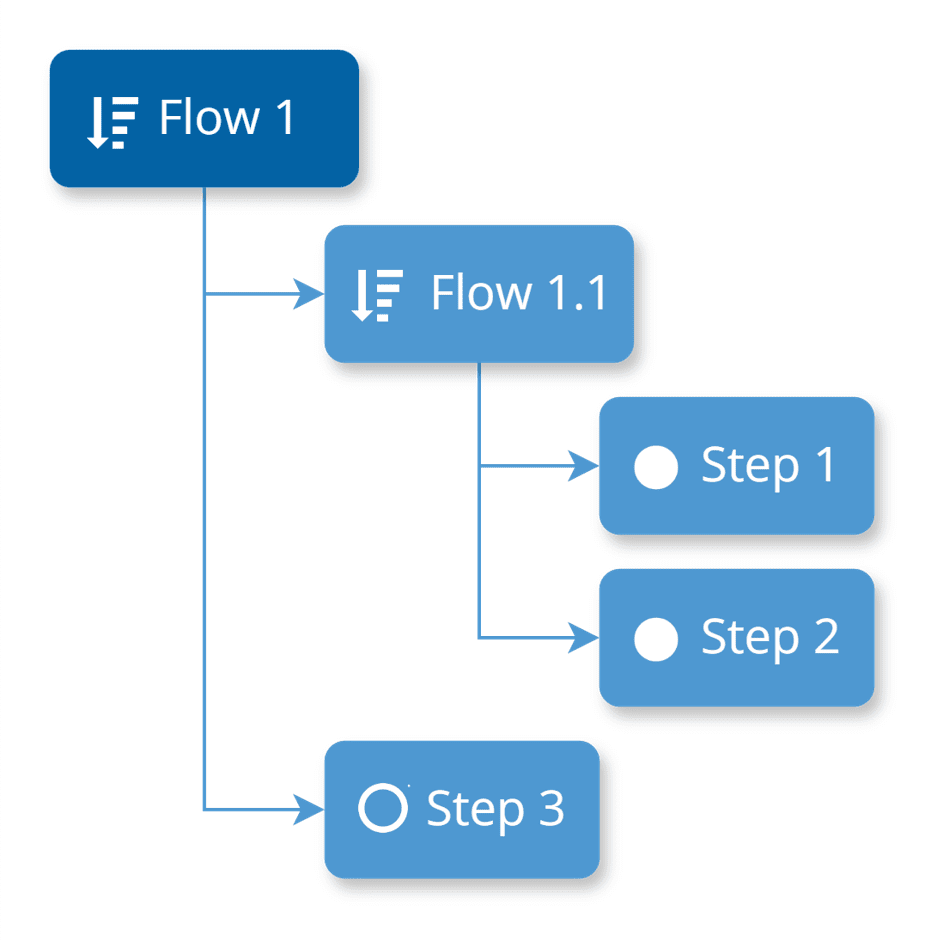
Another possible scenario is displayed below, where Flow 1 is composed of two **Flow Items** of different types (Flow 1.1 and Step 3), while Flow 1.1 is comprised of two **Flow Items** of type **Step** (Step 1 and 2).
{width=300}
!!! note
When a **Step** has **Flows** at the same level, instead of the usual filled circle icon, it appears as an outlined circle resembling the standard **Step** icon.
## Step Characteristics
Each **Step** defines several relevant characteristics that determine the **Material** tracking and other behavior as listed in the next table:
| Characteristic | Description |
|-------------|-------------|
| **Sub-Material Track State Depth** | Defines the Material level for which Track-in and Track-out will be enabled for the Step. |
| **Default Logistic Future Action Execution Mode** | Defines whether logistic Future Actions (Split and Merge) will be executed manually or automatically by default for the Step. |
| **Processing Type** | There are three possible processing types:
• Process – in this case, the system maintains the Last Process Step Resource property with the Resource where the Material was last tracked-in
• Metrology
• Logistical |
| **Material Sort Rule Set** | Specifies the Sort Rule Set used to sort Material to be displayed in the Step View page. |
| **Resource Sort Rule Set** | Defines the Sort Rule Set used to sort Resource for Material on this Step. This is used for pushing Material to Resources, answering the question: What is the next Resource for the Material? |
| **Split Checklist Mode** | Defines what should happen to the Material Checklist Instance when a Material is split in-process:
• Create Note – no Checklist Instance is created
• Create Copy – creates a copy of the Checklist Instance preserving the current state
• Create New – creates and initializes a new Checklist Instance |
| **Shipping Allowed** | Specifies whether Shipping of Material to another Facility is allowed from this Step or not. |
| **Decimal Quantity Allowed** | Specifies whether decimal quantities are allowed on Material operations in this Step. When set to false, only discrete quantities are possible. |
| **Marks Product Completion** | Defines when using Order Management, that the Material must be considered completed when it reaches this Step. |
| **Auto Split by Product** | Specifies that when using Binning/Grading at the Step, that the Material will be automatically split-by-product after Track-Out of this Step. |
| **Material Transfers Allowed** | Defines whether Material Transfers can be requested or fulfilled from this Step. |
| **Enable Step Certification Requirements** | Defines whether the Certification Requirements Context for the Step needs to be checked in addition to the Resource Personnel Requirements for employees performing Material operations on this Step. |
| **Enable Time Constraints** | Defines whether Time Constraints are allowed to or from this Step. Only if Time Constraints are enabled it will be possible to edit the Time Constraints Context. |
| **Set Units** | Defines whether the Step defines (enforces) the Material Primary and Secondary Units. If a Step is defined with Set Units, the Primary Units need to be defined. |
| **In-Step Sampling** | Specifies whether In-Step Sampling (requires Sub-Materials) is enabled for the Step or not. When enabled, the Sampling Pattern Context must be edited. |
| **Track-Out Losses Mode** | What type of loss screen must be displayed when Tracking-Out material in this Step:
• None – no screen is displayed
• Main Material – screen is displayed for the main material
• Sub Materials – screen is displayed for the sub materials |
| **Pass-Through** | Defines whether the Material is Pass-Through or not. In a Pass-Through Step, a Material only has to perform a Move-Next. If the Step is not Pass-Through, a Material needs need to be Dispatched, Tracked-In, Tracked-Out and Moved-Next. |
| **Storage Services** | These properties define the required storage services for storing Material in both Queued and Processed state in this Step. |
| **Include in Planning** | Defines whether the Step must be included in Schedule Scenarios of type Planning or not. |
| **Include in Scheduling** | Defines whether the Step must be included in Scheduling or not. |
| **Loss Reasons** | Defines the Loss Reasons applicable for the Step. Each Loss Reason can be checked to specify whether they apply to:
• Record Loss
• Terminate
• Assemble
A Loss Reason at the Step can also specify what was the actual Step where the loss was incurred. |
| **Loss Classifications** | Defines up to four loss classifications that further classify losses reported on this Step. |
| **Hold Reasons** | Defines the Hold Reasons applicable for the Step. A material on hold cannot be moved from its current Step or current State. |
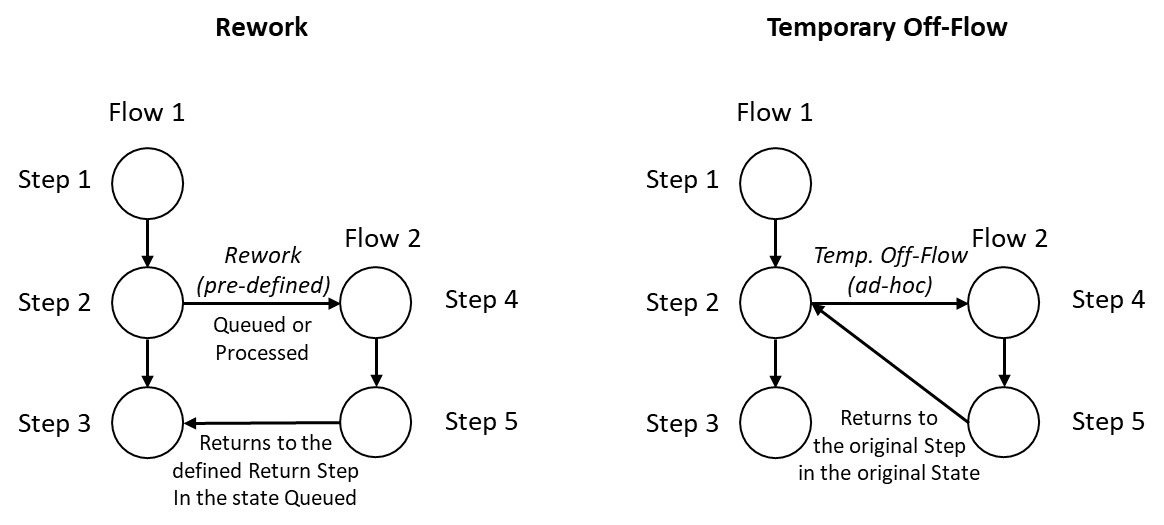
| **Off-Flow Reasons** | Defines the Off-Flow reasons applicable for the Step. Each Off-Flow reason can be configured to specify whether it applies to:
• Rework
• Temporary Off-Flow
The difference between Rework and Temporary Off-Flow is the following:
• Reworks must always be defined in advance and thus, they must be configured as part of the flow.
• The rework return point can be any Step in the flow.
• Rework can only be performed for Materials in state Queued or Processed, but when a Material returns from a Rework it always goes to the state Queued
• Temporary Off-Flows are not defined in advance. A Material can be sent temporarily to any Flow.
• The Temporary Off-Flow return point is always the Step from which the Material was sent to Temporary Off-Flow.
• Temporary Off-Flows can be performed for Materials in state Queued, Dispatched or Processed, and when a Material returns from a Temporary Off-Flow, it always returns to the same state from which it was sent, and to the same Resource (if any).
The difference between Rework and Temporary Off-Flow is illustrated in the picture below.
:information_source: The system supports nesting of reworks and temporary off-flows. |
| **Bonus Reasons** | Defines the Bonus Reasons applicable for the Step. A bonus is the opposite of a loss and it indicates that the material quantity is increased. A common bonus case consists of adding some material which has previously been considered scrap and has been recorded as a loss. |
Table: Step relevant properties
## Flow Characteristics
The table below describes important Flow characteristics.
| Characteristic | Description |
|-------------|---------------------------------------|
|**Versioning**|A Flow is versioned object that is subject to change control.|
|**Context Resolution**|A Material is always at a Flow and at a Step, therefore it’s common for both the Flow and the Step be part of context resolution. Because a Step can be re-used in multiple Child Flows, the Flow that is used in context resolution is not the TopMost Flow of the Material, but rather the immediate Parent Flow of the current Material Step. In the picture below, a simplified version of the Service Context smart table is shown. For Step 1, if a Material would be in Flow 1, the context resolution would resolve the required Service as Service 1; if a Material would be in Flow 2, it would resolve to Service 2; and for all other Flows it would resolve to Service 3.
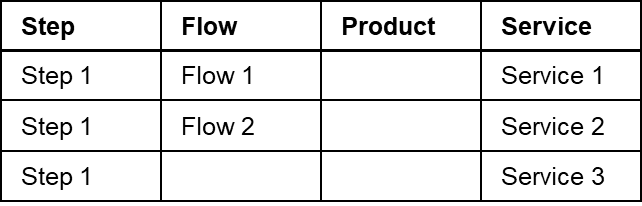|
Table: Flow characteristics
### Types of Flows
#### Sequential Flows
This is the default mode when creating a **Flow**. A Sequential **Flow** may include **Flow Items** of both types (**Flows** or **Steps**), may contain optional **Flow Items**, may be skipped, and can also include Line **Steps**.
!!! info
In a Sequential **Flow**, the final **Flow Item** cannot be optional.
#### Non-Sequential Blocks
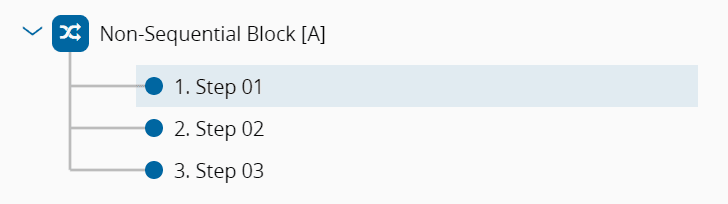
A Non-Sequential Block defines a set of **Steps** (typically testing/metrology **Steps**) that need to be performed on a certain **Material** but for which the order of execution is not relevant. In the example below, the sequences Step 01 – Step 02 – Step 03; Step 02 – Step 01 – Step 03; and Step 03 – Step 01 – Step 02; are all valid sequences for the **Material**.
{width=550}
!!! warning
A Non-Sequential Block **Flow** must consist solely of **Flow Items** of type **Steps**, ensuring there is at least one non-optional **Step**. If the last **Flow Item** is a **Step**, it cannot be an optional one. Moreover, it cannot include Alternate or Line **Flows** and must not contain repeated **Steps**, regardless of any variation in their Logical Names.
#### Alternate Flows
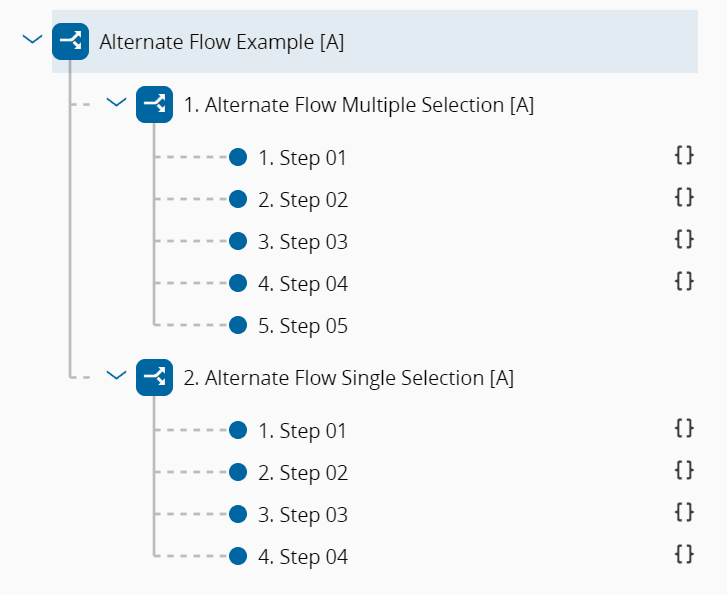
When a **Flow** is Alternate, only one of its branches, be it made of **Flow Items** of type **Flow** or **Step**, will be taken by a **Material**. That is, each **Flow Item** that makes up the **Flow** is mutually exclusive. The Alternate Flow Selection Type offers two options:
* **Single**: Only the first **Flow Item** whose condition resolves to true is considered when attempting to move the **Material** to the next **Step**.
* **Multiple** (default): All **Flow Items** whose conditions resolve to true are displayed for selection while attempting to move the **Material** to the next **Step**.
{width=500}
!!! warning
An Alternate **Flow** cannot have optional **Flow Items**, and it cannot be a Non-Sequential Block or a Line **Flow**. Additionally, it must not contain duplicated **Flow Items**, even if their Logical Names differ.
An Alternate **Flow** with Single Selection requires that every **Flow Item** has a defined Condition, which can be either an Expression or a Rule.
#### Line Flows
The Line **Flow** outlines the sequential Sub-Steps aligning with the operations conducted across the Sub-Resources of the Line **Resource**. A Line **Flow** must only contain **Flow Items** of type **Step**, excluding Pass-Through **Steps** and any **Step** marked as Is Line. The first and last **Step** of a Line **Flow** cannot be optional. Additionally, it must not be a Non-Sequential Block or an Alternate **Flow**.
!!! info
For more information, see [[tutorials-linematerialtracking]].
#### Rework Flow Paths
In a **Flow** composed of **Steps**, it’s possible to define one or more Rework Paths at each **Step**. A Rework Path can be associated with an Off-Flow **Reason** linked to the **Step**, indicating its relevance for Rework, and it establishes both the Go To Flow Path and the Return point within the **Flow**.
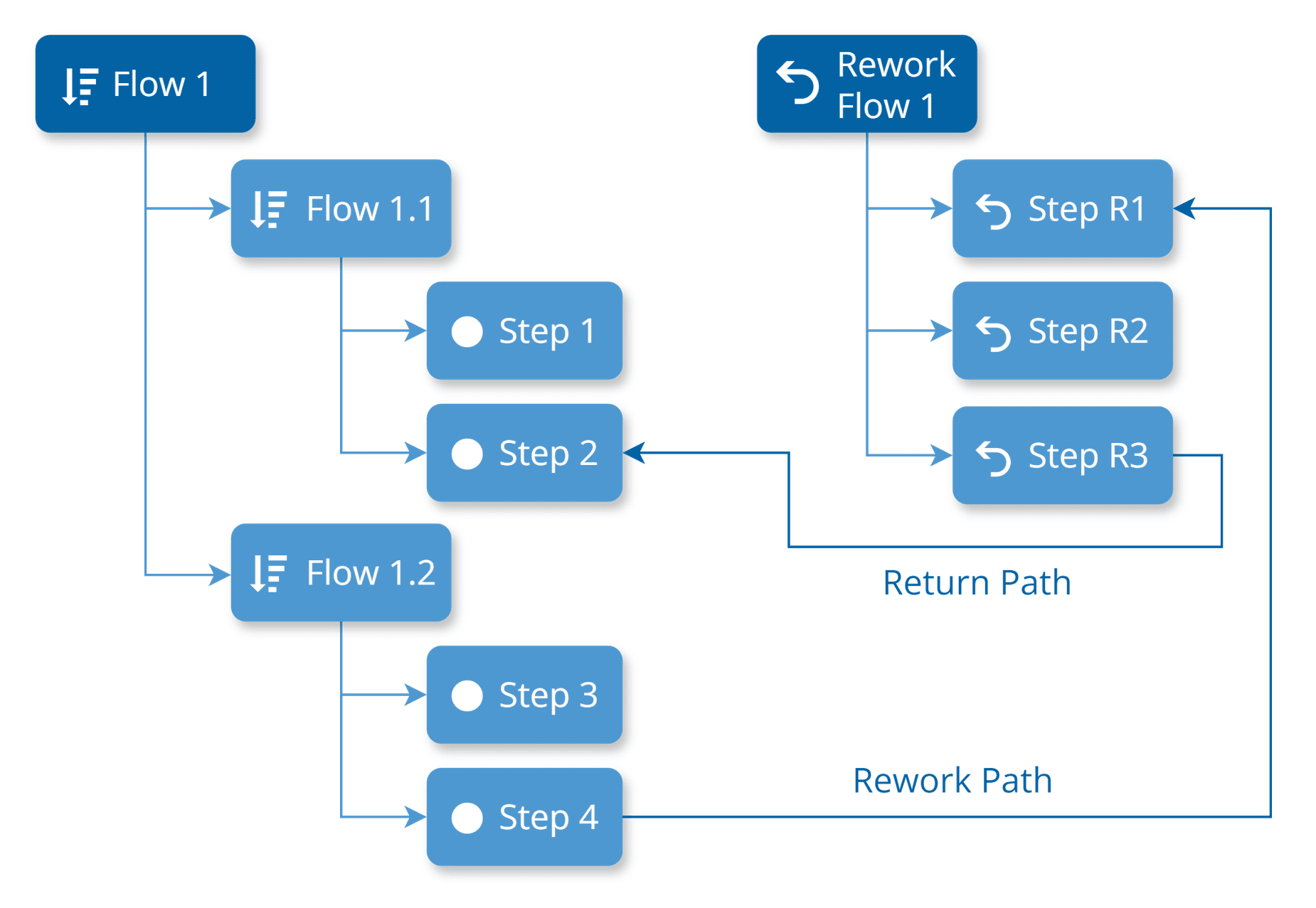
Rework Paths can be defined at the **Parent Flow** level, allowing Return Paths to any **Step** within its structure. These Return Paths are anchored to the **TopMost Flow** where they are defined, rather than to a specific **Flow Item**. For instance, in the diagram below, the Return Path can be any **Step** (e.g., Step 1, Step 2, Step 3, or Step 4) within the **TopMost Flow** (Flow 1).
{width=500}
A **Material** which is in Rework, can be sent to Rework, and you can configure limits to control how many times a **Material** can undergo Rework. For more information on this configuration, see [[tutorials-rework#rework-limits|Rework Limits]].
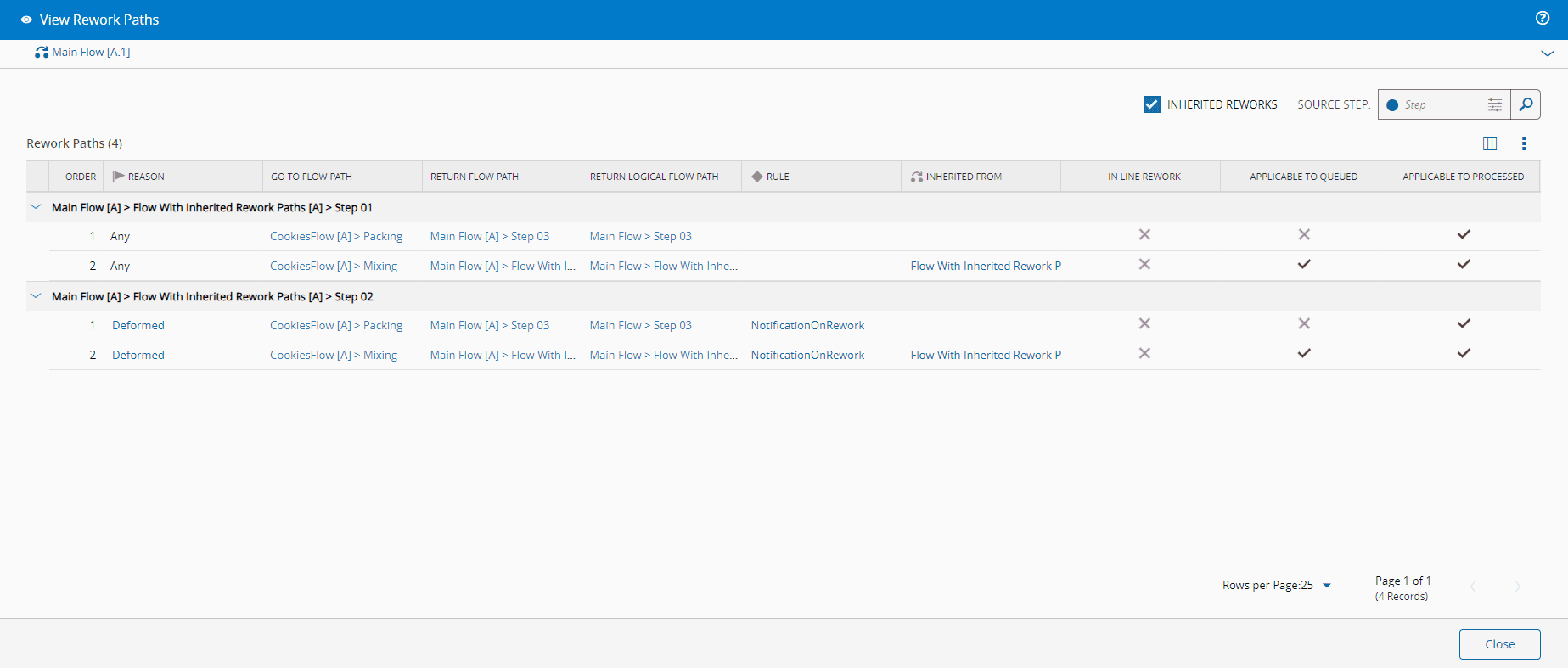
Additionally, a **Flow** inherits Rework Paths from their inner **Flows**. If an inner **Flow** has Rework Paths, they will also be available for **Materials** processed in the main **Flow**, alongside any other Rework Paths defined for the main **Flow**.
You can specify whether a Rework Path applies when the **Material** is in Queued or Processed state. This is controlled by the flags Applies to Queued and Applies to Processed in the Rework Path Entity Type. It's also possible to define a **Rule**, of scope Material Tracking, triggered when the **Material** is sent for Rework via a specific Rework Path. This is managed by the On Rework Rule property of the Rework Path Entity Type.
When the Source Rework Flow (i.e., the **Parent Flow** of the Rework **Step**) is a Line **Flow**, the property IsInLineRework cannot be null - it's either set to `True` or `False`. If this property is `True` the Go To Flow must be a Line **Flow** and all the **Steps** in this **Flow** must exist in the current Source Rework Flow.
You can access a comprehensive list of Rework Paths configured for a Flow by selecting the View Rework Paths button located in the action bar.
### Logical Names
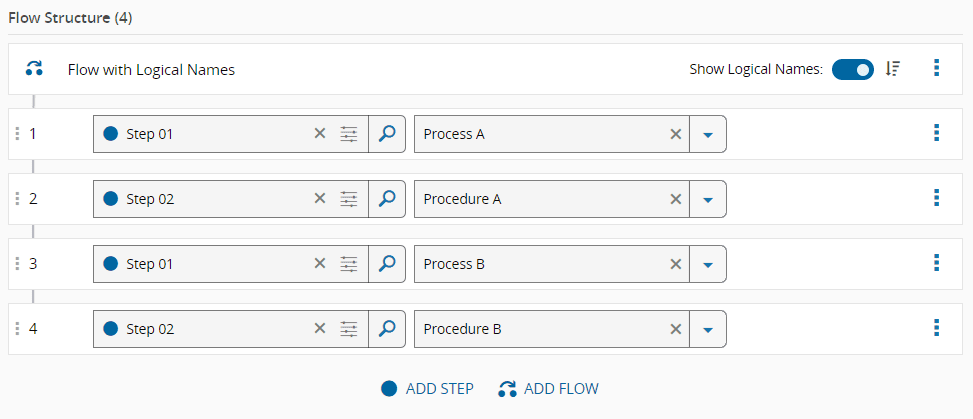
The reusability potential of **Flows** and **Steps** is enhanced through the use of **Logical Names** and **Logical Flow Paths**:
* A **Logical Name** is an optional qualified name for a **Flow** or **Step** within a specific **Flow** version. This name designates the **Intended Usage** of the **Flow Item**.
* A **Logical Flow Path** is a simple sequential list of all the **Logical Names** within the **Flow Item**.
This approach allows you to avoid duplicating **Flow Items** and instead reuse them in different contexts or for different purposes. For instance, you can repeat a sequence of **Steps** with varying parameters (such as Durables, Recipe, BOM, and others) without creating new **Flow Items** each time.
The **Logical Name** feature provides the flexibility to specify the usage, purpose, or intent of a **Step** when creating the **Flow**. You can use the same **Flow Items** with different **Logical Names** across various **Flows**, except for **Alternate Flows**, **Non-Sequential Blocks**, or **Line Flows**.
!!! note
**Logical Names** are predefined and managed at the **Flow** and **Step** level. For more information, see [[tutorials-howto-managesteplogicalnames]].
### Conditional Resolution of Optional Flow Items
Optional **Flow Items**, whether of type **Step** or **Flow**, are elements that can be skipped during the process. The decision to skip them or not must be made when moving the **Material** to the next **Flow** and **Step**, either manually or automatically through a business rule.
Additionally, optional **Flow Items** or those belonging to Alternate **Flows** can have associated conditions. These conditions will be evaluated when determining the possible next **Steps** for a **Material**, determining the **Flow** and **Step** to which the **Material** can move next taking into account the state and characteristics of the **Material** at that time. The conditions applied to the **Flow Items**, determined by the Condition Type property, can be one of the various types listed in the table below.
| Condition Type | Description |
|----------------|-------------|
| Expression | - Requires the definition of a Condition Expression.
- A JSONata expression that checks the state of the Material and determines whether the Flow Item can be applied, returning True or False. This expression can reference direct properties, attributes, and characteristics of the Material, as well as properties of its Product, Product Group, and Step. Some examples are:
- Material Primary Quantity is greater than 100 - `PrimaryQuantity > 100`
- Material name contains the value "Material A" - `$contains(Name, 'Material A')`
- Material Is Hot set to `true` or `false` - `IsHot = true` or `IsHot = false`
- Step name equals "Step A" - `Step.Name = 'Step A'`
- Product Group default units are "Kg" - `Product.ProductGroup.DefaultUnits = 'Kg'`
- Attribute 'RetailPrice' is greater than 100 - `Attributes.RetailPrice > 100`
- Material Characteristics 'Color' is equal to "Red" - `MaterialCharacteristics.Color = 'Red'`
|
| Rule | - Requires the definition of a Condition Rule.
- A Rule (linked to a DEE Action) of scope 'Flow Item Evaluation' that determines if the Flow Item can be applied, returning True or False.
|
| Step Sampling | - Requires the definition of a Sampling Step.
- The system assesses the Material's eligibility based on the associated Sampling rules of the selected Step.
|
| Sampling Plan | - Requires the definition of a Sampling Plan.
- The system evaluates the Material's eligibility based on the plan's Sampling rules.
|
!!! info
Only **Flow Items** of type **Step** belonging to **Flows** other than Non-Sequential Blocks or Alternate **Flows** can have the Condition Type set to Step Sampling or Sampling Plan.
### Execute Rules on Enter/Exit Step
You can define **Rules** to be run when a **Material** enters or exists a **Step**. These **Rules** are linked to **DEE Actions**, enabling you to execute custom code to be triggered when entering or exiting a specific **Step**.
The management of these **Rules** is handled by the **Flow** structure. In the Edit Flow Structure view, you can select a **Rule** with the scope Material Tracking to be executed for Enter and Exit events of **Flow Items** of type **Step**. This functionality is controlled by the On Enter Rule and On Exit Rule properties of the **Flow Item**.
## Visual Conventions
Critical Manufacturing MES includes icons to help you quickly identify each type of **Flow** and highlight any special configurations for **Flow Items**. The table below lists the possible icons and their corresponding meanings.
| Icon | Description |
|-----------------------------------|----------------------------------------|
| :core-static-sequential-sm: | Indicates a Sequential Flow |
| :core-static-float-sm: | Indicates a Non-Sequential Block |
| :mes-static-alternateflow-sm: | Indicates an Alternate Flow |
| :mes-static-lineflow-sm: | Indicates a Line Flow |
| :core-static-rework-sm: | Indicates a Rework Path |
| :mes-static-optional-sm: | Indicates an Optional Flow Item |
| :core-coreconnectiot-stepover-sm: | Indicates a Pass-through Step |
| :core-static-deeaction-sm: | Indicates the presence of a Condition |
| :core-entitytypes-rule-sm: | Indicates the presence of a Rule |
Table: Visual Conventions
**Step** contexts are also represented by icons, making it easier to identify them at a glance. Below is a table listing these icons along with their meanings:
| Icon | Context |
|------------------------------------|-----------------------|
| :mes-entitytypes-service-sm: | Service |
| :mes-entitytypes-resource-sm: | Resource |
| :mes-entitytypes-recipe-sm: | Recipe |
| :mes-entitytypes-parameter-sm: | Parameter |
| :mes-entitytypes-datacollection-sm:| Data Collection |
| :mes-entitytypes-chart-sm: | Chart |
| :mes-entitytypes-checklist-sm: | Checklist |
| :mes-entitytypes-bom-sm: | BOM |
| :mes-entitytypes-durable-sm: | Durable |
| :core-entitytypes-document-sm: | Document |
| :mes-entitytypes-flow-sm: | Flow |
| :mes-static-yieldandcycletime-sm: | Yield and Cycle Time |
| :mes-entitytypes-futureaction-sm: | Future Action |
Table: Visual Conventions for Step Contexts
In the Context Matrix view, each entity is represented by an icon, and their meanings are provided in the table below:
| Icon | Description |
|-------------------------------------|-----------------------|
| :mes-entitytypes-service-sm: | Service |
| :mes-entitytypes-resource-sm: | Resource |
| :mes-entitytypes-recipe-sm: | Recipe |
| :mes-entitytypes-parameter-sm: | Parameter |
| :mes-entitytypes-datacollection-sm: | Data Collection |
| :mes-entitytypes-chart-sm: | Chart |
| :mes-entitytypes-checklist-sm: | Checklist |
| :mes-entitytypes-bom-sm: | BOM |
| :mes-entitytypes-durable-sm: | Durable |
| :core-entitytypes-document-sm: | Document |
| :mes-entitytypes-samplingpattern-sm:| Sampling Pattern |
| :mes-entitytypes-inspectionplan-sm: | Inspection Plan: |
| :mes-static-time-sm: | Time Constraints |
| :mes-entitytypes-flow-sm: | Flow |
| :mes-entitytypes-certification-sm: | Certification Requirements |
| :mes-static-yieldandcycletime-sm: | Yield and Cycle Time |
Table: Visual Conventions for Entities on the Context Matrix View