---
alias: user-guide-using-automation-tasks-library-map-task
render_macros: false
description: "This documentation guides users in defining automation tasks, including metadata, inputs, and settings within a workflow"
---
# Using Automation Tasks Library - Map a Task
This guide explains how to **define a Task** in the Automation Tasks Library, including its:
- Metadata
- Inputs and outputs
- Settings
- Lifecycle scripting
- Designer-specific configuration
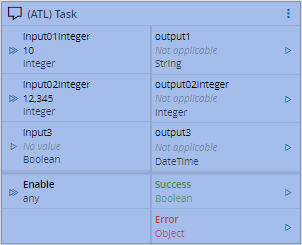
Tasks are listed in the `tasks` array:
```json
{
"converters": [],
"tasks": []
}
```
For more details on settings and I/O configuration:
- [Settings](using_automation_tasks_library_settings.md)
- [Inputs/Outputs](using_automation_tasks_library_input_output.md)
## Task Metadata - AutomationTask Object
The Automation Task object defines the root-level metadata for a task. This includes its name, icon, category, lifecycle, protocol dependencies, and the rules that control where and when the task appears in the designer. Note: All properties must be written in `camelCase` to be recognized correctly.
| Property | Description | Notes |
| :------------------- | :------------------------------------------------------------------------------------------------------------------------------------------------------------------------------------------------------------------------------------------------------------------------------------------------------------- | :--------------------------------------------------------------------------------------------------------------------------------------- |
| `name` | Internal name of the task. This name is used for display in the GUI and to identify the Runtime Class where the converter code is located and executed. | Mandatory, String |
| `displayName` | Display label in the UI. If not set, defaults to `name`. | Optional, String |
| `type` | The type of task or the functionality it provides. This applies only to Control Flow tasks. | Optional, from an enumeration:
• `Function` (Default)
• `Start`
• `End` |
| `category` | The category of the task for placement in the toolbox control (first level). This allows you to group tasks by category in the workflow pane. | Optional, String |
| `section` | The section within the task's category used to group tasks further. | Optional, String |
| `iconClass` | The name of the icon if it's loaded as a font in the GUI. | Optional, String |
| `iconSVG` | The SVG data used to draw the icon on the button and task. This property is ignored if `iconClass` is set. | Optional, String |
| `isProtocol` | A flag indicating if this task is related to a protocol scope. | Optional, Boolean, Defaults to `false` |
| `isController` | A flag indicating if this task is related to a controller scope.
Note: A task can be used in both Controller and Protocol scopes (e.g., for Code, EntityInstance tasks). | Optional, Boolean, Defaults to `true` |
| `lifecycle` | The current lifecycle status of this task. | Optional, from an enumeration:
• `Productive` (Default)
• `Experimental`
• `Deprecated` |
| `lifecycleMessage` | A message displayed when a task is marked as `Deprecated`, suggesting an alternative.
Note: This is only used when `lifecycle` is not `Productive`. | Optional, String |
| `dependsOnProtocol` | A comma-separated list of protocol drivers this task depends on. For example: `"@criticalmanufacturing/connect-iot-driver-oib"`. Leave empty (default) for no dependency, meaning it's available for all protocol drivers. | Optional, List of Strings |
| `dependsOnScope` | A comma-separated list of scopes this task depends on to be available. Leave empty (default) for no dependency, meaning it's available for all scopes. | Optional, List of enumerations:
• `ConnectIoT`
• `FactoryAutomation`
• `EnterpriseIntegration` |
| `dependsOnDesignerScope` | A comma-separated list of designer scopes this task depends on. Leave empty (default) for no dependency, meaning it's available for all designer scopes. | Optional, List of enumerations:
• `DataFlow`
• `ControlFlow` |
| `designer` | Specific settings for the task based on the active designer. | Optional, `AutomationTaskDesigner` object |
| `settings` | Defines the hierarchy of settings and how they should behave and be displayed. | Optional, `AutomationTaskSettings` object |
| `triggers` | Predefined trigger points where scripts can be executed. | Optional, `AutomationTaskTriggers` object (includes `beforeInit`, `init`, `beforeSave`) |
| `scripts` | A library of common or general scripts that can be used within the task. | Optional, `Map` |
Here is an example of how task metadata is defined:
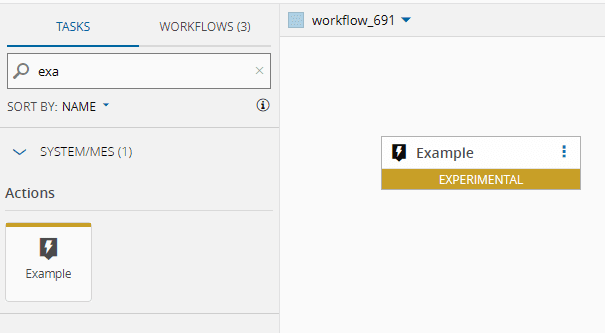
```json
"tasks": [
{
"name": "example",
"displayName": "Example",
"isProtocol": false,
"isController": true,
"lifecycle": "Experimental",
"lifecycleMessage": "Task was migrated to use a different visual renderer. It is currently in preview mode.",
"dependsOnProtocol": [],
"dependsOnScope": [],
"category": "System/MES",
"section": "Actions",
"dependsOnDesignerScope": [
"DataFlow"
],
"iconClass": "icon-core-tasks-connect-iot-lg-automationevent"
}
]
```
### Task Metadata - AutomationTask Object - Scripting
Tasks often require custom logic to transform data, validate inputs, or interact with external systems (e.g., calling REST APIs). For that, you can attach **code snippets** using scripting hooks at different points in the task’s lifecycle.
These hooks let you inject scripts:
- Before initialization (`beforeInit`)
- During initialization (`init`)
- Before saving (`beforeSave`)
Scripts can be declared inline or referenced from shared libraries, and can perform operations like:
- Cleaning or converting input/output values
- Dynamically updating settings
- Making HTTP calls to retrieve or send data
The `AutomationTaskTriggers` object:
| Property | Description | Notes |
| :----------- | :---------------------------------------------------------------------------------------------------------------------------- | :----------------------------------- |
| `beforeInit` | A lifecycle hook for tasks, executing right after settings are loaded and dynamic outputs are created. | Optional, `AutomationTaskScript[]` |
| `init` | A lifecycle hook for the task, executing when the task is initialized (e.g., when settings are opened or the task is dragged and dropped to the designer). | Optional, `AutomationTaskScript[]` |
| `beforeSave` | A lifecycle hook for the task, executing when the task settings are saved. | Optional, `AutomationTaskScript[]` |
The `AutomationTaskScript` object:
| Property | Description | Notes |
| :--------- | :------------------------------------------------------------------------------------------------------------------------------ | :------------------------------------------------------------------ |
| `type` | The type of script represented by this entry. `Script` denotes JavaScript code, while `Reference` points to a general script located in the "Scripts" section. | Optional, from an enumeration:
• `Script` (default)
• `Reference` |
| `encoding` | Indicates the encoding format of the provided script. | Optional, from an enumeration:
• `Base64` (default)
• `Plain` |
| `script` | The script code or the reference name, encoded according to the `encoding` setting. | Mandatory, String or String[] |
**Examples:**
When a script is declared with encoding `Plain`, the `script` property can be a single line of compressed JavaScript code or an array of strings, where each string is a line of the script.
Using the development tooling provided by Critical Manufacturing, specifically [CLI](https://criticalmanufacturing.github.io/cli/) and [Generator-IoT](https://www.npmjs.com/package/@criticalmanufacturing/generator-iot), you can declare a script encoding as a `Reference` to a TypeScript file. This tooling will transpile the TypeScript to JavaScript and save it in Base64 format. Consequently, the `scripts` section in your JSON will contain the corresponding Base64-encoded script.
```json
{
"triggers": {
"beforeInit": [
{
"type": "Reference",
"script": "on_before_init"
}
],
"init": [
{
"type": "Script",
"encoding": "Plain",
"script": "this.settings.ruleName = typeof this.settings.ruleName === 'string' ? { Name: this.settings.ruleName } : this.settings.ruleName;"
}
],
"beforeSave": [
{
"type": "Reference",
"script": "on_before_save"
}
]
},
"scripts": {
"on_before_init": "${script(./scripts/get-configurations/onBeforeInit.ts)}",
"find_iot_rule": "${script(./scripts/get-configurations/find_iot_rule.ts)}",
"on_before_save": "${script(./scripts/get-configurations/onBeforeSave.ts)}"
}
}
```
To create functional scripts, you can utilize a set of predefined variables:
| Variable Name | Usability | Example |
| ---------------- | ------------------------------------------ | ---------------------------------------------------------------------------------------------------------------------- |
| `this.Cmf` | LBOs | Cmf.Foundation.BusinessOrchestration.GenericServiceManagement.OutputObjects.GetObjectsByFilterOutput |
| `this.System` | LboService | ```System.call(input).then((outputRaw: any) => { ... }``` |
| `this.settings` | Access to the task settings (key -> value) | ```if (this.settings.EnumKey1 == Value1) { ... }'``` |
| `this.utilities` | Access to Utilities | If you want to strip an AutomationEntity: ``` this.utilities.stripAutomationEntity(this.settings.baseEntity) ``` |
### Task Metadata - AutomationTask Object - Designer
To provide stricter control over how a task is designed, especially in the Control Flow designer, a separate `designer` section is used to manage subtle differences between designers.
The `AutomationTaskDesigner` object:
| Property | Description | Notes |
| -------- | ----------------------------------------------- | -------------------------------------------------------------------------------- |
| | The name or identifier of the designer. | Mandatory, from an enumeration:
•ControlFlow (default)
• DataFlow
• End |
| | Settings specific to the designer entry. | Mandatory |
`AutomationTaskDesigner` settings for **Control Flow**:
| Property | Description | Notes |
| :------------ | :------------------------------------------------------------------------------------------------------------------------------------------------------------------------------------------------------------------------------------------------------- | :--------------------------------- |
| `type` | The type of task or functionality it provides, primarily necessary for the Control Flow designer. | Optional, from an enumeration:
• `Function` (default)
• `Start`
• `ControlFlow`
• `End` |
| `displayName` | A **templated string** representing how the caption of the block should be rendered. Use `{{}}` tokens to represent input boxes based on settings, inputs, or outputs. If this field is missing, the system uses the base `displayName` field. | Optional, String |
| `branches` | The default branches that should be available to the user when the block is rendered. | Optional, `AutomationTaskDesignerBranch[]` |
`AutomationTaskDesignerBranch` settings for **Control Flow**:
| Property | Description | Notes |
| :------------ | :------------------------------------------------------------------------------------------------------------------------------------------------------------------------------------------------------------------------------------------------------- | :-------------------- |
| `name` | The name of the Branch. | Optional, String |
| `displayName` | A **templated string** representing how the caption of the block should be rendered. Use `{{}}` tokens to represent input boxes based on settings, inputs, or outputs. If this field is missing, the system uses the base `displayName` field. | Optional, String |
| `settings` | The default settings for the branch. | Optional, `Setting[]` |
Here is an example of designer-specific settings for Control Flow:
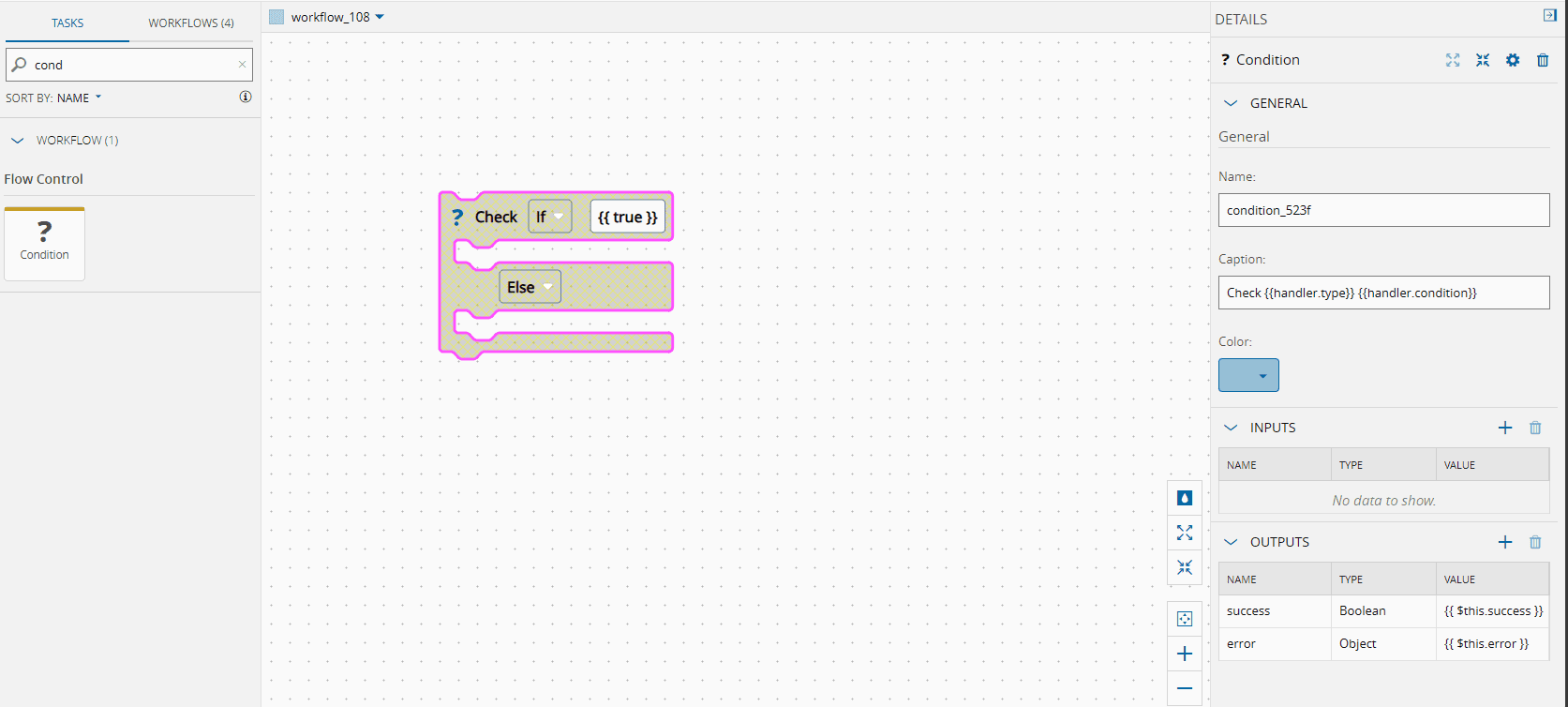
```json
{
"designer": {
"controlFlow": {
"type": "ControlFlow",
"displayName": "Check {{handler.type}} {{handler.condition}}",
"branches": [
{
"name": "handler",
"displayName": "",
"settings": [
{
"name": "type",
"dataType": "Enum",
"defaultValue": "If",
"settings": {
"enumValues": [
"If"
]
}
},
{
"name": "condition",
"dataType": "String",
"displayName": "",
"defaultValue": "{{ true }}",
"infoMessage": "Set the condition to validate",
"settings": {},
"condition": "type != 'Else'"
}
]
},
{
"name": "else",
"displayName": "{{type}}",
"settings": [
{
"name": "type",
"dataType": "Enum",
"defaultValue": "Else",
"settings": {
"enumValues": [
"Else"
]
}
}
]
}
]
}
}
}
```