---
alias: user-guide-automation-task-core-driver-command
tags:
- automation tasks
description: "This documentation outlines a task for controlling driver lifecycle commands and connections"
---
# Driver Command Connect
:iot-driver-command-lg:{style="font-size: 100px"}
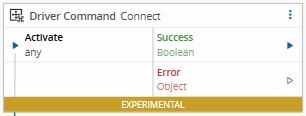
The **Driver Command** task executes lifecycle commands that control the state and operation of a driver.
It provides explicit control over when the driver connects, disconnects, or retries a connection.
!!! note
This task results from a split of the Equipment Setup and Equipment Setup Result tasks. It should be used along with: [[user-guide-automation-task-core-equipmentconfig]] and [[user-guide-automation-task-core-driver-event]].
## Workflows
| Data Flow | Control Flow |
| :--------: | :---------: |
| :material-check:{ style="color: #4DB6AC" } | :material-check:{ style="color: #4DB6AC" } |
## Inputs
| Name | Data Type | Description |
| -------- | --------- | ------------------ |
| Activate | `any` | Activates the task. |
## Outputs
| Name | Data Type | Description |
| ------- | --------- | ------------------------------------------------------ |
| Success | `Boolean` | Emits `true` when the command executes successfully. |
| Error | `Error` | Returns error details if the command fails. |
## Settings
| Name | Data Type | Default | Description |
| ------- | --------- | --------- | -------------------- |
| Command | `String` | `Connect` | Lifecycle command to execute. Supported commands are:
`Connect`
`Disconnect`
`Reconnect`
`SetupSuccess`
`SetupFailure` |
## Behavior
The **Driver Command** task manages the driver’s operational state by executing lifecycle commands.
It is used after configuration and event initialization to establish or control communication with the equipment.
A typical workflow using this task includes the following steps:
1. **Driver Event** detects a lifecycle event (such as `OnInitialize`).
2. **Equipment Configuration** defines the driver’s parameters and setup timeouts.
3. **Driver Command** issues the appropriate lifecycle command (for example, `Connect`) to start driver communication.