---
alias: user-guide-automation-task-core-logmessage
tags:
- automation tasks
description: "This task logs messages to configured transports with adjustable verbosity and input modes"
---
# Log Message

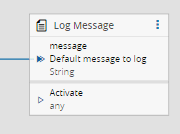
The `Log Message` Task allows messages to be logged in the controller configured log transports using a defined verbosity. This task is especially useful during development to validate output values from other Tasks.
## Inputs
| Name | Data Type | Description |
| -------- | --------- | -------------------------------------- |
| message | `String` | Value to log |
| Activate | `any` | Log the value defined in message input |
## Outputs
This task does not contain outputs.
## Settings
| Name | Data Type | Value | Default | Description |
| ------------------------ | --------- | ------------------------------------------------------ | ------------- | ------------------------------------------------------------ |
| Mode | enum | `RawText`
`MultipleInputs` | `RawText` | Logging input mode |
| Default Message | `String` | | | Message to log if no other is supplied by the `message` input. Valid only for `RawText` mode. |
| Verbosity | `enum` | `Debug`
`Information`
`Error`
`Warning` | `Information` | Verbosity of the message to log |
| Reset inputs on activate | `Boolean` | | true | Resets the inputs after being triggered |
| Custom Format | `Boolean` | | false | Whether the message can be customized to receive multiple formats. Valid only for `MultipleInputs` mode. |
![logmessage01]
## Behavior
Whenever either the `message` and/or the `Activate` inputs receive a value, the value of the `message` is logged in the configured controller logs.
If only the `Activate` input has a link, the default message defined will be the one logged.
There are two modes of input for the message to be logged:
- `RawText` - the message is sent directly as it is written to the `message` input
- `MultipleInput` - the message can be a multi-part string composed by several different variable entries. In this mode, the message can contain variables when referenced as `${VariableName}`.
!!! note
If the desired behavior is to log a value that is triggered from an output, only the *message* input is needed to be linked.
!!! note
The *Activate* input is only necessary to use if the desired behavior is to log the default message
## Remarks
When the flag `Clear Inputs` is set to `true`, if only the `Activate` input is triggered and previously a `message` input was also triggered, nothing will be logged. By design, after the `message` input receives a value, it is reset to allow the same value to be accepted afterwards. Otherwise, if this flag is set to `false`, the previous `message` input will be logged.
The message will be logged on every transport configured for the controller that is configured with a verbosity equal or lower than the one defined by this Task.
[logmessage01]: ../images/logMessage_01.png