---
alias: user-guide-automation-task-core-ready-state-request
tags:
- automation tasks
summary: The Ready state request task facilitates zero downtime operations by asking if the instance is ready.
---
# Ready State Requested
:iot-recipelistrequested-lg:{style="font-size: 100px"}
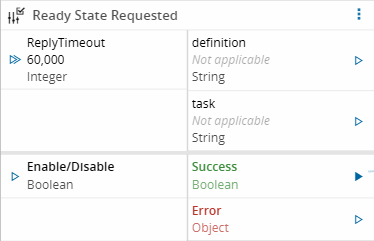
The **Ready State Requested** task listens for incoming ready-state check requests from the MES and triggers a workflow to evaluate the response.
## Details
| Fields | Details |
|-------------------|------------------------------------------------------------------------------------|
| Scope | Connect IoT
Data Platform
Enterprise Integration
Factory Automation |
| Workflow | Data flow
Control flow |
| `IsProtocol` flag | :material-close:{style="color:#EF5350"} |
## Inputs
| Name | Data Type | Default Value | Description |
|----------|-----------|---------------|-------------------------------------------------------------------------------------------------------------------------------|
| Enable/Disable | `any` | `true` | Starts listening for requests when enables, and stops when disabled. Only relevant when `autoEnable` is disabled. |
## Outputs
| Name | Data Type | Description |
|------------|-----------|-----------------------------------------------------------------------------------------------|
| definition | `String` | The name of the Automation Scheduled Action Definition that triggered the check. |
| task | `String` | The name of the Automation Scheduled Action Task that triggered the check. |
| success | `Boolean` | `true` value emitted when the action is successfully performed. |
| error | `Error` | Error emitted if processing fails or a timeout occurs while waiting for a `SendRequest` reply. |
## Settings
| Name | Data Type | Default | Description |
|---------------|-----------|----------------------|--------------------------------------------------------------------------------------------------------------------------------------------------------------------|
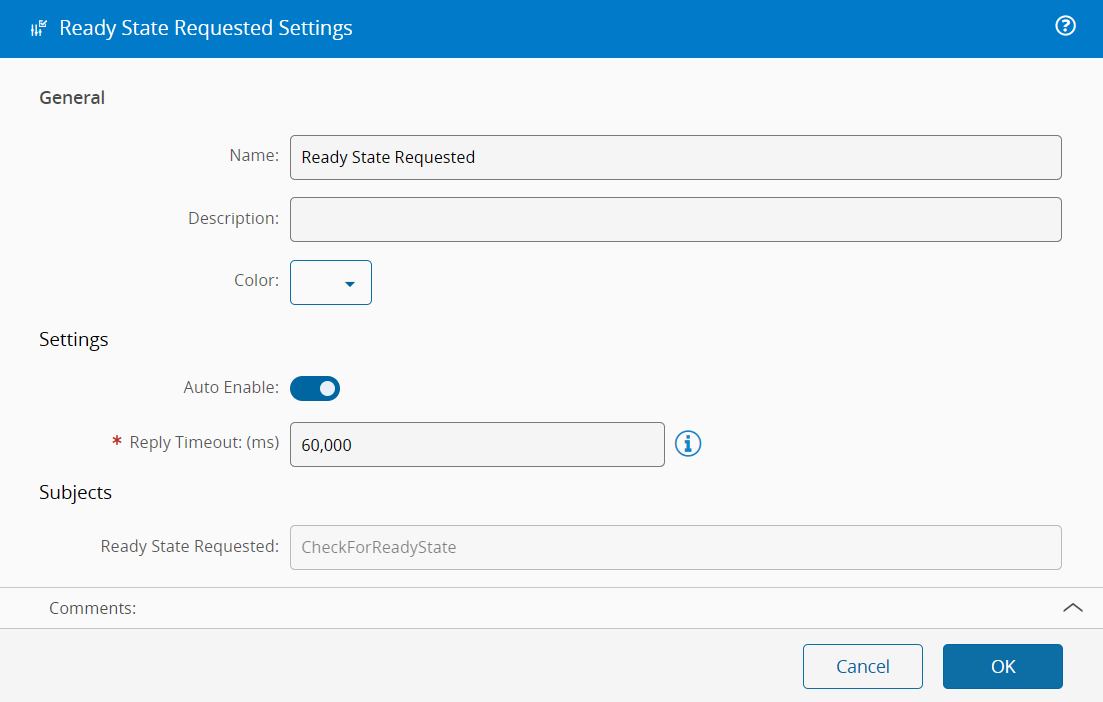
| autoEnable | `boolean` | `true` | Whether the task starts listening for requests automatically when the controller starts. If `false`, it only starts listening when it receives an activate signal. |
| Reply Timeout | `integer` | 60000 | Amount of time allowed to wait for a reply before issuing a timeout. |
| Subject | `String` | `CheckForReadyState` | The subject the task listens on. This must match the subject the DefinedInWorkflow detector uses. Only change this if you have a specific reason to. |
## Behavior
This task listens for incoming ready-state check requests from the MES backend. When a request arrives on the configured subject (by default `CheckForReadyState`), the task:
1. Receives the request along with the definition name and task name that originated it.
2. Emits those values as outputs so the workflow can use them.
3. Starts a timeout clock. If no reply is sent within the configured timeout window, the task sends back an `error` reply and the detector treats the result as not ready.
4. Passes control to the connected workflow, which is responsible for deciding the answer.
## Remarks
These tasks only make sense when the [[user-guide-automation-scheduled-action]] is configured to use the DefinedInWorkflow detector. That **Detector** is for situations where the MES cannot determine readiness from its own data alone, the **Controller's** own workflow logic needs to determine readiness. Ready State Requested and Ready State Reply are the mechanism that the workflow uses.
See [[user-guide-automation-scheduled-action-detectors]] for more information on how the DefinedInWorkflow detector works.
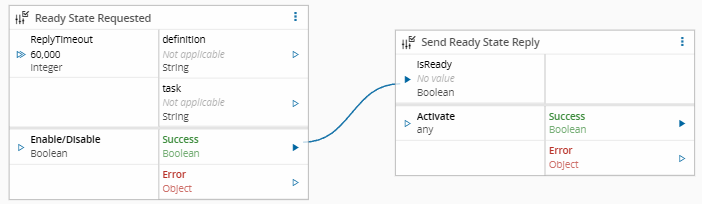
To configure this workflow, you must use this task and [[user-guide-automation-task-core-send-ready-state-reply]], as seen below.
{% include-markdown 'includes/pages/automation_zones_note.md' %}