---
alias: user-guide-automation-task-core-send-ready-state-reply
tags:
- automation tasks
summary: The Ready state reply task facilitates zero downtime operations by communicating if the instance is ready.
---
# Send Ready State Reply
:iot-recipelistrequested-lg:{style="font-size: 100px"}
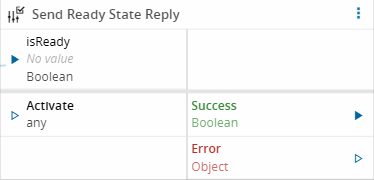
The **Send Ready State Reply** task sends the result of a workflow back to the MES as the answer to a pending ready-state check request.
## Details
| Fields | Details |
|-------------------|------------------------------------------------------------------------------------|
| Scope | Connect IoT
Data Platform
Enterprise Integration
Factory Automation |
| Workflow | Data flow |
| `IsProtocol` flag | :material-close:{style="color:#EF5350"} |
## Inputs
| Name | Data Type | Description |
|----------|-----------|------------------------------------------------------------------------------------------------------------------------------------------------|
| activate | `Boolean` | Activates the configured action. type |
| isReady | `Boolean` | The readiness answer to send back. Connect this to the output of your logic. If left unconnected or undefined, `defaultReply` is used instead. |
## Outputs
| Name | Data Type | Description |
|---------|-----------|-----------------------------------------------------------------------------------------------|
| success | `Boolean` | `true` value emitted when the action is successfully performed. |
| error | `Error` | Error emitted if processing fails or a timeout occurs while waiting for a `SendRequest` reply. |
## Settings
| Name | Data Type | Default | Description |
|---------------|-----------|---------|----------------------------------------------------------|
| Default Reply | `Boolean` | `false` | The value to send as the reply if `isReady` is not set when the task activates. |

## Behavior
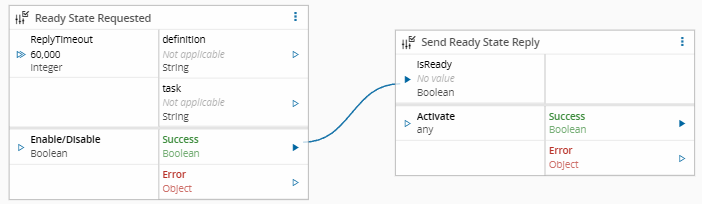
This task sits at the end of the workflow connected to [[user-guide-automation-task-core-ready-state-request]]. When activated, it:
1. Reads the `isReady` input value.
2. Sends that value back as the reply to the pending request.
3. Cancels the timeout that Ready State Requested started.
If `isReady` is not set when the task activates, it falls back to the configured `defaultReply` value of `false`.
## Remarks
These tasks only make sense when the [[user-guide-automation-scheduled-action]] is configured to use the DefinedInWorkflow detector. That **Detector** is for situations where the MES cannot determine readiness from its own data alone, the **controller's** own workflow logic needs to determine readiness. Ready State Requested and Ready State Reply are the mechanism that the workflow uses.
See [[user-guide-automation-scheduled-action-detectors]] for more information on how the DefinedInWorkflow detector works.
To configure this workflow, you must use this task and [[user-guide-automation-task-core-ready-state-request]], as seen below.
{% include-markdown 'includes/pages/automation_zones_note.md' %}