---
alias: user-guide-automation-task-filedrivers-createfile
tags:
- automation tasks
description: "This documentation details a task to create or update files, managing paths, content, and permissions"
---
# Create File

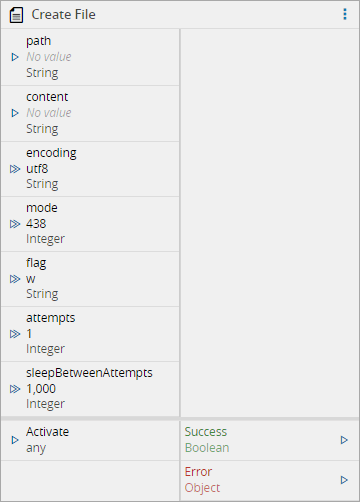
When activated, the `create file` task creates a new file or update the content of an existing one. The file `path` can be provided either by the input port or in the task settings.
## Inputs
| Name | Data Type | Description |
|----------------------|-----------|--------------------------------------------------------------------|
| path | `String` | File path |
| content | `String` | File content to be written |
| encoding | `String` | File content encoding |
| mode | `Integer` | File system permissions mode |
| flag | `String` | File System Flags |
| attempts | `Integer` | Number of attempts to perform this operation. Default is 1 attempt |
| sleepBetweenAttempts | `Integer` | Interval of time between the attempts. Default is 1000ms |
| Activate | `any` | Activate the task |
## Outputs
| Name | Data Type | Description |
| ------ | --------- | --------- |
| Success | `Boolean` | Triggered when the task is executed with success |
| Error | `Error` | Triggered when the task failed for some reason |
## Settings
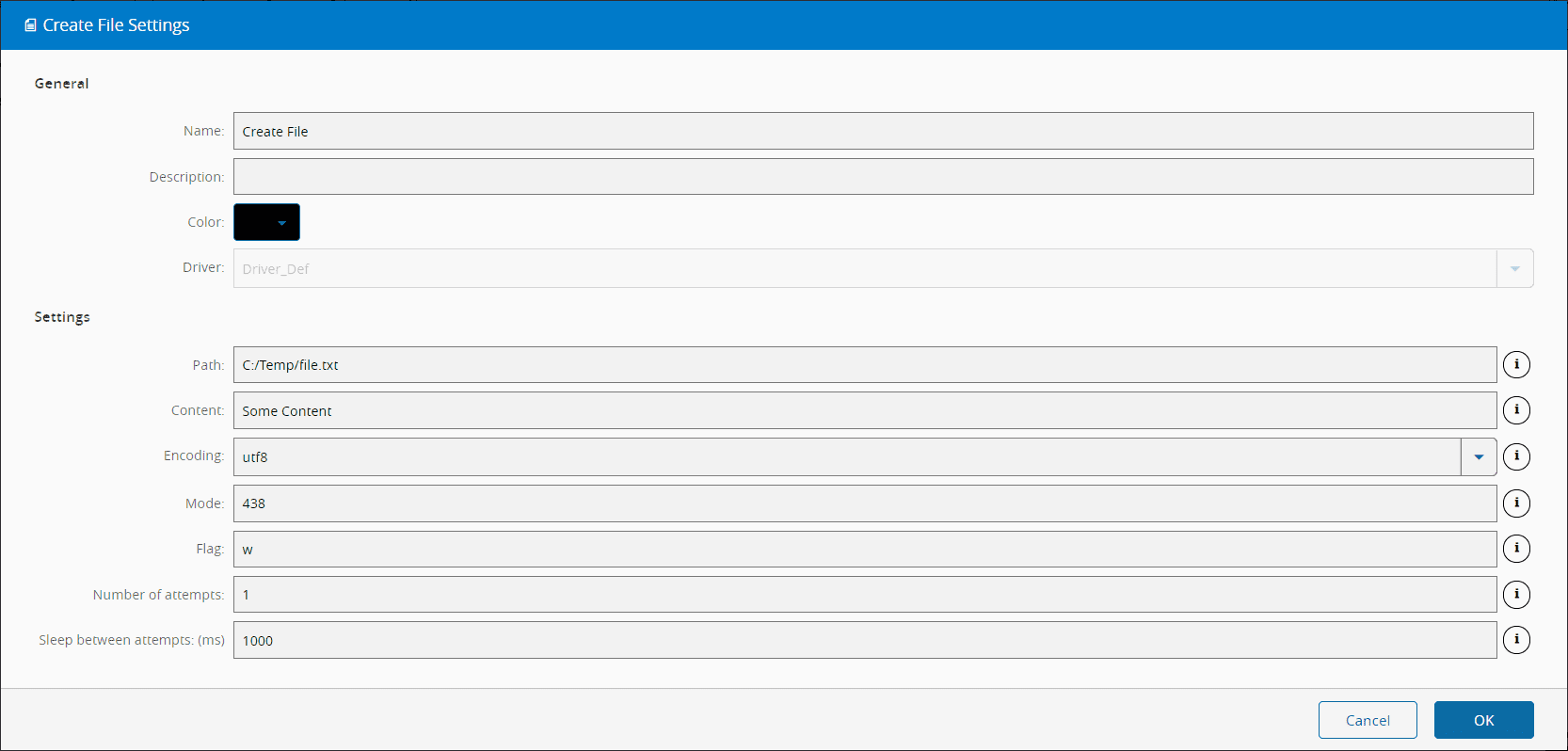
On the `General` tab, you have the usual settings and the following settings:
| Name | Data Type | Values | Default | Description |
| ------ | --------- | --------- | --------- | --------- |
| Path | `String` | | | File path |
| Content | `String` | | | File content to be written |
| Encoding | `Enum` | `utf8`
`ucs2`
`utf16le`
`latin1`
`binary`
`base64`
`ascii`
`hex` | `utf8` | File content encoding |
| Mode | `Integer` | | 0o666 | File system permissions mode |
| Flag | `String` | | w | File System Flags |
| Number of attempts | `Integer` | | 1 | Number of attempts to perform this operation. |
| Sleep Between Attempts | `Integer` | | 1000 | Interval of time between the attempts. |
For the `Path` file you can use tokens as represented below:
```bash
Available tokens:
${path} - Watched path
${archive} - Archive path
${temp} - Temporary directory of the user
${id} - DriverId ("\" chars replaced with "_")
Examples:
${path}\subdir\newFile.txt
${temp}\files\${id}\Recipe\File.csv
c:\source\Result\OK.bin
```
### File system permissions mode
The task setting `mode` controls the ability of the users to view, change, navigate, and execute the contents of the file system.
Each of the three rightmost digits represents a different component of the permissions: owner, group, and others. These are the examples from the symbolic notation section given in octal notation:
| Symbolic Notation | Octal Notation | Integer Notation | Description |
| ----------------- | -------------- | ---------------- | ------------------------------------------------------------ |
| `----------` | 0o000 | 000 | No permissions |
| `-rwx------` | 0o700 | 448 | Read, write & execute only for owner |
| `-rwxrwx---` | 0o770 | 504 | Read, write & execute for owner and group |
| `-rwxrwxrwx` | 0o777 | 511 | Read, write & execute for owner, group and others |
| `---x--x--x` | 0o111 | 73 | Execute |
| `--w--w--w-` | 0o222 | 146 | Write |
| `--wx-wx-wx` | 0o333 | 219 | Write & execute |
| `-r--r--r--` | 0o444 | 292 | Read |
| `-r-xr-xr-x` | 0o555 | 365 | Read & execute |
| `-rw-rw-rw-` | 0o666 | 438 | Read & write |
| `-rwxr-----` | 0o740 | 480 | Owner can read, write & execute
Group can only read
Others have no permissions |
### File System Flags
The following flags are available :
| Flags | Description |
| ----- | ------------------------------------------------------------ |
| `a` | Open file for appending. The file is created if it does not exist. |
| `ax` | Like `'a'` but fails if the path exists. |
| `a+` | Open file for reading and appending. The file is created if it does not exist. |
| `ax+` | Like `'a+'` but fails if the path exists. |
| `as` | Open file for appending in synchronous mode. The file is created if it does not exist. |
| `as+` | Open file for reading and appending in synchronous mode. The file is created if it does not exist. |
| `r` | Open file for reading. An exception occurs if the file does not exist. |
| `r+` | Open file for reading and writing. An exception occurs if the file does not exist. |
| `rs+` | Open file for reading and writing in synchronous mode. Instructs the operating system to bypass the local file system cache. |
| `w` | Open file for writing. The file is created (if it does not exist) or truncated (if it exists). |
| `wx` | Like `'w'` but fails if the path exists. |
| `w+` | Open file for reading and writing. The file is created (if it does not exist) or truncated (if it exists). |
| `wx+` | Like `'w+'` but fails if the path exists. |
## Behavior
In this task you choose a driver when dropping it into the workflow (if you have more than one driver associated with the controller).
Upon activation, will send a `CreateFile` command to the driver where it will try to write into a file located in the `path` location. If it fails, will retry `attempts` times, waiting `sleepBetweenAttempts`milliseconds each time.
If the operation is executed with success, a value `true` is emitted on the `Success` output. In case of the task , for some reason, is not able perform the `copy` operation, an `Error` is emitted.
## Remarks
There is no particular remark to be made.