Record Material Loss/Bonus#
 Material.RecordLossBonus
Overview#
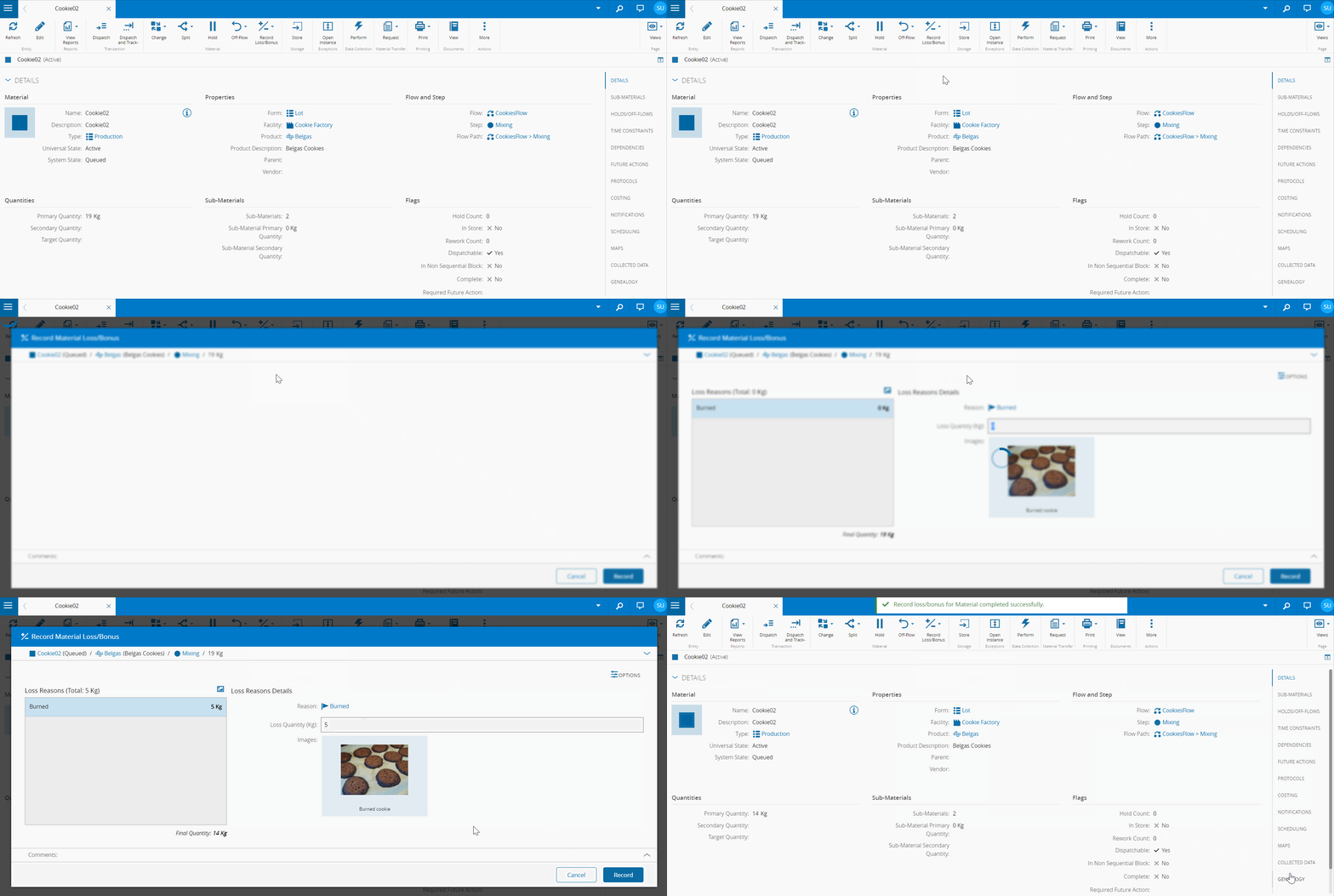
The user accesses the system in order to record a quantity loss or bonus for the Material.
Setup#
No special setup is required other than to meet the preconditions of the transaction. Note that the Loss and Bonus Reasons for Record Loss/Bonus must be associated with the current Material Step.
Preconditions#
- The Material exists, is Active, and is InTransit.
- The Topmost Material is not currently in a transfer.
- The Loss/Bonus Reasons used are defined for the current Material Step and are applicable to Record Loss.
- If the Material Step has the property
Decimal Quantity Allowedenabled, the user can enter decimal quantity losses; otherwise, quantities must be integers. - The Material Target Quantity is empty.
- If the Material Package Count is greater than zero:
- If the Material is a Sub-Material, the Record Loss operation is not allowed.
- If the Material is Topmost:
- The Material Primary Units match the Packed Quantity Units of any Active Package referencing that Material.
- The final Material Primary Quantity is greater than or equal to the Total Packed Quantity of all Active Packages referencing that Material, excluding Packages with a Content Type of
Material Ids.
- If the Material has any Packages, the Material Primary Units match the Packed Quantity Units of any Active Package of that Material.
- For each selected Loss/Bonus Reason, the Primary Quantity Loss (Bonus) or Secondary Quantity Loss (Bonus) is greater than or equal to zero.
- If the Main Material Product is a Part of type
Repairable, the Material cannot be referenced in any active Resource Part. - When recording a loss:
- If the Topmost Material has a BOM version other than empty, the final Material Primary Quantity is greater than or equal to the Material Assembled Quantity.
- The Material has a Primary Quantity or a Secondary Quantity greater than zero.
- When recording a bonus:
- The Assembly Type for the current BOM in the topmost Material is not
AutomaticAtTrackInorExplicitAdd. - Since the bonus quantity is assumed to reside at the same Container/Position as the Material
- If the Material is associated with a Container with Capacity Validation Mode set to
Units, the Capacity Per Position of the Container can hold the Material plus the additional bonus quantity (Primary or Secondary, as defined by the Container Capacity Units).
- If the Material is associated with a Container with Capacity Validation Mode set to
- The Assembly Type for the current BOM in the topmost Material is not
Sequence of Steps#
- Choose the Record loss/bonus option, under the Record loss/bonus button.
- Optionally, review the Material details, by expanding the Material section.
- Optionally, expanding the Options section two properties can be changed:
- Terminate Material on zero quantities and no Sub-Materials - if checked, will terminate the Material under those circumstances.
- Define final quantity manually - if checked, allows the user to define the final quantity and the delta will be automatically calculated and shown.
- Using the Losses and Bonuses tabs, enter the primary and secondary (if defined) quantities, for each Loss and Bonus Reason.
- If a Multimedia object is associated with a Loss or Bonus Reason, selecting the multimedia button opens a visual catalogue to choose the appropriate Reason; selecting OK adds it to the list.
- Optionally, enter a Comment.
- Select Finish to complete the Operation.
Info
- It is possible to define the default value for checkbox Terminate Material on zero quantity(ies) and no SubMaterial by adding the entry Context = Material.RecordLossBonus, Element = TerminateOnZeroQuantity as context in the General Table.
- If the Step associated to the Material is a Packing Step, and the Material is In-Process or Processed, the Record Bonus operation is not possible.