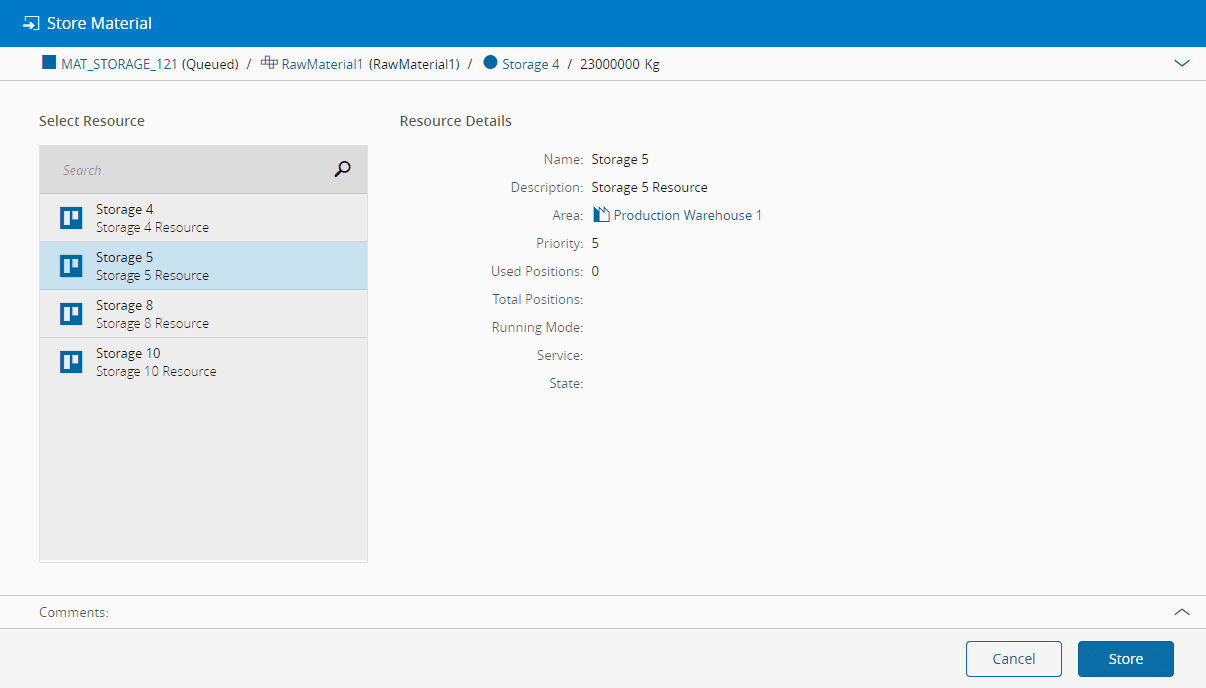
Store Material#
 Material.Store
Overview#
This operation is used to store a Material in a storage Resource.
Setup#
To store a Material at a given Step and Resource, it is necessary to:
- Define a storage Service for Queued or Processed Materials in the Step. The Service to use will match the Material System State.
- Have at least one storage Resource with the matching Service enabled, or a storage Resource with Picking Place enabled.
Preconditions#
- The Material exists and it is active.
- The Material is a Top Most Material (it has no parent).
- The Material is not In Transit or In Store.
- The Material is currently not associated with any Resource.
- The Resource must have the Processing Type set to Storage and it must be Dispatchable.
- For a storage Resource without Picking Place enabled, define a corresponding Queued or Processed Service at the current Material Step, then enable the Service globally and for the Resource. A storage Resource with Picking Place enabled does not require a Service when you store the Material from the Material page.
- If the Resource property Track Positions is
true, the Used Positions count must be less than the Total Positions count. Also, if the position addresses are not automatically generated, you must provide a valid address and the specified position must be within the defined bounds for the different storage dimensions. - If the Resource property Is Product Mix Allowed is
false, the Material must have the same Product as other Materials already associated with the Resource.
Sequence of Steps#
- Select the Material to be stored.
- If the Resource property Track Positions is
true, provide a valid position. Note that in this case the provided position address must be compliant with the defined Resource position address format. - If the Resource has any Storage Bins configured, a Storage Bin must be specified. A flag can be set to show only the Storage Bins marked with the Preferred Storage Location flag.
- Press Store to complete the transaction.