---
alias: user-guide-manage-default-revisions
tags:
- versions
- revisions
description: "Configure default revisions to automatically select the appropriate version for entities"
---
# Manage Default Revisions
:lock: *EntityTypeName*.**ManageDefaultRevisions**
## Default selection
The default revision is the revision that will always be used as a default in the system and loaded when you open a referencing it in other objects unless another revision is specifically set as the reference. The default revision is determined by the following method:
1. Consider only revisions with one Effective version and that are not Obsolete. From these, consider in descending order of precedence:
1. A revision for which both the `Default From Date` and `Default To Date` properties are defined and the current date falls within the interval defined by `Default From Date` and `Default To Date`.
2. A revision for which no `Default To Date` is defined, and the `Default From Date` is the highest date before the current date.
3. A revision for which no `Default From Date` and no `Default To Date` is defined, which has the highest sequence.
4. The revision with the highest sequence. (this is required because there could be multiple revisions with Effective versions that are not applicable for the current date interval and a single Effective revision must be supplied).
1. Consider only revisions that are not Terminated and not Effective (necessary to load the default entity in the GUI):
* The revision (in any state) with highest Sequence.
1. Consider only revisions that are Terminated (also necessary to load the default entity in the GUI):
* Take the revision with highest Sequence
## Managing Default Revision Dates
Revisions have two internal properties that define the time interval during which the revision can be set as default. In order to enable an entity type to use these date values to determine the default revision at any given time, you must set the `Enable Default Revision Dates` property on the **Entity Type** page for the entity you wish to use. For more information, see [Entity Types](../../administration/entity_types.md).
!!! info
This property can only be set for versioned entities.
After setting `Enable Default Revision Dates`, you must select `Generate Schema` to apply the changes. Without regenerating the schema, the functionality will not work correctly. For more information, see [[user-guide-entity-types#generating-an-entity-type-schema|Generate an Entity Type Schema]].
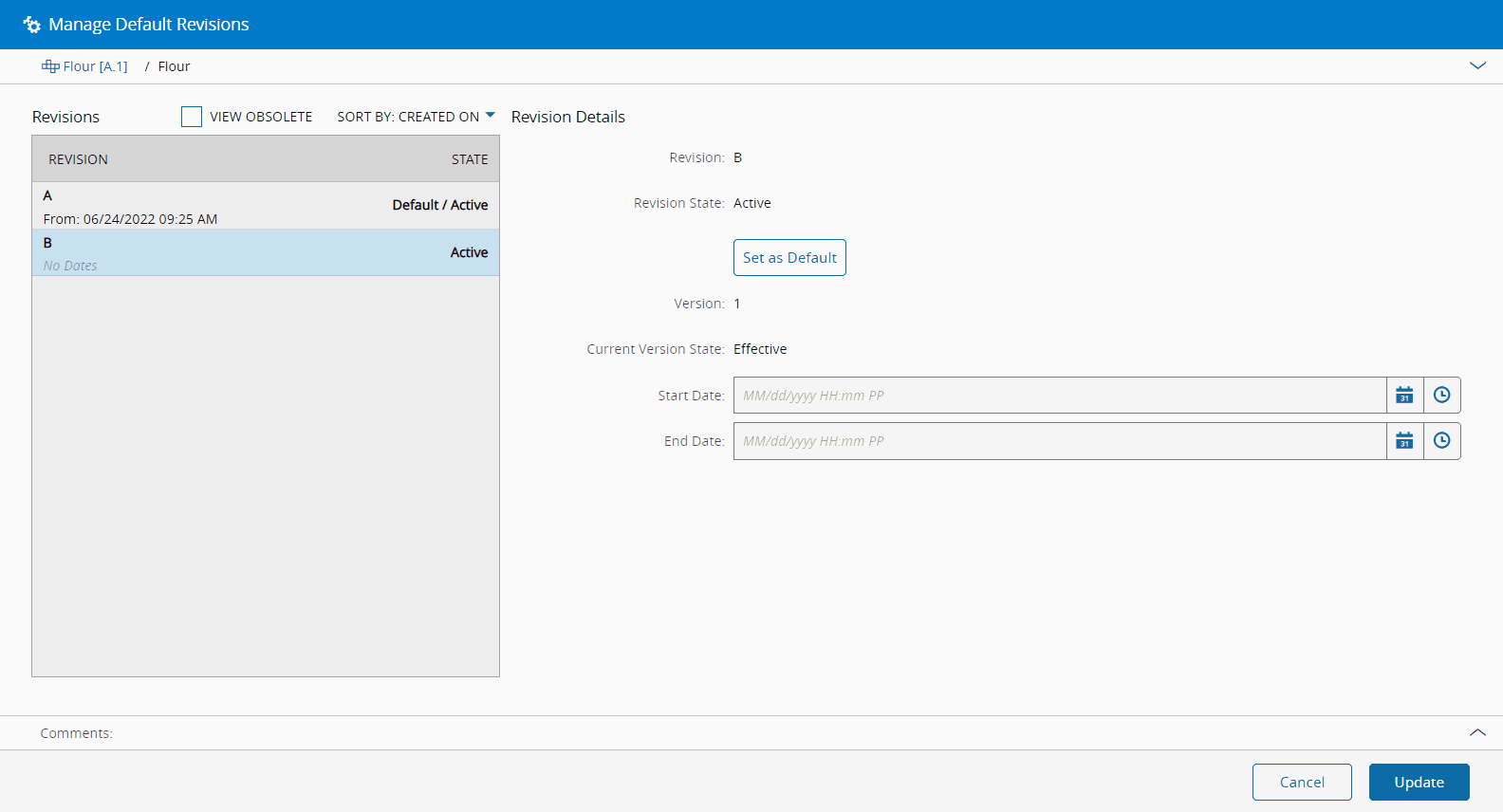
These date intervals can be managed through this wizard, accessible through the top ribbon of any versioned entity by selecting the **Manage Default Revisions** button.
Opening the wizard, you can see a list of all revisions that meet the requirements defined above and that can be set as default. You can choose to view all including obsolete revisions and sort them by Name, Start Date or Creation Date. For each of the revisions listed on the left:
1. Select a date (`Default From Date`) from which this revision should be set as default.
2. Select a date (`Default To Date`) from which this revision should stop being set as default. This date must be set to after the date set above.
You can also use the **Set as Default** button, which provides you with a quick way to set any Revision, provided that it is Active, as default. By selecting this button you are:
1. Setting the `Default From Date` of the selected Revision to Now.
2. Clearing the dates for any Revision for which the `Default To Date` or `Default From Date` is greater or equal to Now.
3. Clearing the dates for any Revision for which the `Default From Date` is less or equal to Now and no `Default To Date` is set.
When you have completed the changes, select **Update** to finish the process and update the default revisions dates for the entity.
Critical Manufacturing MES will then set a **Timer** that will perform the appropriate operations on the defined dates, running the algorithm defined above to determine which revision should be set as default. If the current date is set in the interval between the value for `Default From Date` and the value for `Default To Date` of a specific revision, that revision will immediately be set as default. For more information on **Timers**, see [Timers](../../administration/timers.md).
## Example scenario
Assuming four revisions for this entity, with the following versioning structure:
```mermaid
graph BT
subgraph
subgraph Entity Level
Entity[Chocolate Chip Cookies]
end
subgraph Revision Level
RevisionA[A] ---> Entity
RevisionB[B] ---> Entity
RevisionC[C] ---> Entity
RevisionD[D] ---> Entity
end
subgraph Version Level
Version1[A.1
Effective] ---> RevisionA
Version2[A.2
Active] ---> RevisionA
Version3[A.3
Active] ---> RevisionA
Version4[A.4
Created] ---> RevisionA
Version6[B.1
Terminated] ---> RevisionB
Version7[B.2
Created] ---> RevisionB
Version8[C.1
Effective] ---> RevisionC
Version9[C.2
Terminated] ---> RevisionC
Version10[C.3
Active] ---> RevisionC
Version11[D.1
Effective] ---> RevisionD
end
end
classDef mermaid_title color:#000, fill:#fafafa, stroke:#fafafa, stroke-width:0x, font-size:100%, font-weight:200;
classDef mermaid_start color:#000, fill:#fafafa, stroke:#fafafa, color:#fafafa, stroke-width:0x, font-size:100%, visibility: hidden;
classDef mermaid_businessdata color:#000, fill:#65CDE8, stroke:#65CDE8, stroke-width:0px, font-size:100%;
classDef mermaid_nonbusinessdata color:#000, fill:#B7DEE8, stroke:#B7DEE8, stroke-width:0px, font-size:100%;
classDef mermaid_entity color:#000, fill:#FB9F53, stroke:#FB9F53, stroke-width:0px, font-size:100%;
classDef mermaid_entitylinked color:#000, fill:#FCD5B5, stroke:#FCD5B5, stroke-width:0px, font-size:100%;
classDef mermaid_context color:#000, fill:#B9CDE5, stroke:#B9CDE5, stroke-width:0px, font-size:100%;
classDef mermaid_optional color:#000, fill:#B7DEE8, stroke:#65CDE8, stroke-width:1px, font-size:100%, stroke-dasharray: 5 5;
classDef mermaid_state color:#000, fill:#d7e4bd, stroke:#000, stroke-width:1px, font-size:100%, font-weight:300;
class Entity mermaid_entity
class Version1,Version8,Version11 mermaid_businessdata
class RevisionA,RevisionB,RevisionC,RevisionD mermaid_entitylinked
class Version2,Version3,Version10 mermaid_nonbusinessdata
class Version4,Version7 mermaid_context
class Version6,Version9 mermaid_optional
```
A quick timeline example based on this diagram is displayed below:
```mermaid
gantt
title Default Revision Dates
dateFormat YYYY-MM-DD
section Revision A
Default: 2021-04-01, 183d
section Revision C
Default: 2021-09-30, 122d
section Revision D
Default: 2020-04-01, 365d
```
You can read the diagram as follows:
* Revision D is the current default given that there are no date interval for any other revision and it is th current highest sequence among the entity revisions.
* Revision B cannot be set as default because there are no effective versions associated to it.
* After 01-04-2021, revision A is set as default and revision D is moved to the Active state.
* On 30-09-2021, revision C is set as default and revision A is moved back to the Active state. Since the end date is not defined, it will remain as the default version until the criteria changes according to the algorithm described at the top of the page.