eDHR Validation and Sign-off#
Overview#
The eDHR Validation and Sign-off feature ensures that each batch, lot, or unit is manufactured according to specifications, and that the corresponding Manufacturing Report (eBR/eDHR) is automatically generated and attached to a Validation Protocol at the right point in the production flow.
Concept#
The feature provides a mechanism to associate a Material (or group of Materials) to a Validation Protocol, export Stimulsoft-based reports to PDF, and attach them as Documents to the Protocol — all triggered automatically at configured Steps in the production flow.
The Material-to-Protocol association and the actual report generation/attachment can be configured at different Steps. For example:
- Materials can be associated with a Protocol at the start of the Flow.
- The eDHR report can be generated and attached only at the end of the Flow, once all data is available.
Note
Only Stimulsoft-based reports are supported by this feature. For more information, see Stimulsoft Tutorial ⧉
Setting up Protocol Validation#
Protocol#
Set up the Protocol that will be used for validation. The Protocol definition is determined by the customer project according to the required validation process.
Note
For more information, see Create Protocol ⧉
Smart Table#
Configure the Smart Table MedDevMaterialProtocolContext to define when and how the Protocol validation is triggered.

The following value columns must be configured:
Protocol#
Defines the Protocol definition used to open a Protocol Instance.
Operation#
Defines the validation operation to perform. Two operations are supported:
AssociateMaterial— Associates the Material (or group of Materials) with a Protocol Instance. No report is generated.AttachDocument— Generates a Stimulsoft report as a PDF and attaches it as a document to the Protocol Instance. The related Material is also automatically associated with the Protocol Instance.
GroupingProperty#
Defines which Material property to use for grouping. The following values are supported:
Name— Groups by the Material's own name. Use this when only the individual Material should be associated with the Protocol Instance.Production Order— Groups Materials by Production Order.Manufacturer Lot Number— Groups Materials by Manufacturer Lot Number. Recommended when validation is done at lot level (e.g., with Continuous Flows).
GroupingRule#
Defines a custom Rule to determine the grouping of Materials. Use this when the standard GroupingProperty values do not cover the required grouping logic.
Warning
GroupingProperty and GroupingRule are mutually exclusive — only one can be defined per Smart Table row.
MaterialSelectionRule#
Defines a custom Rule to determine whether the current Material should trigger report generation when Operation is AttachDocument. The rule receives the current material as SourceMaterial input and must set Input["Result"] to true to proceed with generation, or false to skip it.
Use this when report generation should only occur for specific materials within a group — for example, only the Tail material in a Continuous Flow lot. This allows you to filter the materials that will trigger report generation, providing a mechanism to optimize performance and resource utilization.
Note
MaterialSelectionRule is optional and only applies when Operation is AttachDocument. If not configured, the operation is applied to all materials that resolve to this Smart Table row.
Note
The Medical Template provides an out of the box rule called MedDevCheckSourceMaterialIsTailMaterial. This rule checks whether the current material is a Tail material in a Continuous Flow context and triggers the report generation only if that condition applies.
Report#
Defines the Stimulsoft report to be generated when Operation is AttachDocument. Can be an out-of-the-box report or a custom report.
Note
Report should contain the full path to the Stimulsoft report (e.g., Material History/Material History)
Report Parameters#
Defines the parameters that will be used during the report generation.
Note
Report Parameters is an optional column to be configured. If no parameters are configured, the report will be generated without being filtered by the parameters.
The parameters should be defined in JSON format, with the parameter name as the key and the value to filter by as the value. For example:
You can also use placeholder expressions in the parameter values to dynamically resolve them at runtime. For example:
{
    "MaterialName": "{{Material.Name}}",
    "LotNumber": "{{Material.ManufacturerLotNumber}}",
    "ProductName": "{{Material.Product.Name}}",
    "ProductionOrder": "{{Material.ProductionOrder.Name}}"
}
Info
The names and types of the filters depend on the configured report. One must verify the expected filters and options for the specific report in order to configure this option correctly.
Override#
Controls whether an existing report attachment should be replaced when the AttachDocument operation runs for a Protocol Instance that already has an attachment for the same report path.
- When set to
true, any existing attachment with the same report path is removed and replaced by the newly generated report. - When
falseor not set, report generation is skipped if an attachment for the same report path already exists.
Note
Override is optional and only applies when Operation is AttachDocument.
ValidateReplication#
Controls whether replication validation should be performed before triggering report generation for the AttachDocument operation.
- When set to
true, the system will validate if last Service History ID (SHID) of the current material has been replicated to the ODS before triggering report generation. If the SHID is not found in ODS, report generation will be skipped and an error message will be logged.
Smart Table Configuration Rules#
When adding rows to MedDevMaterialProtocolContext, the following rules apply:
- The Step must have the
MedDevIsMatProtocolStepattribute set totrue. - Exactly one of
GroupingPropertyorGroupingRulemust be set — not both. - If Operation is
AttachDocument, theReportcolumn must be populated. MaterialSelectionRuleis optional and only applies when Operation isAttachDocument.Overrideis optional and only applies when Operation isAttachDocument. When not set, it defaults tofalse(existing attachments are preserved).ValidateReplicationis optional and only applies when Operation isAttachDocument. When not set, it defaults tofalse(replication validation is not performed).
Execution Behavior#
This feature is triggered when a Step has the attribute MedDevIsMatProtocolStep set to true.
The feature executes at two points in the Material lifecycle:
- When a Material arrives at a Step (state:
Queued) - After Track-Out (state:
Processed)
The execution follows this sequence:
1. Resolve Context#
The Smart Table MedDevMaterialProtocolContext is resolved using the current Step and Material context to determine:
- The target Validation Protocol
- The required Operation (
AssociateMaterialorAttachDocument) - The Grouping criteria (by
Name,Production Order,Manufacturer Lot Number, or a custom Rule) - The associated Report (if applicable)
2. Identify Protocol Instance#
The feature evaluates whether a Protocol Instance already exists for the resolved group (based on the Grouping Property or Grouping Rule):
- No existing instance → A new Protocol Instance is created and the Material is added.
- Existing instance found → The resolved Operation is applied to the existing instance.
3. Perform Operation#
Depending on the resolved Operation:
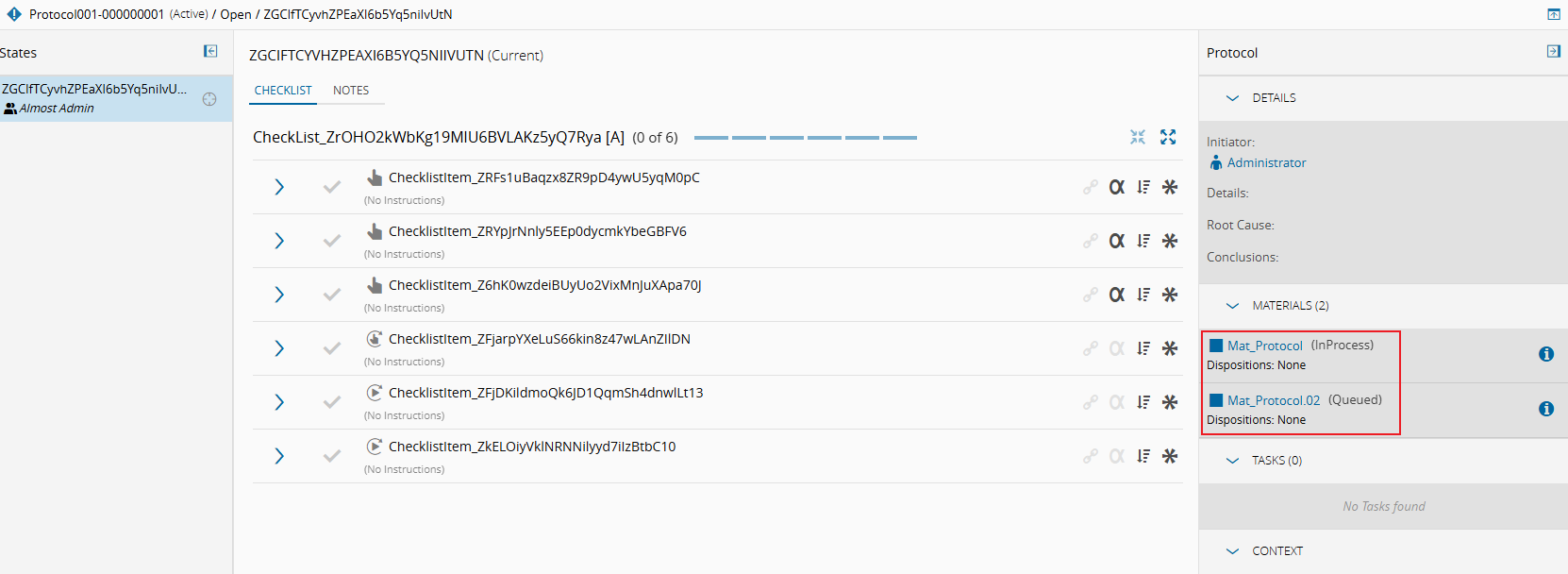
AssociateMaterial— The grouped Materials are added to the Protocol Instance. No report is generated.
In the example below, both Mat_Protocol and Mat_Protocol.02 belong to the same group, so both Materials are assigned to the same Protocol Instance:
-
AttachDocument— For each resolved material, the system evaluates the following sequence before triggering report generation:- MaterialSelectionRule evaluation — If a
MaterialSelectionRuleis configured, it is executed with the current material asSourceMaterial. If the rule returnsfalse, the material is skipped and no report is generated for it. - Override check — The system checks if the Protocol Instance already has an attachment for the same report path:
- If
Overrideisfalse(or not set) and an attachment already exists, report generation is skipped for that material. - If
Overrideistrue, the existing attachment is replaced.
- If
- Asynchronous generation — An Integration Entry with message type
GenerateAndAttachReportis created. TheMedDevGenerateAndAttachReportToProtocolDEE processes this entry asynchronously: it loads the Stimulsoft report, applies the configured parameters, renders it to PDF, and attaches it to the Protocol Instance.
- MaterialSelectionRule evaluation — If a

Note
Report generation is performed asynchronously. The Protocol Instance attachment list will be updated once the export is complete. The waiting time will depend on the expected time for the report to be generated, which can vary based on the amount of data and complexity of the report.
Note
The attachment's description will contain the name of the printed report. This is used when the Override setting is enabled, to determine if the attachment is a previous version of the same report.
Note
If ValidateReplication is set to true and the last Service History ID of the material is not found in ODS, then the Integration Entry will fail.
Administration#
Step Attribute: MedDevIsMatProtocolStep#
Set the attribute MedDevIsMatProtocolStep to true on any Step where the Smart Table MedDevMaterialProtocolContext should be resolved.
- Type: Boolean
- Default:
false - Effect: When
falseor not set, the Smart Table resolution is skipped entirely for that Step.
Lookup Table: MedDevMaterialProtocolOperations#
MedDevMaterialProtocolOperations is a Lookup Table used in the Smart Table MedDevMaterialProtocolContext to configure the Operation property.
| Value |
|---|
AssociateMaterial |
AttachDocument |
Lookup Table: MedDevMaterialProtocolGroupingProperties#
MedDevMaterialProtocolGroupingProperties is a Lookup Table used in the Smart Table MedDevMaterialProtocolContext to configure the GroupingProperty property.
| Value |
|---|
Name |
Production Order |
Manufacturer Lot Number |
Note
For more information on how to add values to a Smart Table, see How to: Add Value to Smart Table ⧉
Configuration Entry: /MedDev/AutoReportGeneration/DefaultTimezone/#
This configuration entry defines the default timezone to be used for report generation. If empty, it will use the timezone of the application server. The timezone should be defined in IANA format (e.g., Europe/Lisbon, Europe/London, etc.)
Configuration Entry: /MedDev/AutoReportGeneration/DefaultCulture/#
This configuration entry defines the default culture to be used for report generation. If empty, it will use the culture of the application server. The culture should be defined in IETF BCP 47 standard (e.g., en-US, pt-PT, etc.)
Configuration Entry: /MedDev/OData/BaseURL/#
This configuration entry defines the base URL for OData services. It is used to construct the full URL for OData requests. By default, the value assigned is the internal URL for the data-manager component. If empty, the report generation integration entry will fail.